MacWhisper Alternatives: 4 Voice Tools for Mac Users (2026)
MacWhisper is great for transcription. But what if you need more?
MacWhisper brought OpenAI's Whisper to Mac with a clean, native interface. It's excellent for transcribing audio files locally - no cloud, no subscription.
But MacWhisper has limitations:
- Batch processing only - Not designed for real-time dictation
- Raw transcription - Output needs editing
- Mac only - No Windows or Linux
- No AI formatting - Just transcription, not transformation
If you need more than file transcription, here are the best mac voice to text alternatives.

Understanding Mac's Built-in Dictation
Before exploring alternatives, let's establish the baseline: macOS includes free speech to text mac functionality called Dictation.
How Mac Dictation Works:
- Enable in System Settings > Keyboard > Dictation
- Press Fn key twice (or custom shortcut)
- Speak into any text field
- Text appears where cursor is
Mac Dictation Strengths:
✅ Free and built-in - No additional downloads
✅ Works anywhere - Any text field on macOS
✅ On-device processing - M1/M2/M3 Macs process locally
✅ Voice commands - Say "comma," "new paragraph," etc.
Mac Dictation Limitations:
❌ Basic accuracy - Whisper-based tools are more accurate
❌ No AI formatting - Raw transcription only
❌ Limited customization - Can't create custom modes
❌ 40-second limit - Must pause frequently
❌ Older Macs require internet - Intel Macs send audio to Apple servers
This is why many users seek alternatives - they want Whisper's accuracy, AI formatting, or better real-time workflows. That's where MacWhisper and other voice to text software options come in.
What MacWhisper Does Well
MacWhisper excels at its core use case:
✅ 100% local processing - Audio never leaves your Mac
✅ Multiple Whisper models - Trade speed vs accuracy
✅ Batch transcription - Process multiple files
✅ Meeting recording - Auto-record Zoom, Teams (Pro)
✅ One-time price - $79, no subscription
✅ Apple Silicon optimized - Fast on M1/M2/M3
✅ Speaker separation - Identifies different speakers
✅ File format support - Import audio/video files directly
Current MacWhisper Pricing (2026):
- Free: Tiny, Base, Small models
- Starter: $79 lifetime - All models, basic features
- Pro: $149 lifetime - Meeting recording, AI features, batch processing
- Pro Plus: $249 lifetime - Advanced integrations, enterprise features
Source: MacWhisper on Gumroad
Where MacWhisper Falls Short
❌ Not real-time - Designed for file transcription, not dictation
❌ Raw output - Still needs editing for professional use
❌ Mac only - No cross-platform support
❌ No AI formatting - Just transcription, no transformation
The Real-Time vs Batch Distinction:
MacWhisper is a batch processing tool. You record or import audio, then process it into text. This workflow makes sense for:
- Transcribing interview recordings
- Converting podcast episodes to text
- Processing meeting recordings after the fact
- Creating subtitles for video files
But it's not designed for live dictation for mac - typing while you speak into emails, Slack messages, or documents. The workflow friction (record → import → process → export → paste) makes it impractical for daily communication.
Accessibility Consideration:
If you have RSI, carpal tunnel, or other conditions that make typing painful, you need a dictation app that works in real-time without file management steps. MacWhisper's batch workflow adds unnecessary friction for accessibility users.
If you need to dictate quickly into emails and messages (not transcribe recordings), MacWhisper isn't the right tool.
The deeper limit, beyond Mac-only and not-real-time: MacWhisper is transcription. It is not context-aware writing. If you dictate "hey jane got that report done will send it over soon," MacWhisper gives you exactly that string. You still add the greeting, capitalize, punctuate, structure, and sign off yourself. MacWhisper does the audio-to-text part well. The writing part is on you.
Contextli pairs the same local-first privacy posture with context-aware Modes (Email Mode, Messaging Mode, Notes Mode, LinkedIn Mode, Marketing Copy Mode, General Dictation). Each Mode can be customized with three to five examples of your own past writing, and from then on every dictation in that Mode matches your voice. None of MacWhisper, Superwhisper, Wispr Flow, or Apple Dictation offers per-Mode customization by example.
Alternative #1: Contextli - Best for Context-aware Output
Price: from $79 one-time (lifetime)
Platforms: Mac, Windows, Linux
Offline: ✅ Yes
Why Contextli Over MacWhisper
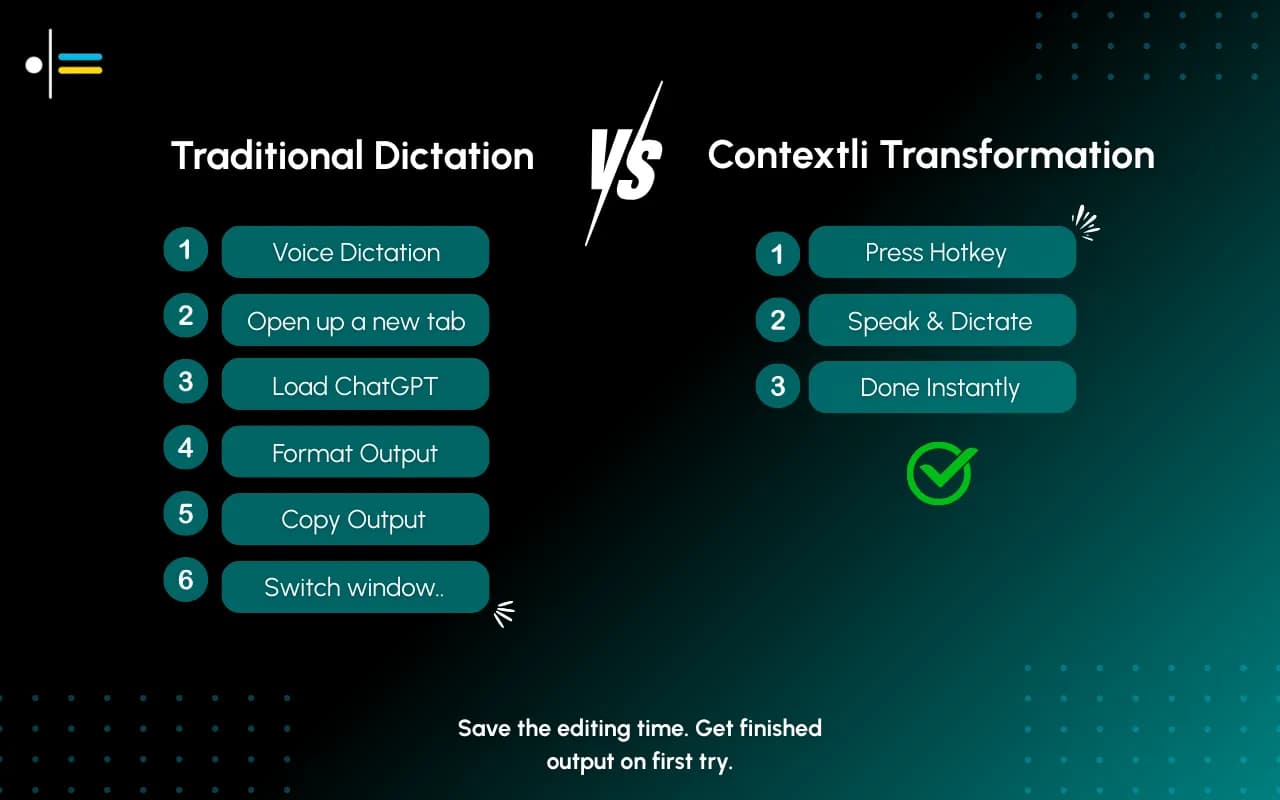
MacWhisper transcribes files. Contextli transforms speech into formatted messages - a completely different workflow.
MacWhisper workflow:
- Record or import audio
- Transcribe (raw text)
- Manually edit for professional use
- Copy to destination app
Contextli workflow:
- Press hotkey
- Speak
- Context-aware output auto-pastes where cursor is
For file transcription, MacWhisper wins. For daily communication, Contextli wins.

The Context-Aware Difference
Here's what makes Contextli different from speech recognition software that just transcribes:
You say: "Tell the team we need to push the launch back because login is broken and users won't be able to sign in"
MacWhisper output (raw transcription):
"Tell the team we need to push the launch back because login is broken and users won't be able to sign in"
Contextli Slack Context output:
"Hey team - heads up, we need to delay the launch. Login's broken, working on a fix. Will update soon."
Contextli Email Context output:
"Hi team,
I wanted to flag that we need to delay the launch. We've identified a critical issue with the login flow that would prevent users from signing in.
I'll send an update once we have a fix in place and a revised timeline.
Best,
Alex."
Same voice input. Different contexts produce different formatted outputs. No editing needed.
The customization story is what makes this stick over time. Open Email Mode customization in Contextli settings, paste three to five emails you have actually sent to clients, and from then on Email Mode writes in that voice: your opening style, your sentence length, your sign-off. You can also pin explicit instructions ("always use UK spellings," "sign off as J., not Junaid"). Same for Messaging Mode for Slack, same for LinkedIn Mode for posts. No other tool in this list adapts per channel to a voice you trained with examples.
Key Differences
| Feature |
MacWhisper |
Contextli |
| Primary use |
File transcription |
Real-time dictation |
| Output |
Raw transcription |
Formatted, ready to send |
| Workflow |
Import → Process → Export |
Hotkey → Speak → Auto-paste |
| Cross-platform |
Mac only |
Mac, Win, Linux |
| Price |
from $79 |
from $79 |
| Meeting recording |
✅ Pro |
❌ |
| Contexts/modes |
❌ |
✅ |
| Speaking speed |
250 words per minute |
250 words per minute |
Who Should Choose Contextli
- You need real-time dictation for emails, Slack, etc.
- You want context-aware output without editing
- You use Windows or Linux (not just Mac)
- You value workflow speed over batch processing
- You have RSI or typing pain and need hands-free communication
Try Contextli →
If privacy is part of why you picked MacWhisper, Contextli matches its local posture and adds two more rungs of control. The full three-rung privacy ladder: Level 1: Local models (transcription and the context-aware writing layer both run on your machine; internet off, app still works). Level 2: Bring your own key (BYOK) (your audio goes from your machine to the transcription or AI provider you chose, never through Contextli's servers). Level 3: Disable cloud sync (notes live as local files in a folder you control; Contextli's database stores nothing). Stack all three and Contextli never makes a single request to external servers. MacWhisper covers Level 1 only and gives you transcription rather than context-aware writing.
Price: $8.49/mo or $249 lifetime
Platforms: Mac, iOS
Offline: ✅ Yes
Overview
Superwhisper is a Mac-focused dictation app with custom modes - you define how speech gets transformed, not just transcribed.
Source: Superwhisper
Key Features
- Custom modes - Pure transcription, formatted text, or custom AI instructions
- Real-time dictation - Type anywhere by voice
- Local + cloud options - Choose your processing
- BYOK - Bring your own API keys
- Screen context awareness - Uses visible screen content to improve accuracy
MacWhisper vs Superwhisper
| Feature |
MacWhisper |
Superwhisper |
| File transcription |
✅ Primary |
✅ Supported |
| Real-time dictation |
⚠️ Limited |
✅ Primary |
| AI formatting modes |
❌ |
✅ |
| Price |
from $79 |
$249 lifetime |
| iOS app |
✅ |
✅ |
| Meeting recording |
✅ Pro |
❌ |
Who Should Choose Superwhisper
- You're Mac-only and want real-time dictation
- You want custom modes for different outputs
- You're okay with $249 (vs MacWhisper's $79)
- You don't need Windows/Linux
- You want screen-aware context for better accuracy
Price: $15/mo ($144/year)
Platforms: Mac, Windows, iOS
Offline: ❌ Cloud-only
Overview
Wispr Flow offers clean dictation with filler word removal and a Command Mode for text editing.
Source: Wispr Flow
Key Features
- Filler word removal - Removes "um," "uh," automatically
- Command Mode - Edit text with voice
- Cross-platform - Mac, Windows, iOS
- 100+ languages - Broad language support
- IDE integration - Works with Cursor, Windsurf
MacWhisper vs Wispr Flow
| Feature |
MacWhisper |
Wispr Flow |
| Offline |
✅ |
❌ |
| Price |
from $79 one-time |
$15/mo |
| Real-time |
⚠️ |
✅ |
| Windows |
❌ |
✅ |
| AI editing |
❌ |
✅ Command Mode |
| Privacy |
✅ Local |
❌ Cloud |
Who Should Choose Wispr Flow
- You need Windows support (MacWhisper is Mac-only)
- You want filler word removal automatically
- You're okay with cloud processing (no offline)
- You can accept subscription pricing
- You work with IDEs and want coding integration
Alternative #4: Whisper.cpp - Best for Developers
Price: Free (open source)
Platforms: Any (requires setup)
Offline: ✅ Yes
Overview
Whisper.cpp is the C++ implementation of OpenAI's Whisper that MacWhisper is built on. Use it directly for maximum control.
Source: Whisper.cpp on GitHub
Key Features
- Free and open source - No cost
- Same engine as MacWhisper - Identical accuracy
- Complete control - Build exactly what you need
- Any platform - Mac, Windows, Linux, embedded
MacWhisper vs Whisper.cpp
| Feature |
MacWhisper |
Whisper.cpp |
| User interface |
✅ Native Mac |
❌ Command line |
| Setup required |
Minimal |
Technical |
| Price |
from $79 |
Free |
| Customization |
Limited |
Unlimited |
| Support |
Email |
Community |
Who Should Choose Whisper.cpp
- You're a developer building custom tools
- You want free and maximum control
- You're comfortable with command line
- You need to run on unusual platforms
Which MacWhisper Alternative Is Right for You?
Stay with MacWhisper if:
- You primarily transcribe audio/video files
- You want the cheapest option (from $79)
- 100% local processing is your priority
- You don't need real-time dictation
- You need meeting recording capabilities
Choose Contextli if:
- You need real-time dictation for daily communication
- You want context-aware output, not raw transcription
- You use Windows or Linux too
- You're willing to pay from $79 for workflow transformation
- You have accessibility needs (RSI, typing pain)
Choose Superwhisper if:
- You're Mac-only and want real-time + modes
- You want similar custom mode features but Mac-focused
- $249 lifetime fits your budget
- You value screen-aware context
Choose Wispr Flow if:
- You need Windows support
- Cloud processing is acceptable
- You want Command Mode editing
- Subscription ($15/mo) is okay
- You work in IDEs regularly
Choose Mac's Built-in Dictation if:
- You want free and good enough
- Basic accuracy meets your needs
- You're on M1+ Mac (for offline processing)
- You don't need AI formatting
My Recommendation
For MacWhisper users who need more:
If you love MacWhisper's local processing but need real-time dictation with context-aware output, try Contextli.
It keeps the privacy benefits (local Whisper option) while adding:
- Real-time dictation workflow
- Pre-defined formatting Contexts
- Auto-paste to cursor
- Cross-platform support
- 250 words per minute speaking speed
Try Contextli →
MacWhisper remains excellent for what it does - transcribing files locally. But for daily communication, you need a workflow tool, not just a transcription tool.
FAQ
Is MacWhisper the same as Whisper Transcription?
MacWhisper (direct download) and Whisper Transcription (App Store) are related products by the same developer. The direct download version has more features, including dictation into any text field and MDM support for enterprises.
Can MacWhisper do real-time dictation?
Limited. MacWhisper Pro includes a dictation feature that works system-wide, but it's primarily designed for batch processing files rather than continuous real-time typing. The workflow is optimized for importing recordings, not live dictation.
What's the best MacWhisper alternative for privacy?
Contextli with local mode (Whisper + local LLM) or Superwhisper with offline models. Both process on-device with zero network calls. Mac's built-in dictation on M1+ Macs also processes locally.
Does MacWhisper work on Windows?
No. MacWhisper is Mac-only (macOS and iOS). For Windows with similar local processing, consider Contextli or Whisper.cpp.
How accurate is Mac's built-in dictation compared to Whisper?
Whisper-based tools (MacWhisper, Contextli, Superwhisper) are generally more accurate than Mac's built-in dictation, especially for technical terms, accents, and background noise. However, Mac's built-in dictation on M1+ chips is quite good for general use.
Can I use MacWhisper for live meetings?
MacWhisper Pro can auto-record meetings from Zoom, Teams, and other platforms, then transcribe them afterward. It's not designed for real-time live transcription during the meeting - it processes after recording is complete.
What's your experience with MacWhisper? Share in the comments.




 Junaid Khalid