Which Voice to Text Software Should You Use for Writing? (2026)
One is a chatbot. One is a workflow tool. Here's when to use each.
ChatGPT changed everything. Suddenly, anyone could generate professional text with a good prompt.
But ChatGPT is a chatbot - designed for conversations, exploration, and complex tasks that benefit from back-and-forth dialogue.
Contextli is different. It's a voice to text software tool designed for repeated, quick writing tasks. Instead of typing prompts into a chat interface, you press a hotkey, speak naturally, and get formatted output instantly - no conversation required.
This isn't a "which is better" comparison. They solve different problems. This guide helps you understand when to use each - and when to use both.
Quick Comparison
|
ChatGPT |
Contextli |
| Type |
Conversational AI chatbot |
Voice-triggered workflow tool |
| Best for |
Complex, exploratory tasks |
Repeated, quick tasks |
| Input |
Typing prompts |
Speaking naturally |
| Output |
In chat window |
At your cursor, any app |
| Speed |
Seconds to minutes |
Seconds |
| Learning curve |
Prompt engineering |
Context setup |
| Price |
Free / $20/mo |
from $79 one-time |
Understanding Voice to Text Software vs AI Chatbots
Before diving into the comparison, it's important to understand what makes these tools fundamentally different.
ChatGPT is a conversational AI - a chatbot you interact with through text prompts. You type what you want, it responds, and you iterate back and forth until you get the result you need. It's flexible, powerful, and handles complex tasks exceptionally well.
Contextli is voice to text software with AI transformation built in. You speak once, and it outputs formatted text directly where your cursor is. There's no conversation, no iteration - just instant output optimized for the app you're using.
The key difference? ChatGPT requires you to describe what you want in writing. Contextli lets you speak what you mean and transforms it based on context. For quick, repeated tasks, this distinction matters.
When to Use ChatGPT
ChatGPT excels at tasks that benefit from conversation:
Complex, Multi-Step Tasks
When you need to:
- Explore ideas and refine them through dialogue
- Build on previous responses
- Adjust tone, length, or style iteratively
- Work through something you haven't done before
Example: Writing a sales page for a new product. You'll go back and forth - "make it more urgent," "add a guarantee section," "shorter headline" - until it's right.
Research and Analysis
When you need to:
- Summarize long documents
- Compare options and get recommendations
- Explain complex topics
- Answer questions you don't know the answer to
Example: "Explain the pros and cons of microservices vs monolith for my use case."
Creative and Long-Form Work
When you need to:
- Generate creative content (stories, scripts)
- Write long-form pieces that need iteration
- Brainstorm ideas and possibilities
- Create content you'll heavily customize
Example: Writing a 2,000-word blog post with a specific structure and voice.
Learning and Problem-Solving
When you need to:
- Understand how to do something
- Debug code or troubleshoot issues
- Get explanations and tutorials
- Learn about unfamiliar topics
Example: "How do I implement rate limiting in my FastAPI application?"
When to Use Contextli
Contextli excels at tasks that are:
- Repeated frequently
- Need to happen fast
- Follow predictable formats
- Don't require conversation
Daily Communication
When you need to:
- Send emails quickly
- Respond to Slack messages
- Write quick status updates
- Reply to routine communications
Example: You have 15 emails to respond to. None require deep thought - just clear, professional responses. Speak each one in 15-30 seconds instead of typing for 2-3 minutes each.
Context-Aware Output
When you need:
- Professional email format
- Slack-appropriate messaging
- Structured documentation
- Consistent output style
Example: Every email should have a greeting, clear body, and sign-off. You don't want to specify that each time - you want it automatic.
This is where Contextli's Context Modes shine. Here's how it works:
You say (voice input):
"Tell the client we need to push the delivery date back two weeks because we're still waiting on API documentation from their team, but we're using the time to improve the UI based on their feedback."
Email Context output:
Hi Sarah,
I wanted to give you a quick update on the timeline. We need to adjust our delivery date by two weeks as we're currently waiting on the API documentation from your team.
The good news is we're using this time productively - we've been incorporating the UI feedback you provided and the improvements are looking great.
I'll keep you posted as we move forward. Let me know if you have any questions.
Best,
Alex

Slack Context output:
"hey team - fyi we're pushing delivery back 2 weeks. still waiting on API docs from the client, but we're using the time to polish the UI based on their feedback 👍"

Same intent. Different formatting. No additional prompting required.
Contextli's context-aware Modes (Email Mode, Messaging Mode, Notes Mode, LinkedIn Mode, Marketing Copy Mode, General Dictation) are not just preset prompts. Each Mode can be customized with three to five examples of how you actually write. Paste five of your past client emails into Email Mode customization, and every dictated email matches that voice from then on: your opening, your sentence length, your sign-off. Pin instructions like "always use UK spellings" or "sign off as J., not Junaid" and they stick. ChatGPT does not retain that voice between conversations. You re-describe it every time you open a new chat.
Flow-State Work
When you need to:
- Stay in your current app
- Not break concentration
- Keep momentum going
- Handle interruptions quickly
Example: You're deep in code and need to respond to a Slack message. Press hotkey, speak, done. Back to code without losing context.
Volume Writing
When you:
- Write 20+ emails daily
- Send 50+ messages
- Create routine documentation
- Handle high communication volume
Example: Sales reps, project managers, anyone who writes constantly throughout the day.
For a sales-specific deep dive, see Best Dictation Tool for Sales Reps in 2026: Outreach Without Typing, which walks through Email Mode and Messaging Mode tuned to a team's cold-outreach voice with real SDR day-in-the-life numbers.
For founder-specific volume writing, the same workflow scales to investor updates and customer escalations. See Voice-to-Text for Founders: How to Reply to Investor Emails in 30 Seconds for the end-to-end setup.
Workflow Comparison
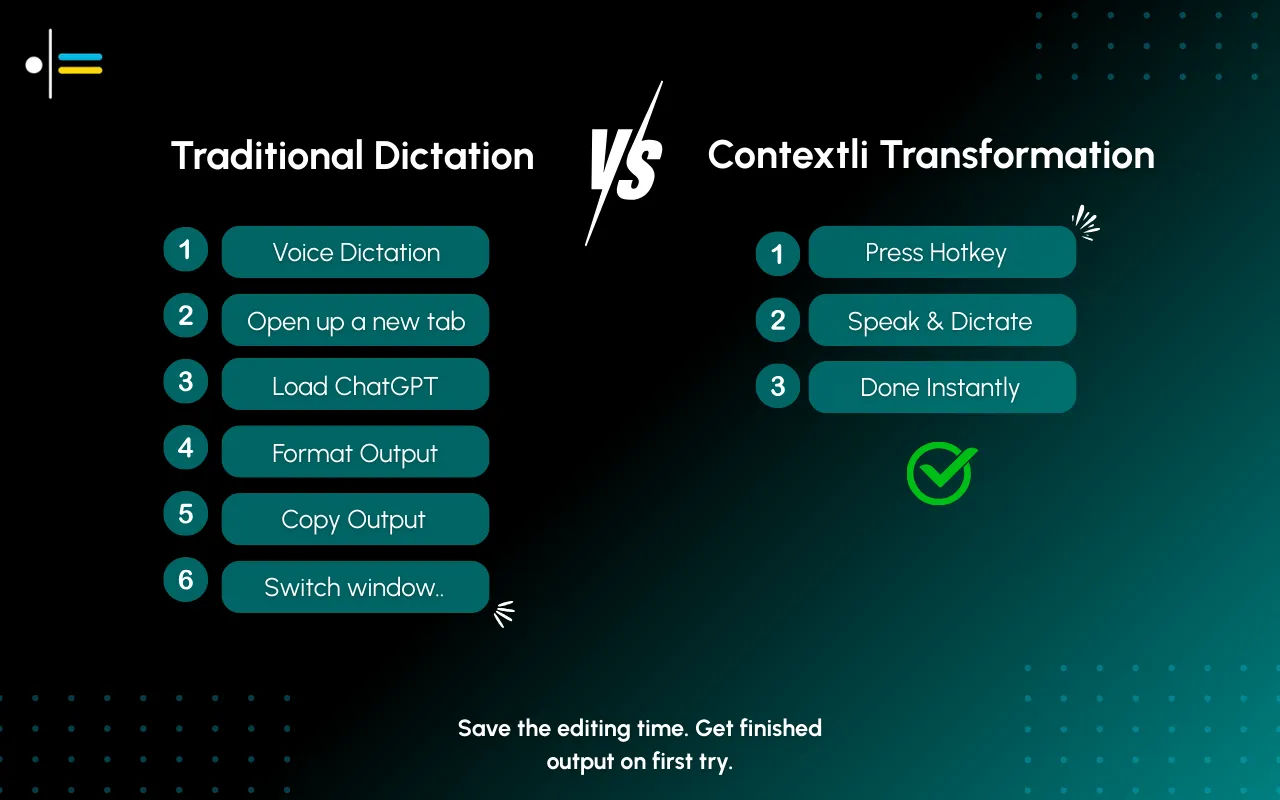
Writing an Email: ChatGPT
- Open ChatGPT (browser or app)
- Type prompt: "Write a professional email to Sarah declining the meeting for Tuesday because I have a conflict. Suggest rescheduling to later in the week." (Not sure how to phrase it? A free AI prompt generator can turn a rough idea into a clean prompt.)
- Wait for generation
- Read output
- If not right, type refinement
- Copy the text
- Open email client
- Paste
- Review/edit
- Send
Time: 2-4 minutes
Writing an Email: Contextli
- Press email hotkey (Cmd+Shift+E)
- Speak: "tell sarah can't make tuesday, have a conflict, let's reschedule to later in the week"
- Formatted email appears at cursor
- Review
- Send
Time: 30-60 seconds
When the Difference Matters
For one email, the difference is minor.
For 20 emails daily:
- ChatGPT: 40-80 minutes
- Contextli: 10-20 minutes
Daily time saved: 30-60 minutes just on email.
When you speak at 250 words per minute compared to typing at 40-50 words per minute, the productivity gains add up quickly - especially when combined with AI formatting that eliminates the editing step.
Voice to Text Apps vs Conversational AI: Understanding the Categories
It helps to understand where these tools fit in the broader landscape of AI writing assistance.
Dictation Apps and Speech to Text Software
Traditional dictation apps like Dragon, Windows Voice Access, or Apple Dictation convert your speech to text word-for-word. They're fast, but you get raw transcription that often needs significant editing.
Pros: Fast input, hands-free
Cons: Requires heavy editing, no contextual formatting
AI Chatbots
Tools like ChatGPT, Claude, and Gemini are conversational AI systems. You describe what you want in text, they generate responses, and you iterate.
Pros: Extremely flexible, handles complex tasks
Cons: Multi-step workflow, requires typing prompts
AI-Powered Voice to Text Software
Modern tools like Contextli, Wispr Flow, and similar apps combine speech recognition with AI transformation. You speak your intent, AI formats it based on context.
Pros: Fast workflow, context-aware output, minimal editing
Cons: Less flexible for exploratory tasks
ChatGPT sits in the second category. Contextli sits in the third. They're solving different problems.
The Integration: Using Both
Most power users don't choose one - they use both for different purposes.
ChatGPT for:
- Initial strategy/planning
- Complex one-off content
- Research and learning
- Creative exploration
- Anything requiring iteration
Contextli for:
- Daily email
- Slack/Teams messages
- Quick documentation
- Routine communications
- High-volume writing

Example Day
9:00 AM: Use ChatGPT to outline a presentation structure (complex, needs iteration)
9:30 AM: Clear email inbox with Contextli (15 emails in 10 minutes)
10:00 AM: Use ChatGPT to draft detailed project proposal (long-form, needs refinement)
11:00 AM: Quick Slack responses with Contextli (10 messages in 5 minutes)
2:00 PM: Use ChatGPT to brainstorm feature ideas (creative exploration)
3:00 PM: Document meeting notes with Contextli (quick, context-aware output)
Feature Comparison
| Feature |
ChatGPT |
Contextli |
| Voice input |
⚠️ (in app) |
✅ Primary |
| Conversational |
✅ |
❌ |
| Custom Contexts |
⚠️ (GPTs) |
✅ |
| Auto-paste |
❌ |
✅ |
| Hotkey activation |
❌ |
✅ |
| Works offline |
❌ |
✅ (local mode) |
| Plugins/integrations |
✅ Many |
⚠️ Limited |
| Image generation |
✅ |
❌ |
| Code execution |
✅ |
❌ |
| Context memory |
✅ (conversation) |
⚠️ (Context rules) |
| Long-form writing |
✅ |
⚠️ |
| Mac |
✅ |
✅ |
| Windows |
✅ |
✅ |
| Linux |
⚠️ (web) |
✅ |
Price Comparison
ChatGPT
| Tier |
Price |
Features |
| Free |
$0 |
GPT-3.5, limited |
| Plus |
$20/mo ($240/yr) |
GPT-4, DALL-E, plugins |
| Team |
$25/user/mo |
Collaboration features |
Contextli
| Tier |
Price |
Features |
| Starter Lifetime |
$79 once |
All features, forever |
| Pro Lifetime |
$149 once |
All features, forever |
| Pro Plus Lifetime |
$249 once |
All features, forever |
| + BYOK |
Your API costs |
Use your own API keys |
Cost Analysis (2 Years)
| Scenario |
ChatGPT |
Contextli |
| Free tier only |
$0 |
N/A |
| Full features |
$480 |
$79-$249 |
| Heavy use (BYOK) |
$480 + API costs |
$79-$249 + API costs |
For users who need AI writing assistance, Contextli's one-time pricing represents significant savings - $231-$401 less over two years compared to ChatGPT Plus.
Common Questions
Can Contextli replace ChatGPT?
No. They serve different purposes.
Contextli replaces how you use ChatGPT for quick, repeated writing tasks. You'll still want ChatGPT (or Claude, or similar) for complex, conversational, exploratory tasks.
Can ChatGPT replace Contextli?
Technically yes - you can type every prompt into ChatGPT.
But practically, no. The workflow overhead (open browser, type prompt, copy, paste) makes ChatGPT inefficient for quick, repeated tasks. That's what Contextli optimizes for.
Should I get both?
If you:
- Write a lot of emails/messages (benefit from Contextli)
- Also do complex AI work (benefit from ChatGPT)
Then yes, both make sense.
If you only do occasional writing, ChatGPT alone might be sufficient - just less efficient for quick tasks.
What about ChatGPT's voice feature?
ChatGPT's mobile app has voice input. It's conversational - you speak, it responds, you speak again.
Contextli is different: speak once, get context-aware output, done. No conversation, no iteration, just output.
For quick tasks, Contextli's approach is faster.
How does Contextli compare to other dictation apps?
Traditional dictation apps like Dragon or Windows Voice Access give you word-for-word transcription. You speak, it types exactly what you said, including "um" and "uh."
Contextli is AI-powered voice to text software - it transforms your speech based on the context. You speak naturally, and it outputs formatted text appropriate for the destination (email, Slack, documentation, etc.).
Think of it as the difference between a transcriptionist and a personal assistant.
Decision Framework
Use ChatGPT if:
- Task is complex or exploratory
- You'll need multiple iterations
- You're doing research or learning
- Output requires conversation to refine
- It's a one-off task
Use Contextli if:
- Task is routine and repeated
- You know what output you want
- Speed matters more than exploration
- You do this task frequently
- You want voice input
For a role-specific deep-dive on how marketers use a context-aware dictation tool across landing pages, social posts, and LinkedIn copy, see our 2026 guide to the best voice-to-text tool for marketing specialists.
Use Both if:
- You do both types of tasks
- You want maximum efficiency
- You write a lot AND do complex AI work
Choosing the Right Voice to Text App for Your Workflow
Beyond the ChatGPT vs Contextli comparison, it's worth considering what you actually need from a voice to text app.
For Transcription Only
If you just need your words converted to text with no formatting:
- Apple Dictation (free, built-in for Mac/iOS)
- Windows Voice Access (free, built-in for Windows)
- Google Docs voice typing (free, browser-based)
For AI-Enhanced Transcription
If you want some AI help but still mainly need transcription:
- Otter.ai (meeting transcription)
- Dragon by Nuance (professional dictation)
- Whispr Flow (cross-platform dictation)
For Workflow Transformation
If you want context-aware output that's ready to send:
- Contextli (productivity-first, multiple platforms)
- Custom GPT workflows (if you don't mind the multi-step process)
If the writing involves confidential client data, regulated industries, or anything you would not want on a vendor's database, Contextli is also the only tool in this section with a full three-rung privacy ladder. Level 1: Local models. Transcription and the context-aware writing layer run on your own machine. Internet off, app still works. Level 2: Bring your own key (BYOK). You supply the API key and your data goes from your machine to the provider directly. Contextli never sees it. Level 3: Disable cloud sync. Notes live as local files in a folder you control; Contextli's database stores nothing. Stack all three and Contextli never makes a single request to external servers. ChatGPT is cloud-only. Wispr Flow is cloud-only. Apple Dictation covers Level 1 but is generic transcription with no per-channel adaptation.
For Conversational AI
If you need dialogue and iteration:
- ChatGPT (general purpose, widely available)
- Claude (strong reasoning, coding)
- Gemini (Google ecosystem integration)
Most productive users end up with tools from multiple categories.
Summary
ChatGPT is a brilliant conversational AI. Use it for tasks that benefit from dialogue.
Contextli is a workflow tool. Use it for tasks that benefit from speed.
They're complementary, not competitive.
The power users of 2026 aren't asking "ChatGPT or Contextli?"
They're asking "ChatGPT or Contextli for this task?"
Try Contextli →

Next Resources
More guides to level up your productivity and AI writing strategy:
Do you use ChatGPT for quick writing tasks? How long does it take? Share in the comments.




 Junaid Khalid