


Weekly Reflection TemplateAug 19, 2026
Weekly Review Template: Run Your Review in 15 Minutes
A weekly review template you can run in 15 minutes every Sunday. Six prompts, a scoring table, and a faster way to capture it by voice.
 Junaid Khalid
Speech-to-text transcribes your words. Voice-to-text transforms them into ready-to-send output. Learn which approach saves more time and why it matters.

They sound the same. They're not.
"Speech-to-text" and "voice to text" are used interchangeably everywhere - marketing pages, reviews, even technical documentation.
But there's an important distinction that affects which tool you should choose:
Speech-to-text: Converts spoken words to written text exactly as spoken voice to text: Can mean the same thing, OR tools that transform voice into formatted, contextual output
Most people searching for voice to text software don't realize they're actually looking for two completely different categories of tool. This guide clarifies the terminology and helps you choose the right type of tool for your needs.
Speech-to-text is the technical process of converting audio speech into text characters. It's speech recognition at its most literal - capturing exactly what was said.
Input: "um hey sarah so basically I wanted to follow up on the project um the timeline looks good but we need to make sure QA has enough time"
Output: "um hey sarah so basically I wanted to follow up on the project um the timeline looks good but we need to make sure QA has enough time"
The output is a faithful representation of the input. Every word, including filler words, hesitations, and imperfect grammar.
Examples:
voice to text, in its broader sense, can include tools that don't just transcribe - they transform speech into usable output. This is where the real productivity gains happen.
Input: "um hey sarah so basically I wanted to follow up on the project um the timeline looks good but we need to make sure QA has enough time"
Output:
Hi Sarah,
Following up on the project - the timeline looks good overall. One consideration: we need to ensure QA has adequate time.
Best, Alex.
The output captures intent and produces formatted, professional text ready to use.
Examples:
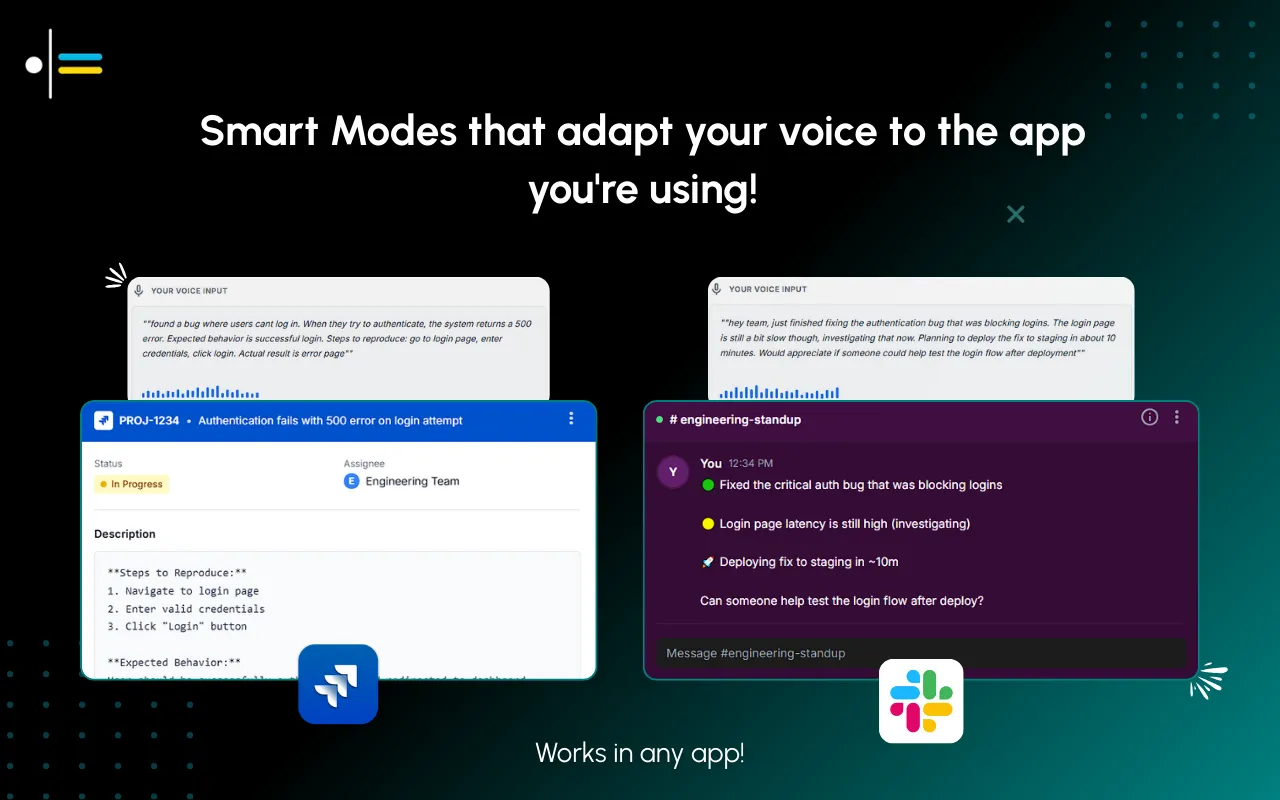
But here's the thing that makes transformation tools like Contextli different from just "cleaner transcription" - context modes. The same voice input produces completely different outputs depending on where you're writing. Let me show you what I mean.
Input: "tell mark I can't do the meeting tomorrow, see if we can push to next week, let him pick the day"
Email Context output:
Hi Mark,
Thanks for setting up the meeting - unfortunately, I won't be able to make it tomorrow. Would it work to push this to next week instead? Let me know which day works best on your end and I'll block the time.
Looking forward to it!
Best, Alex.

Slack Context output:
Hey Mark - can't make tomorrow's meeting. Can we push to next week? Let me know which day works and I'll make it happen 👍

Same input. Completely different outputs. That's the difference between speech recognition software that transcribes and voice to text software that transforms.
Understanding what's happening under the hood helps explain why these tools produce such different results.
Both speech-to-text and voice to text tools start with the same foundation: automatic speech recognition (ASR). Your voice hits a microphone, gets converted to a digital audio signal, and a model (like Whisper, Deepgram, or Google's speech engine) breaks that signal into phonemes, matches patterns, and outputs text.
This is where traditional speech to text software stops. The output is raw text. What you said, how you said it, filler words included.
voice to text transformation tools add a second step. After transcription, the raw text gets passed to a large language model (an LLM like GPT or Claude) along with a set of instructions - what Contextli calls a "Context." The LLM reshapes your raw speech into structured, formatted output based on those instructions.
This is why transformation tools can produce emails, Slack messages, Jira tickets, or clinical notes from the same voice input. The transcription layer captures what you said. The transformation layer turns it into what you meant to communicate.
The key difference: transcription is a single-step process. Transformation is a two-step process that uses AI to bridge the gap between how people speak and how they need to write.

If you're using voice input for emails, Slack messages, or documents, you need transformation, not transcription.
Raw transcription requires extensive editing:
This editing often takes longer than typing would have. That's the trap most people fall into when they try talk to text for the first time - they save time speaking, then lose it all editing.
If you're capturing meetings for the record, you may want transcription - faithful documentation of what was actually said.
Raw transcription is appropriate when:
For users with disabilities who can't type, the choice depends on context:
This matters more than people realize. Most accessibility-focused voice tools are transcription-only, which means users still face a wall of editing before their output is usable. Transformation tools remove that barrier entirely - you speak, and the output is ready to send.
Privacy architecture varies dramatically between voice tools, and most comparison guides flatten the question into a single "offline yes or no." The cleaner frame is the three-rung privacy ladder. Contextli is the only voice tool with all three rungs as independent, stackable user controls.
Level 1: Local models. Transcription and the context-aware writing layer run on your own machine. Internet off, app still works. You will need a modern Mac or Windows laptop, not a ten-year-old machine.
Level 2: Bring your own key (BYOK). You supply the API key for transcription or AI, and your data goes from your machine to the provider directly. Contextli never sees it.
Level 3: Disable cloud sync. Cloud sync is how Contextli lets you use the same notes across devices. Turn it off and Contextli stores nothing in its database. Your transcribed notes live as local files on your machine, where you can browse them yourself.
Stack all three and Contextli never makes a single request to external servers. Wispr Flow is cloud-only at every tier. ChatGPT voice is cloud-only. Otter is cloud-only. MacWhisper covers Level 1 (it is local) but is transcription-only with no context-aware writing. Superwhisper covers Level 1 on Mac. For confidential client emails, regulated industries, or anything that touches sensitive data, the stack matters more than any single speed claim.
| Feature | Speech-to-Text (Transcription) | voice to text (Transformation) |
|---|---|---|
| Filler words | Included | Removed |
| Punctuation | Minimal/none | Full |
| Structure | None | Paragraphs, lists |
| Formatting | Plain text | Context-appropriate |
| Editing needed | Heavy | Minimal |
| Privacy options | Varies | Varies (Contextli offers full offline) |
| Best for | Records, legal | Communication, productivity |
| Examples | Whisper, built-in dictation | Contextli, Superwhisper |
Some tools offer both modes:
What sets Contextli apart from other voice to text tools is the Context system. You create unlimited custom modes - each with its own formatting rules, tone, and hotkey. A psychiatrist can have a "Clinical Notes" context that formats speech into SOAP notes. A sales rep can have a "Cold Email" context that turns a 10-second voice note into a full personalized outreach. You speak at 250 words per minute and get professional output that would have taken 10 minutes to type and format.

The context-aware transformation layer runs through six canonical Modes (Email Mode, Messaging Mode, Notes Mode, LinkedIn Mode, Marketing Copy Mode, General Dictation). Each Mode can be customized with three to five examples of your own past writing, and from then on every dictation in that Mode matches that voice: your opening, your sentence length, your sign-off. Pin explicit instructions like "always use UK spellings" or "sign off as J., not Junaid" and they stick. None of the other tools in this hybrid section adapt per channel to a voice you trained with examples.
Recommended: Whisper (raw), built-in dictation, Otter.ai (for meetings)
Recommended: Contextli (from $79 lifetime), Superwhisper ($249)
Recommended: Contextli (transformation default, transcription available)
Total: 5-6 minutes
Total: 1-2 minutes
For a single email, transformation saves 3-4 minutes. For 20 emails daily, that's 60-80 minutes saved.
Scale that across a week and you're looking at 5-6 hours reclaimed. That's not a marginal improvement - that's an entire afternoon of deep work you're getting back.

No. The difference between transcription and transformation is significant. Choose based on your actual needs. A speech to text application that gives you raw text and a voice to text tool that gives you formatted output are solving fundamentally different problems.
You can. But editing takes time. If you're doing it for every email, the time adds up to hours weekly. That's the hidden cost of transcription-only tools - the editing tax nobody accounts for.
Good transformation tools preserve your meaning and voice. They format and clean - they don't rewrite your message into something different. The best ones let you customize exactly how your output should look, so it sounds like you, just polished.
Transcription is more literally accurate to what you said. But what you said often isn't what you meant to communicate in writing. Transformation captures intent. And in professional communication, intent is what matters.
Modern speech recognition handles accents, background noise, and natural speech patterns far better than most people expect. You don't need to speak like a news anchor. Tools like Contextli are designed for messy, natural speech - that's the entire point.
For most professionals: Transformation tools.
You're writing emails, Slack messages, and documents. You want output you can send. Editing raw transcription is a tax on your time that you're paying every single day.
Tool recommendation: Contextli (from $79 lifetime)
For specific transcription needs: Add a dedicated transcription tool.
If you also need meeting transcription or verbatim records, add a transcription tool for those specific use cases. Don't try to force a transcription tool to do transformation work, or vice versa. Match the tool to the task.
More guides to level up your voice to text workflow:

Junaid Khalid
Founder & CEO
Founder and solopreneur writing about how modern businesses run leaner and faster with AI. I build software that turns everyday work, from capturing thoughts to writing and staying organized, into something effortless, and I share what I learn along the way.
A weekly review template you can run in 15 minutes every Sunday. Six prompts, a scoring table, and a faster way to capture it by voice.
Junaid KhalidA vet visit notes template that captures the diagnosis, dosing, and follow-up before you leave the exam room. Speak it into your notes instead of typing.
Junaid KhalidCounseling progress notes software that writes your notes by voice and keeps client data on your own machine, so counselors finish notes the same day.
Junaid Khalid