


Voice typing, an advanced form of speech-to-text technology, has become an indispensable tool for professionals seeking to optimize their workflows and enhance productivity. In 2026, these tools have evolved significantly, offering high accuracy and sophisticated features that transform spoken words into polished, context-appropriate text. This guide will help you understand the landscape of voice typing solutions and how to select the best one for your professional needs, including How to Use Voice Typing in Google Docs.
Summary
Voice typing tools are crucial for professional productivity, with many achieving over 90% accuracy. The key to selecting the right tool lies in evaluating features like accuracy, integration, and critically, context-awareness. Contextli stands out by offering unique "Modes" that adapt voice input to specific communication contexts, significantly reducing editing and cognitive load for professionals. This approach ensures that spoken words are not just transcribed, but appropriately formatted and toned for emails, messages, notes, and more.
Understanding Voice Typing and Its Benefits
Voice typing is a technology that converts spoken language into written text, allowing users to create documents, emails, and messages simply by speaking. This technology, also known as speech-to-text or voice recognition software, has seen remarkable advancements, making it a highly reliable and efficient tool for professionals across various industries. To understand the basics of this technology, you can refer to our guide on What Is Speech to Text?.
The primary benefit of voice typing is the significant boost in productivity it offers. Professionals often spend a considerable amount of time typing, which can be inefficient and lead to repetitive strain injuries. By using voice typing, individuals can articulate their thoughts much faster than they can type them. In 2026, voice typing tools achieve over 90% accuracy, with some reaching 95 - 99% accuracy in optimal conditions. This high level of precision means less time spent on corrections and more time focused on content creation.
For professionals, the ability to rapidly convert speech into text translates into tangible time savings. Research indicates that professionals save 6 - 8 hours per week using professional dictation apps, with premium apps justifying the investment by reducing drafting time by 48%. This efficiency gain is particularly valuable for those who handle a high volume of written communication, such as lawyers, consultants, and executives. Imagine a lawyer dictating code documentation, significantly reducing the time spent on manual writing and allowing more focus on coding tasks. This real-world example highlights the practical impact of voice typing on professional roles.
Furthermore, voice typing facilitates multitasking. Professionals can dictate notes during a call, compose emails while walking, or draft reports without being tethered to a keyboard. This flexibility enhances workflow and allows for more dynamic and responsive communication. The increasing adoption rate underscores its value: 68% of professionals now use voice typing for at least some of their daily tasks, a substantial increase from just 23% in 2023. This widespread adoption reflects a growing recognition of the technology's benefits in professional settings.
Key Features to Look for in Voice Typing Tools
When selecting a voice typing tool, professionals should consider several critical features to ensure it meets their specific needs. These features go beyond basic transcription and delve into how effectively the tool integrates into a professional workflow.
Context-Aware Processing: A Game Changer
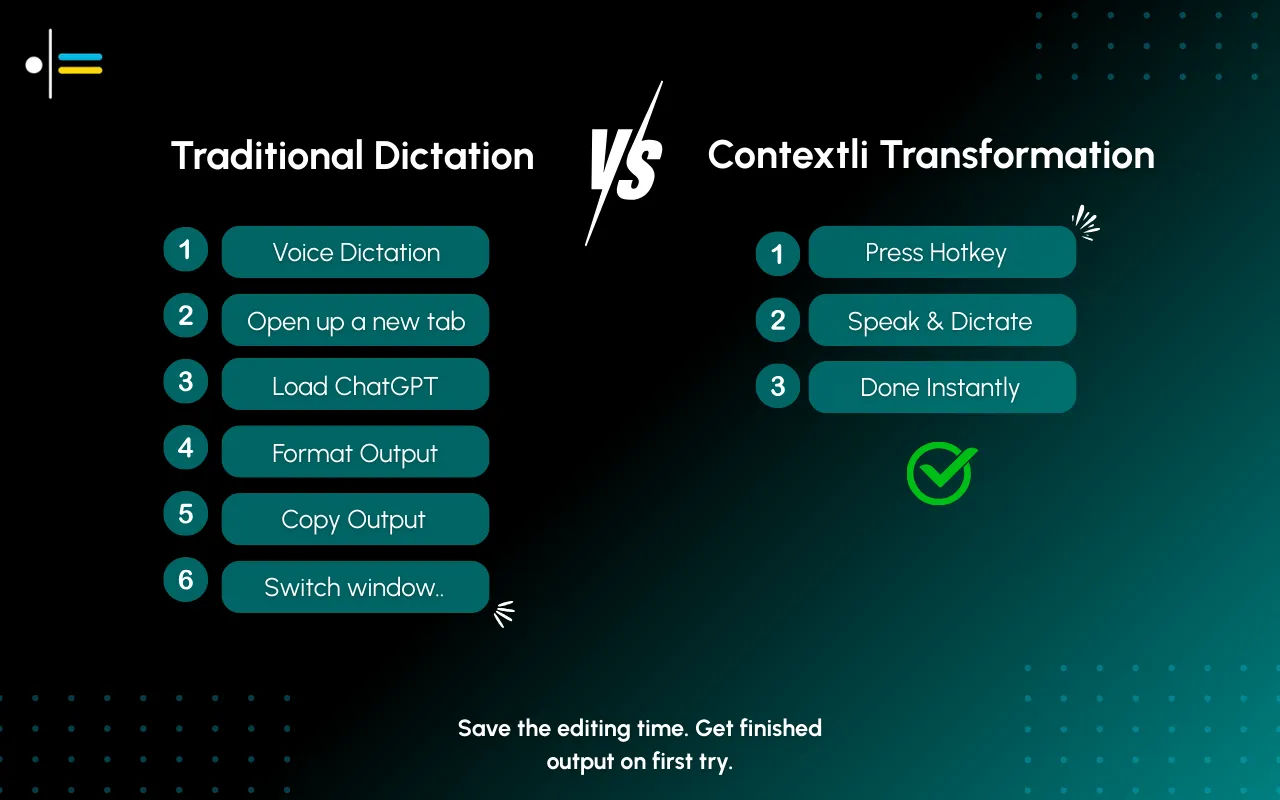
One of the most significant advancements in voice typing technology is context-aware processing. Traditional dictation tools treat all speech the same, regardless of the output medium. This often forces users to mentally switch tone, structure, and formatting, leading to friction, extra editing, and cognitive load. This is where Contextli distinguishes itself.
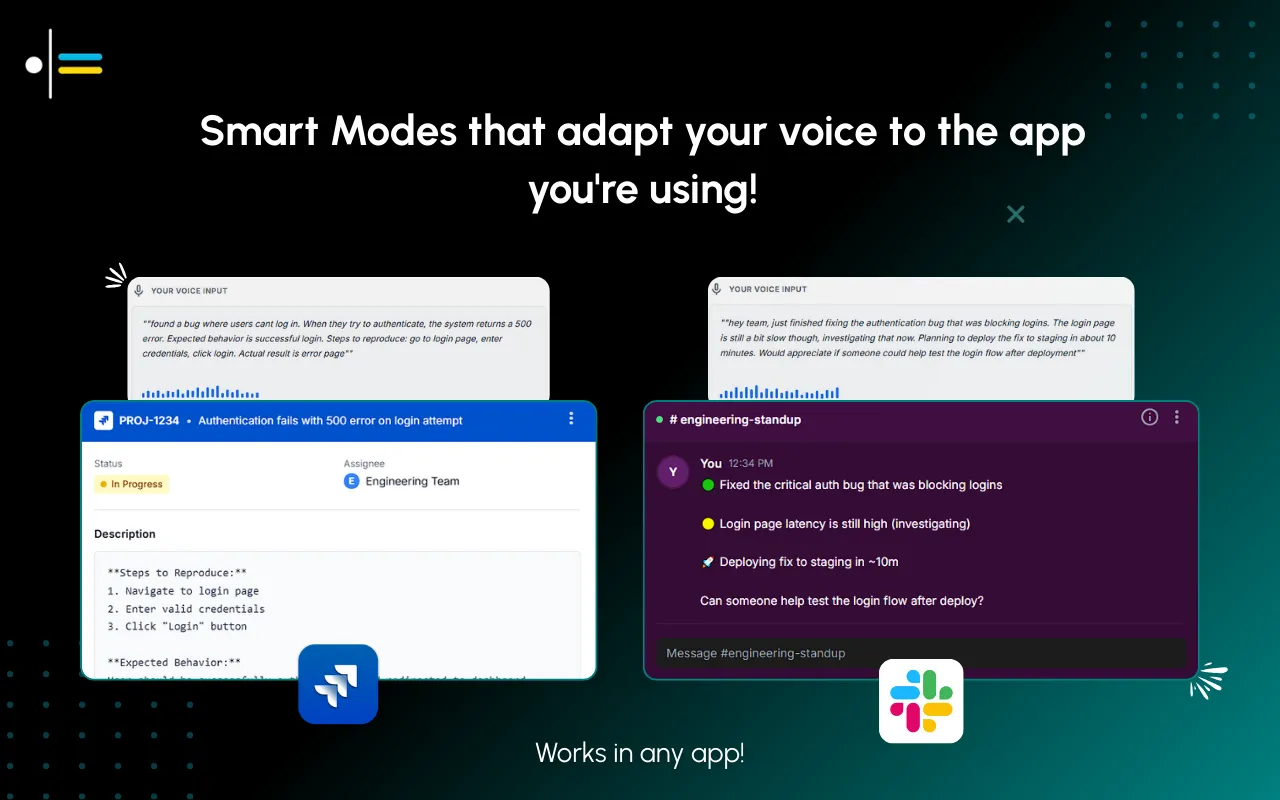
Contextli introduces "Modes" - context-aware processing profiles that automatically adapt your speech to the right output format. This is a crucial differentiator for professionals who communicate across various platforms daily. For instance:
- Email Mode: This mode ensures a professional, neutral tone with proper structure, ideal for client communications or internal memos.
- Messaging Mode: Perfect for platforms like Slack or WhatsApp, this mode translates speech into conversational and concise text.
- Notes Mode: Converts spoken thoughts directly into organized bullet points, streamlining the process of capturing ideas and meeting minutes.
- LinkedIn Mode: Adapts your speech to a professional-casual tone suitable for social posts, helping maintain a consistent personal brand.
- Marketing Copy Mode: Focuses on benefit-driven, persuasive writing, essential for crafting compelling advertisements or promotional materials.
- General Dictation: Provides clean transcription while preserving the original meaning, suitable for drafting longer documents or articles without specific formatting requirements.
These Contextli's unique features ensure that your voice becomes the right kind of text for each specific context, reducing the need for extensive post-dictation editing. This capability is particularly beneficial for heavy email and messaging users who value simplicity, predictability, and professional output without sacrificing efficiency. A lawyer, for example, reported that she stopped proofreading routine client emails entirely because her AI keyboard catches mistakes she used to miss even during careful review. This illustrates the power of context-aware tools in maintaining high standards of communication.
Comparison of Popular Voice Typing Tools
Beyond context-awareness, other features like accuracy, integration, and platform compatibility are essential. Let's compare some popular voice typing tools, including Contextli, Google Docs Voice Typing, and Windows Speech Recognition.
| Feature | Contextli | Google Docs Voice Typing | Windows Speech Recognition |
|---|---|---|---|
| Context-Aware Modes | Yes (Email, Messaging, Notes, LinkedIn, etc.) | No (Basic transcription only) | No (Basic transcription only) |
| Accuracy (Optimal) | 95-99% | High (varies with Google's updates) | High (requires training) |
| Integration | Desktop application, works across apps | Primarily within Google Docs | System-wide for Windows applications |
| Target User | Professionals, knowledge workers | General users, students, casual use | Windows users, accessibility needs |
| Editing & Polishing | Automatic, context-specific | Manual | Manual, some basic commands |
| Cognitive Load | Low | Moderate to High | Moderate to High |
| Platform | Desktop (Windows, Mac) | Web-based (Google Docs) | Windows OS |
| Offline Capability | Yes (for some features) | Limited (requires internet for full function) | Yes (after initial setup) |
Google Docs Voice Typing is a widely accessible tool for those who primarily work within the Google ecosystem. It offers decent accuracy for general dictation and is convenient for drafting documents directly in the cloud. For a deeper dive into its capabilities, you can explore How to Use Voice Typing in Google Docs. However, it lacks context-aware features, meaning users still need to manually adjust tone and formatting for different types of communication.
Windows Speech Recognition is a built-in feature for Windows users, offering system-wide voice control and dictation. It can be quite accurate once trained to an individual's voice and can be used for general dictation application across various Windows programs. This voice recognition software for Windows is particularly useful for accessibility purposes and for basic voice commands. However, like Google Docs Voice Typing, it does not offer context-specific output, requiring the user to manage the appropriateness of the text manually. For those seeking a dedicated dictation application on Windows, it's a solid, free option, but without the intelligent adaptation of context-aware tools.
When considering speech to text software, the distinction lies not just in transcription accuracy but in the intelligence applied after transcription. Contextli's approach of "Speak once. Write appropriately everywhere" directly addresses the pain points of professionals who need to maintain different communication styles across diverse platforms.
How to Choose the Right Voice Typing Tool for Your Needs
Choosing the right voice typing tool involves understanding your specific professional demands and aligning them with the features offered by various solutions. Here’s a step-by-step guide to help you make an informed decision:

- Assess Your Communication Needs:
- Frequency of Use: How often do you write emails, messages, notes, or social media posts? If you're a heavy user, a sophisticated dictation application with advanced features will be more beneficial.
- Diversity of Contexts: Do you frequently switch between formal emails, casual Slack messages, and structured notes? If so, a context-aware tool is essential.
-
Types of Content: Are you drafting marketing copy, legal documents, personal notes, or social media updates? Different content types require different tones and structures.
-
Prioritize Accuracy and Reliability:
- While most modern voice typing tools offer high accuracy, test a few options to see which one performs best with your accent and speech patterns. Look for tools that consistently achieve 95% or higher accuracy in optimal conditions.
-
Consider tools that offer continuous learning, meaning they improve over time as they adapt to your voice and vocabulary.
-
Evaluate Context-Awareness:
- This is a critical factor for professionals. Does the tool offer different "modes" or profiles for various communication types?
-
Tools like Contextli, with its Email Mode, Messaging Mode, and Notes Mode, significantly reduce the cognitive load and editing time by automatically adjusting the output to the appropriate context. This differentiates it from generic speech to text software.
-
Check for Integration and Compatibility:
- Platform: Do you primarily use Windows or Mac? Some tools are platform-specific, like windows speech recognition or mac speech to text. Ensure the tool is compatible with your operating system.
- Application Integration: Does the voice typing tool work seamlessly with the applications you use most frequently (e.g., Google Docs, Microsoft Word, Outlook, Slack, CRM systems)? A desktop application that works across various platforms is often more versatile.
-
Offline Capability: Do you need to dictate in environments without internet access? Some tools require an active internet connection for full functionality.
-
Consider Customization Options:
- Can you add custom vocabulary, such as industry-specific jargon, client names, or technical terms? This can greatly improve accuracy and efficiency for specialized professionals.
-
Are there options for custom commands or macros to automate repetitive tasks?
-
User Experience and Ease of Use:
- A tool should be intuitive and easy to learn. A complex interface can negate the productivity benefits.
-
Look for clear feedback mechanisms, such as visual cues indicating when the microphone is active or when text is being processed.
-
Security and Privacy:
-
For professionals handling sensitive information, data security and privacy are paramount. Understand how the tool processes and stores your voice data. Look for encryption and compliance with relevant data protection regulations.
-
Cost vs. Value:
- While free options like voice typing in Google Docs or built-in windows speech recognition are available, premium dictation application often offer advanced features, higher accuracy, and better support.
- Evaluate if the time savings and increased professionalism justify the investment. Remember, professionals save 6 - 8 hours per week using professional dictation apps, which can easily offset the cost.
By following these steps, you can pinpoint a voice typing tool that not only transcribes your speech but also intelligently adapts it to your professional communication needs, ultimately enhancing your efficiency and output quality.
Conclusion: Embracing Voice Typing for Efficiency
The evolution of voice typing technology has transformed it from a niche tool into an essential asset for professionals. In 2026, the capabilities of speech to text software extend far beyond simple transcription, offering sophisticated features that cater to the diverse demands of modern professional communication. The key differentiator for today's discerning professional is context-awareness - the ability of a dictation application to understand the nuances of different communication platforms and adapt its output accordingly.
Tools that offer context-aware processing, such as Contextli with its innovative Modes, are revolutionizing how professionals interact with their written tasks. By automatically adjusting tone, structure, and formatting for emails, messages, notes, and social media posts, these advanced solutions significantly reduce the cognitive load and editing time that often plague traditional voice typing experiences. This leads to not just faster output, but also more appropriate and polished communication, which is crucial for maintaining a professional image.
The benefits are clear: increased productivity, reduced time spent on editing, and the ability to communicate effectively across various platforms without mentally switching gears. As demonstrated by the significant rise in professional adoption, voice typing is no longer a luxury but a strategic advantage. It empowers individuals to speak once and write appropriately everywhere, freeing up valuable time and mental resources that can be redirected to more critical tasks.
We encourage you to explore the power of context-aware voice typing. Experience how a tool designed to understand your professional context can transform your daily writing tasks, enabling you to communicate with unparalleled efficiency and precision.
FAQ
What is the primary advantage of context-aware voice typing for professionals?
The primary advantage is the significant reduction in cognitive load and editing time. Context-aware tools, like Contextli, automatically adapt your spoken words to the appropriate tone, structure, and formatting required for different communication contexts (e.g., email, chat, notes), ensuring professional and polished output without manual adjustments.
Can voice typing tools integrate with my existing professional software?
Many voice typing tools, especially desktop applications, offer broad integration capabilities. While some, like voice typing in Google Docs, are primarily web-based and integrate within their specific ecosystem, others like Contextli or advanced windows speech recognition solutions are designed to work across various desktop applications, enhancing workflow efficiency.
Is voice typing accurate enough for professional use in 2026?
Yes, in 2026, voice typing tools achieve over 90% accuracy, with some reaching 95 - 99% accuracy in optimal conditions. This high level of precision, combined with context-aware processing, makes them highly reliable for professional document creation, email drafting, and note-taking, significantly reducing the need for extensive post-dictation editing.

