In a world where knowledge workers spend 20 hours a week crafting emails, Slack messages, and notes, why settle for raw transcription when AI can deliver polished, context-perfect output? The short answer is, you don't have to. Contextli introduces a revolutionary approach to speech to text software, leveraging context-aware processing to transform spoken words into appropriately formatted and toned written communication for any professional setting. This guide will explore how Contextli stands apart as a leading dictation software for professionals, addressing the critical need for adaptability in today's fast-paced digital communication landscape.
Summary
Contextli is a desktop application that provides context-aware speech-to-text capabilities for professionals. It solves the problem of traditional dictation tools that treat all speech the same, forcing users to manually adapt tone and structure. Contextli's unique "Modes" - such as Email Mode, Messaging Mode, and Notes Mode - automatically tailor speech output to suit specific communication contexts, reducing friction, extra editing, and cognitive load. This approach ensures appropriateness and clarity in various professional communications, making it an indispensable tool for heavy email and messaging users, founders, consultants, and knowledge workers aged 40+.
Understanding Speech-to-Text Technology
Speech-to-text technology, also known as automatic speech recognition (ASR), converts spoken language into written text. This technology has evolved significantly over the years, moving from rudimentary dictation systems to sophisticated AI-powered solutions. Early versions relied on strict vocabularies and speaker training, while modern speech to text software can transcribe diverse accents and speaking styles with impressive accuracy. To learn more about the nuances, consider understanding speech to text.
The evolution of speech recognition software has been driven by advancements in artificial intelligence, particularly deep learning and neural networks. These technologies enable systems to better understand context, differentiate homophones, and process natural language more effectively. The global speech-to-text API market size was valued at USD 4.66 billion in 2025 and is projected to grow from USD 5.63 billion in 2026 to USD 25.28 billion [web:0], underscoring its rapid expansion.
This growth is fueled by increasing demand for efficiency and accessibility across various sectors. Key trends for 2026 include enhanced multilingual support, real-time transcription, and the integration of emotional intelligence into voice models. Crucially, there's a growing emphasis on contextual awareness beyond basic transcription, setting the stage for tools like Contextli.
The Importance of Context in Communication
Effective communication is inherently contextual. The way we speak or write depends heavily on the audience, platform, and purpose. A formal email to a client differs vastly from a quick Slack message to a colleague or a personal note for internal use. Each requires a distinct tone, structure, and level of detail.
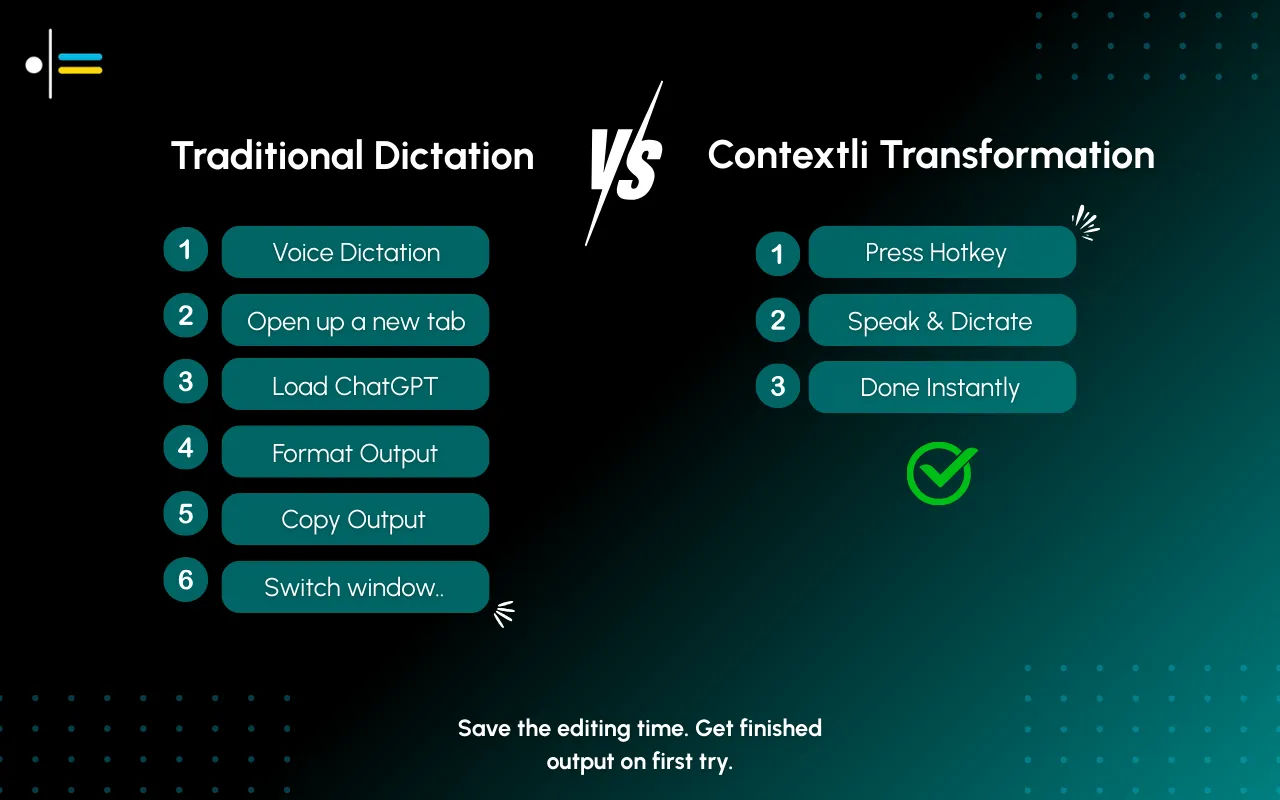
Traditional dictation software often fails to account for this critical aspect. When you use generic voice recognition software, it provides a raw transcription, leaving the onus on the user to manually adjust the output for tone, formatting, and conciseness. This mental switching and subsequent editing add significant cognitive load and consume valuable time that professionals can ill afford to lose. Professionals spend nearly 20 hours weekly on written communication, highlighting the need for tools that adapt tone and structure to reduce cognitive load.
For instance, voice typing in Google Docs offers moderate accuracy, typically around 90-95%, but it does not adapt to context. This means transcribing a professional email using Google Docs voice typing would still require substantial manual editing to achieve the appropriate tone and structure. The absence of context-awareness in conventional tools creates friction and slows down the communication process, making them less than ideal for the diverse demands of professional communication.
Introducing Contextli: Your Context-Aware Solution
Contextli emerges as a game-changer in the realm of dictation software for professionals by directly addressing the critical gap of contextual awareness. Unlike other speech to text software that offers a one-size-fits-all transcription, Contextli provides a desktop application designed to understand and adapt to the specific communication context. Its core innovation lies in its "Modes" - context-aware processing profiles that automatically tailor your spoken words into the right output format, tone, and structure.
This unique approach significantly reduces friction, extra editing, and cognitive load for users. Instead of dictating raw text and then spending time rephrasing, formatting, and correcting, Contextli delivers output that is already optimized for its intended destination. This ensures that your voice becomes the right kind of text for each context, enhancing both efficiency and professionalism.
Contextli is built for professionals, founders, consultants, and knowledge workers who are heavy email and messaging users and who value simplicity, predictability, and professional output. It differentiates itself from competitors focused solely on speed or AI models by prioritizing appropriateness and clarity.
Modes of Contextli Explained
Contextli's power lies in its specialized Modes, each designed to cater to a distinct communication scenario:
- Email Mode: This mode processes your speech into a professional, neutral tone with proper email structure. It handles greetings, closings, and paragraph breaks, ensuring your message is ready to send with minimal edits. Imagine dictating a complex client update and having it automatically formatted into a clear, concise email.
- Messaging Mode: Ideal for platforms like Slack or WhatsApp, this mode converts your speech into conversational and concise messages. It understands the need for brevity and informal language, streamlining your internal communications. This means no more overly formal Slack messages that sound out of place.
- Notes Mode: Perfect for capturing thoughts, meeting minutes, or brainstorming sessions, Notes Mode converts your speech into organized bullet points. This helps in quickly structuring information, making it easy to review and act upon later.
- LinkedIn Mode: Crafted for social professional networking, this mode generates posts with a professional-casual tone. It helps you craft engaging updates that resonate with your network without sounding too stiff or too informal.
- Marketing Copy Mode: This mode focuses on benefit-driven, persuasive writing. It's designed for professionals creating marketing materials, sales pitches, or promotional content, helping to articulate value propositions effectively.
- General Dictation: For instances where specific contextual adaptation isn't required, this mode provides clean, accurate transcription, preserving the meaning of your spoken words without additional formatting. This is the closest to traditional voice recognition software but with Contextli's superior accuracy.
These modes are not just about transcription; they are about transformation, ensuring that your communication is always appropriate and impactful.
Customization by example (the real win)
The six Modes are the starting point. The actual win comes from making them yours. Every Mode can be customized with three to five examples of how you actually write, plus explicit instructions.
The flow: open Email Mode customization in Contextli settings. Paste three to five emails you have actually sent to clients. They do not need to be your best emails, just representative. If you tend to open with "Hi Sarah," instead of "Hello Sarah,", paste an example with "Hi Sarah,". If you sign off with "Best, J." instead of "Best regards, Junaid Khalid", paste that too. If you use UK spellings, the examples carry them.
From that moment on, every dictated email matches the voice in your examples. The sentence length, the formality, the opening, the closing. You can also pin explicit instructions in the customization panel: "never start an email with the word I," "always use UK spellings," "sign off as J., not Junaid," "default to Hi over Dear unless I name a specific title." These instructions are sticky and reliable for hard preferences.
A consultant who feeds Email Mode five past client emails gets a Mode that produces emails in her voice. She does not have to reread every dictation to fix tone. She reads for accuracy and sends. Same setup for Messaging Mode (paste five Slack messages you have actually sent your team), same for LinkedIn Mode (paste five posts you have written), same for Marketing Copy Mode (paste five landing-page headlines from your own brand).
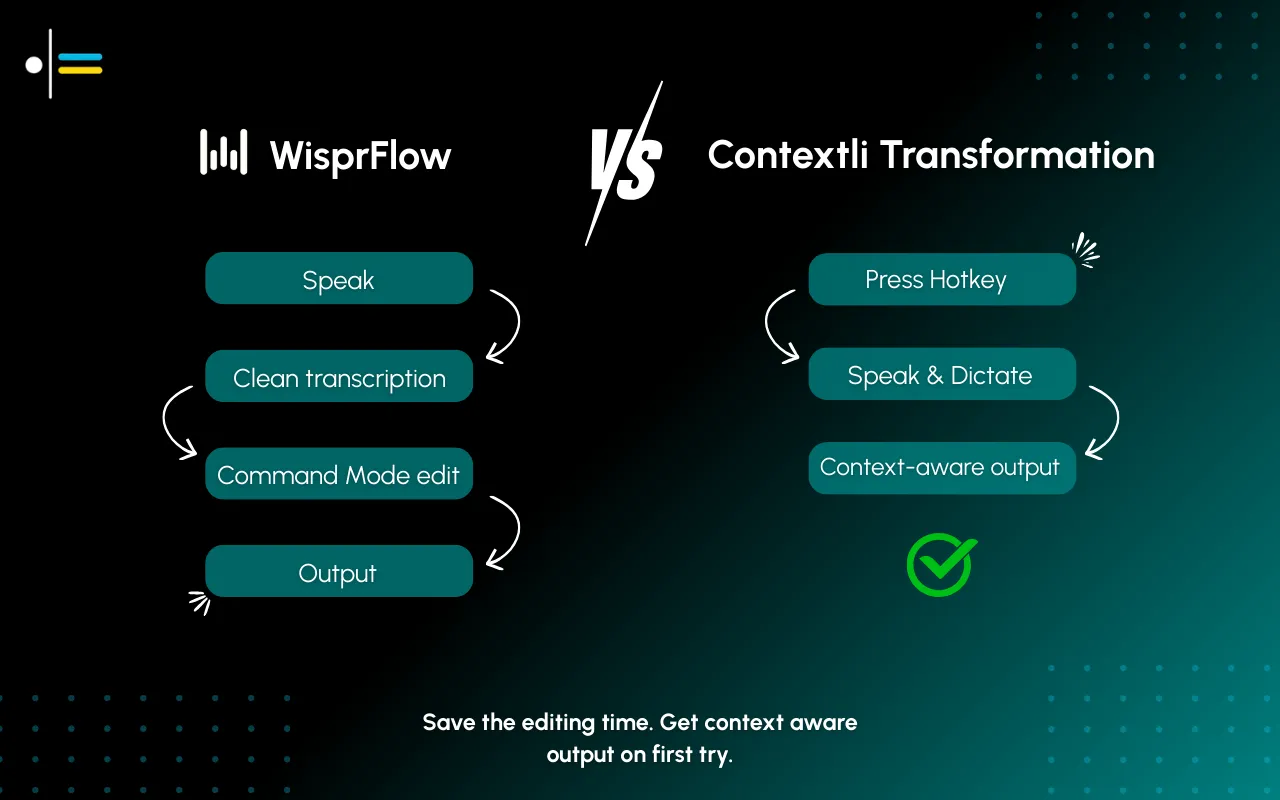
No other dictation tool offers this. Wispr Flow does not adapt per channel from examples. Willow Voice does not. MacWhisper does not (it is transcription-only). Superwhisper has custom modes but no example-based voice training. Apple Dictation and Windows native dictation do not. This is the wedge that turns dictation from transcription into context-aware writing in your voice.
Benefits of Using Contextli for Professionals
The advantages of integrating Contextli into a professional workflow are numerous, particularly for those juggling multiple communication platforms and diverse audiences.
- Reduced Cognitive Load: By automatically adapting tone and structure, Contextli eliminates the mental effort required to switch between communication styles. This frees up cognitive resources, allowing professionals to focus on the content of their message rather than its presentation.
- Enhanced Efficiency and Time Savings: Professionals spend a significant portion of their week on written communication. Contextli drastically cuts down on editing time. A 2025 qualitative study found that AI-powered voice-to-text technology reduces clinicians' documentation burden during consultations, allowing more focus on patient interaction [web:136]. This efficiency translates directly into more time for core responsibilities.
- Consistent Professionalism: Contextli ensures that all your written communications maintain a high standard of professionalism, regardless of the platform. This consistency builds trust and reinforces your professional brand.
- Improved Output Quality: Beyond mere transcription, Contextli's context-aware processing refines your spoken words into polished, appropriate text. This leads to clearer, more impactful communication. Speech-to-text intervention supported text production for students with writing difficulties, improving output quality [web:140].
- Seamless Multi-Platform Communication: Whether you're drafting an email, sending a Slack message, or updating your LinkedIn profile, Contextli provides the right output for the right platform, making cross-platform communication effortless.
- Accessibility and Comfort: For those who find typing cumbersome or suffer from repetitive strain injuries, Contextli offers an ergonomic alternative. It allows users to write naturally by speaking, promoting comfort and accessibility. Many professionals are looking for the best speech recognition tools that cater to their specific needs, and Contextli fits this bill perfectly. When considering top voice to text software, Contextli's specialized modes make it a standout choice.
Comparing Contextli with Other Speech-to-Text Tools
While the market offers a variety of speech to text software, Contextli distinguishes itself through its unique context-aware approach. Traditional voice recognition software, including popular options like voice typing in Google Docs or built-in dictation features on Windows and Mac, primarily focuses on transcribing speech into raw text.

Here's a comparison to highlight Contextli's differentiation:
| Feature/Tool |
Contextli |
Traditional Dictation (e.g., Google Docs voice typing, Windows Speech Recognition) |
AI Chatbots (e.g., ChatGPT with voice input) |
| Core Functionality |
Context-aware speech-to-text transformation |
Raw speech-to-text transcription |
Conversational AI, content generation |
| Adaptability to Context |
High (via Modes: Email, Messaging, Notes, etc.) |
Low (one-size-fits-all transcription) |
Moderate (requires explicit prompting for tone/format) |
| Cognitive Load |
Low (automated adaptation) |
High (manual editing for tone/format) |
Moderate (requires careful prompt engineering) |
| Output Quality |
Polished, context-appropriate text |
Raw, unformatted text |
Generated text based on prompts |
| Primary Use Case |
Professional communication across platforms |
Basic transcription, simple document creation |
Research, complex writing, idea generation |
| Editing Required |
Minimal |
Significant |
Moderate to significant (depends on prompt) |
| Desktop Application |
Yes |
Often built-in or browser-based |
Typically web-based or mobile app |
Traditional tools like Google Docs voice typing are excellent for basic transcription, but they lack the intelligence to understand the purpose of your communication. This means a dictated email still requires manual formatting, adding greetings and closings, and adjusting the tone. Similarly, generic voice recognition software for Windows or mac speech to text tools provide a verbatim transcript without considering if it's for a client report or a quick internal memo.
For a deeper dive into how Contextli compares with other voice-to-text software, explore our comparison with other voice-to-text software.
The privacy stack (the three-rung ladder)
The other tools comparison most professionals never see: where does your speech actually go when you dictate? Contextli is the only dictation tool that gives users a full three-rung ladder of privacy controls. Stack any of them, or all three together.
Level 1: Local models. Transcription and the context-aware writing layer run on your own machine. Internet off, app still works. You will need a modern Mac or Windows laptop, not a ten-year-old machine.
Level 2: Bring your own key (BYOK). You supply the API key for transcription or AI, and your data goes from your machine to the provider directly. Contextli never sees it.
Level 3: Disable cloud sync. Cloud sync is how Contextli lets you use the same notes across devices. Turn it off and Contextli stores nothing in its database. Your transcribed notes live as local files on your machine, where you can browse them yourself.
Stack all three and Contextli never makes a single request to external servers. Wispr Flow is cloud-only at every tier; their documentation states transcription always happens in the cloud. Willow Voice is cloud-only by design. Otter is cloud-only. ChatGPT voice is cloud-only. Apple Dictation covers Level 1 only but is generic transcription with no per-channel adaptation. MacWhisper covers Level 1 (it is local) but is transcription-only with no context-aware Modes. Superwhisper covers Level 1 on Mac only. Dragon NaturallySpeaking is cloud-only in modern versions. For confidential client work, regulated industries (legal, healthcare, financial advisory), or anything you would not want sitting on a vendor's database, the three-rung stack matters more than any other speed or accuracy claim.
Real-World Applications of Contextli
Contextli's context-aware capabilities make it invaluable across a multitude of professional scenarios, enhancing productivity and communication quality.
- For Consultants and Advisors: Imagine a consultant who just finished a client meeting. Using Contextli's Notes Mode, they can quickly dictate key takeaways and action items, which are then automatically structured into organized bullet points. Later, switching to Email Mode, they can dictate a follow-up email to the client, knowing Contextli will format it professionally and with the appropriate tone, saving precious time between appointments.
- For Founders and Entrepreneurs: Founders constantly switch between investor updates, team communications, and marketing outreach. With Contextli, they can dictate a quick, conversational Slack message in Messaging Mode, then switch to LinkedIn Mode to craft a professional-casual update for their network, all from their spoken words. This rapid context switching without manual editing is a significant time-saver.
- For Executives and Operators: Time-constrained executives need to communicate swiftly and effectively. Whether it's dictating a strategic directive in Email Mode or providing feedback on a project in Notes Mode, Contextli ensures that their communication is always clear, concise, and professionally presented, reflecting positively on their role.
- For Content Creators (Professional): A content creator working on a marketing campaign can use Marketing Copy Mode to dictate persuasive ad copy. Then, when responding to comments or engaging with their audience, they can switch to Messaging Mode for a more conversational tone, demonstrating the versatility of Contextli across content types.
- For Heavy Email and Messaging Users: For professionals who spend hours daily drafting emails and responding to messages, Contextli transforms their workflow. They can dictate responses and new messages, knowing that the output will be perfectly tailored to the platform, significantly reducing the mental effort and time spent on written communication.
These scenarios illustrate how Contextli moves beyond simple transcription to provide a truly intelligent writing assistant that understands the nuances of professional communication.
Getting Started with Contextli
Embracing the efficiency and precision of context-aware speech-to-text with Contextli is a straightforward process. As a desktop application, Contextli offers robust performance and seamless integration into your daily workflow.
- Download and Installation: Visit the official Contextli website to download the application for your operating system (Windows or macOS). The installation process is intuitive, following standard desktop application procedures.
- Account Setup: Upon first launch, you will be prompted to create or log in to your Contextli account. This ensures your settings and custom preferences are securely stored and accessible.
- Microphone Configuration: Contextli works best with a clear audio input. Ensure your microphone is properly connected and configured within your system settings. Contextli will guide you through optimizing your microphone for the best speech recognition performance.
- Explore the Modes: Familiarize yourself with Contextli's various Modes (Email, Messaging, Notes, LinkedIn, Marketing Copy, General Dictation). You can switch between these modes easily through the application's interface or via customizable hotkeys.
- Start Dictating: Once set up, simply select your desired mode and begin speaking. Contextli will process your speech and output the text directly into the active application, whether it's your email client, a chat application, or a word processor. Experiment with different modes to experience the automatic adaptation of tone and structure.
- Customization: Contextli allows for personalization. You can adjust certain parameters within each mode to fine-tune the output to your specific preferences.
Contextli is designed for ease of use, ensuring that professionals can quickly integrate this powerful tool into their demanding schedules without a steep learning curve.
FAQ
What are the benefits of context-aware speech-to-text?
Context-aware speech-to-text, like that offered by Contextli, significantly reduces cognitive load by automatically adapting the tone, structure, and formatting of dictated text to suit specific communication contexts (e.g., email, messaging, notes). This leads to increased efficiency, reduced editing time, consistent professionalism, and improved output quality across various platforms, allowing professionals to communicate more effectively and focus on the message rather than the medium.
How does Contextli differ from traditional dictation software for professionals?
Traditional dictation software, including voice typing in Google Docs or built-in Windows speech recognition, primarily provides raw transcription of spoken words. It lacks the intelligence to understand the intent or destination of the communication. Contextli, however, goes beyond mere transcription by offering "Modes" that automatically transform speech into context-appropriate text, adapting tone, structure, and conciseness for specific uses like professional emails, casual messages, or structured notes, thereby requiring minimal post-dictation editing.
Can Contextli be used with any application on my computer?
Yes, Contextli is designed as a desktop application that outputs text directly into any active text field on your computer. This means you can use it seamlessly with your email client, messaging apps like Slack or WhatsApp, word processors, CRM systems, and any other application where you typically type text. Its universal compatibility makes it a versatile tool for professionals across all their digital communication needs.
Conclusion
In an increasingly digital and fast-paced professional world, the demand for efficient and contextually appropriate communication has never been higher. Contextli stands out as a pioneering solution in the landscape of speech to text software, offering a powerful desktop application that understands and adapts to the nuances of professional discourse. By providing context-aware speech-to-text capabilities through its innovative Modes, Contextli directly addresses the pain points of cognitive overload and excessive editing common with traditional voice recognition software.
For professionals, founders, consultants, and knowledge workers who navigate a complex web of emails, messages, and notes daily, Contextli offers a streamlined path to clarity and appropriateness. It is more than just a dictation tool; it is a strategic partner that ensures your voice becomes the right kind of text, every time. As the global speech-to-text market continues its robust growth, with projections showing a CAGR of 14.1% from 2025 to 2030, reaching USD 8,569.5 million by 2030, the importance of sophisticated, context-aware tools will only amplify. Contextual speech recognition is emerging as a key differentiator, moving beyond basic transcription to improve output relevance.
If you are seeking to reclaim valuable time, enhance the professionalism of your communications, and reduce the mental friction of switching contexts, Contextli offers a compelling solution. We encourage you to download and try Contextli today to experience firsthand how this best speech recognition tool can transform your daily communication needs. Speak once. Write appropriately everywhere.




 Junaid Khalid