Most weekly reviews die the same way. You open a blank note on Sunday evening, stare at it for two minutes, type "went ok, busy week", and close the tab. Nothing about that recall was honest, and nothing about it changed the next week. The blank page is the problem: it asks you to invent structure and remember details at the same time, and you are tired.
A weekly review template fixes the first half of that. It gives you the same six questions every week, so you are recalling instead of composing. The second half, the friction of typing it all out, is where most people quit anyway. This guide gives you the template, a scoring table you can reuse, and a way to run the whole thing by talking instead of typing.
Key takeaways
- A working weekly review template is six fixed prompts plus a five-row scoring table, not a blank note you fill from scratch.
- Run it in 15 minutes: 5 minutes recalling the week, 5 minutes scoring, 5 minutes setting three priorities for next week.
- Sunday evening or Monday morning both work; pick the one you will actually keep and never move it.
- Dictating your answers into your notes app is often faster than typing them, because a review is recall, and recall comes out in full sentences.
- With Contextli's Notes Mode, you speak the review and it types clean prose into whatever notes app has focus. Turn off cloud sync and the review never leaves your machine.
Why a fixed template beats a blank note
The value of a review is comparison. This week against last week, this quarter against the plan. You cannot compare two things recorded differently, and a blank note guarantees they will be. One week you write three paragraphs about a launch, the next you write "fine". There is no line to read across.
A fixed template forces the same shape every time. Same questions, same scoring rows, same order. That makes the review fast, because you are answering known prompts instead of designing a document, and it makes the review comparable, because in eight weeks you can scroll back and read energy as a 3, then a 4, then a 2 the week the deadline hit.
Keep the template short enough to finish. A review you can run in 15 minutes on a bad Sunday is one you will still be running in six months. A 45-minute reflection ritual is one you will abandon by February.
The 15-minute weekly review template
Copy these six prompts into a note and reuse them every week. The whole thing is three five-minute blocks.
Block one, recall the week (5 minutes):
- What actually happened this week? List the three or four things that mattered, good or bad. No editing, just the facts.
- What went well, and why? Name the cause, not just the win, so you can repeat it.
- What did not go well, and what caused it? Be specific about the trigger, not the feeling.
Block two, score the week (5 minutes). Fill the scoring table below. It takes 60 seconds once you have the rows memorised.
Block three, set next week (5 minutes):
- What is the one thing that, if it slips again, will still be here next Sunday? Write it down as this week's carry-over.
- What are the three priorities for next week? Only three. A list of ten is a wish, not a plan.
- What will you deliberately not do next week? Naming a thing to drop is half of a real weekly planning template.
That is the entire review. Six questions and a table. If you finish early, stop. Padding a review does not make it more useful.
The scoring table (reuse this every week)
Numbers make a review comparable in a way sentences never do. Rate each dimension 1 to 5, where 1 is a bad week and 5 is a strong one. The point is not the absolute score. It is the trend line you see after a month of them.
| Dimension |
Score (1-5) |
One-line note |
| Energy and focus |
|
Were you rested and able to concentrate, or running on fumes? |
| Progress on priorities |
|
Did last week's three priorities actually move? |
| Relationships |
|
Did you show up for the people who matter, or go quiet? |
| Health and movement |
|
Sleep, food, exercise: honest, not aspirational. |
| Learning |
|
Did you learn one thing worth keeping? |
Keep the notes to one line each. The table is a dashboard, not a diary. When you look back across eight weeks, a column of energy scores dropping from 4 to 2 tells you more than any paragraph you wrote that month.
Sunday night or Monday morning?
Both work. The wrong answer is "whenever I get to it", because that answer means never.
Sunday evening suits people who want to close the week before it ends, walk into Monday with three priorities already set, and protect their weekend from work thoughts by parking them on paper. The risk is that you are tired on Sunday night and rush it.
Monday morning suits people who think more clearly after sleep and want to plan against a fresh calendar. The risk is that Monday's inbox eats the review before you start it, so you have to block the first 15 minutes and defend them.
Pick one, put it in the calendar as a recurring 15-minute block, and treat it like a meeting you cannot move. The end of week review that survives is the one with a fixed slot, not the one that depends on motivation.
Why typing is the slow part, and what to do about it
Here is the friction nobody names. The thinking in a review takes five minutes. The typing takes fifteen, because recall comes out in full sentences and your hands cannot keep up with them. So you compress. "Launch went well" instead of the two sentences you actually thought about why it went well. The compression is where the review loses its value.
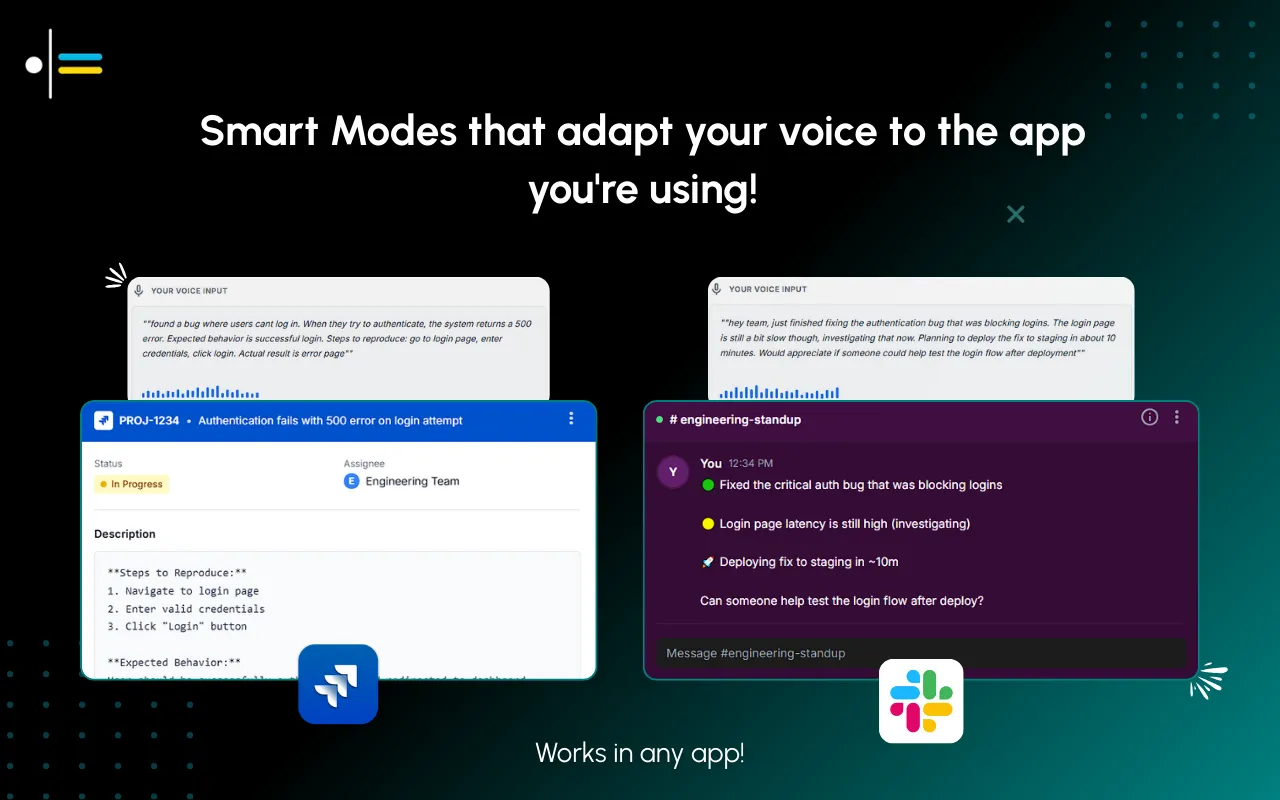
Talking is faster than typing for exactly this kind of content. A review is you narrating what happened, which is speech, not composition. This is where a context-aware dictation tool earns its place. You speak your answer to each prompt and it types clean, punctuated prose into the note.
The word "context-aware" matters here. Generic dictation gives you a wall of run-on text with no capitals and no paragraph breaks, and you spend the time you saved cleaning it up. Contextli's Notes Mode is tuned for exactly this: bullet points where you pause, full sentences where you narrate, headings where you say "next section". It is a system-level app that types into whatever window has focus, so it works in Apple Notes, Obsidian, a Google Doc, or the notes app you already keep your reviews in. There are no integrations to set up, because it types where your cursor is.
You can go further with the customization story. Feed Notes Mode three or four examples of how you already write your reviews (terse bullets, no filler, UK spellings, whatever your style is) and every future dictation matches that voice. You are not learning a new format. The tool is learning yours.
Contextli for the weekly review, and the privacy question
A weekly review is honest by design. It contains the deal that slipped, the argument you had, the health thing you have been avoiding. That is precisely why it works, and precisely why you do not want it sitting in a random vendor's cloud.
Contextli lets you close that gap. Turn off cloud sync and Contextli stores nothing in its database: your reviews live as local files on your own machine and nowhere else. Go one rung further and run the local models, so transcription and the AI cleanup both happen on your laptop with the internet off, and the review never touches a network at all. The honest trade-off is that on-device models want a reasonably modern Mac or Windows laptop; an old machine will run them slowly. For the most private setup you can have, that is the price.
This is a combination other dictation tools do not offer. Apple's built-in macOS Dictation is on-device but gives you raw transcription with no context and no formatting. Otter.ai formats meetings well but is cloud-first by design, which is the opposite of what a private journal wants. If all you need is the fastest possible raw transcription, Wispr Flow is quicker than we are. For a private, formatted weekly review that stays on your own machine, the local-models-plus-no-sync setup is the point.
A real Sunday, timed
It is 6pm on a Sunday. Junaid opens last week's review note in Obsidian and taps the same six-prompt template he uses every week. Instead of typing, he starts Contextli in Notes Mode and talks through it.
He speaks his answer to prompt one, four things that happened, and it types them as clean bullets. He narrates what went well and why, and it lands as two proper sentences with capitals and a full stop. He reads the scoring table aloud, "energy three, priorities four, relationships two", and fills the row. Then three priorities for next week and one thing to deliberately not do.
Typing all of that carefully would have taken him about twelve minutes. Speaking it took closer to four. The review itself, the thinking, took the same five minutes it always does. He is done in under ten, the note reads like he wrote it by hand, and because sync is off, it never left his laptop.

FAQ
How long should a weekly review take?
Aim for 15 minutes: five to recall the week, five to score it, five to set next week's priorities. If a review regularly runs past 30 minutes you are journaling, not reviewing, and you will eventually stop doing it. Keep the template short enough to finish on a tired Sunday.
What is the difference between a weekly review and weekly planning?
A weekly review looks backward: what happened, what worked, what did not. Weekly planning looks forward: what are the three priorities for the coming week. A good template does both, which is why prompts five and six here point at next week. Do the review first, because your plan should be informed by what you just learned.
Should I do my weekly review on Sunday or Monday?
Both work; consistency beats the specific day. Sunday evening closes the week and protects your weekend from lingering work thoughts. Monday morning gives you a clearer head and a fresh calendar. Pick one, put it in your calendar as a recurring block, and never move it.
Can I do a weekly review by voice instead of typing?
Yes, and it is usually faster, because a review is recall and recall comes out in full sentences. With Contextli's Notes Mode you speak each answer and it types clean, formatted prose into whatever notes app has focus. Typing a full review might take 12 minutes; speaking it often takes 4.
Will my weekly review stay private if I dictate it?
It can be fully private. Turn off cloud sync in Contextli and your notes live only as local files on your machine, with nothing stored in any database. Run the on-device models with the internet off and the review never touches a network. The trade-off is that local models want a modern laptop to run quickly.
What should go in the scoring table?
Five dimensions rated 1 to 5: energy and focus, progress on your priorities, relationships, health and movement, and learning. The individual weekly number matters less than the trend across a month. A column of scores sliding from 4 to 2 tells you something a paragraph never will.
Do I need a special app for a weekly review template?
No. The template is six prompts and a table you can paste into any notes app: Apple Notes, Obsidian, Notion, or a plain text file. A dictation tool only changes how you fill it in. Because Contextli types into the focused window at the system level, it works in whichever app you already keep your reviews in.
Keep building the habit
If you are assembling a personal system around this, the review does not stand alone. Pair it with a meeting notes template so the week you are reviewing was captured cleanly in the first place, and a gratitude journal habit if you want a lighter daily counterpart to the weekly ritual. Founders running reviews against real targets will find the voice-to-text workflow for founders useful for turning these notes into action.
To make the dictation match your own terse style, see how to customize Contextli's modes with examples, and for more ways to get words down without your keyboard, read 7 ways to write faster without typing. All of these sit under the wider Contextli contexts library.
Try it on this Sunday's review
Run the template above this Sunday, and speak your answers instead of typing them. Contextli's Notes Mode types a clean, formatted review into your own notes app while you talk, and with cloud sync off it never leaves your machine. Download Contextli and dictate your next weekly review in a quarter of the time it takes to type it. Start with 100 credits/month on the free tier, no credit card required.




 Junaid Khalid