


Weekly Reflection TemplateAug 19, 2026
Weekly Review Template: Run Your Review in 15 Minutes
A weekly review template you can run in 15 minutes every Sunday. Six prompts, a scoring table, and a faster way to capture it by voice.
 Junaid Khalid
A 2026 workflow guide for support agents who reply to 40+ tickets a day in brand voice. Covers dictation tools, Modes, and the privacy trade-offs that actually matter for support work.
A support agent who handles 40 to 60 tickets a day spends most of that day typing the same kinds of replies in roughly the same tone. The replies are not creative work. They are pattern work, with the customer's specific situation slotted into a familiar structure: acknowledge, confirm, set expectations, offer a next step. The bottleneck is not thinking. The bottleneck is hands.
Dictation should fit support work better than almost any other channel. The problem is that most dictation tools were not built for it. They transcribe what you say, verbatim, and hand you a wall of unpunctuated text that still needs to be reshaped, whether by hand or by pasting it into a free email rewriter, into a reply that matches your team's voice. That is not faster than typing. That is two jobs instead of one.
This guide walks through what actually saves time for a support agent in 2026, which dictation tools are worth trying, and how to set one up so that a 90-second reply turns into a 30-second reply without the customer feeling the difference.
A generic dictation tool optimizes for one thing: turning speech into text quickly and accurately. That is the entire product. For a knowledge worker writing one careful email at a time, that is enough.
Support work is different. A support agent is not writing one careful email. They are writing forty, in a tone the brand has spent years building, with specific facts slotted into specific structures. The reply to a refund question always opens with empathy, always names a timeframe, and always offers an alternative. The reply to a feature request always thanks the customer first, always acknowledges the underlying need, and always points to the public roadmap or feedback channel. The patterns are not optional. They are the brand.
When a generic dictation tool transcribes a support agent saying "tell them their refund will hit in five to seven business days and ask if they want to keep the annual plan at a discount instead," the tool outputs exactly that sentence. The agent then has to rewrite it into the actual reply, with the opening, the closing, the proper structure, and the right tone. The dictation saved typing the rough idea, but most of the work is still left over.
A context-aware dictation tool does the opposite. The agent says the same sentence and the tool produces the full reply, with the team's standard opening, the apology phrasing the brand prefers, the refund timeframe in the right format, the alternative offer phrased as a question, and a sign-off that matches the agent's name and the team's voice. The agent reads it, checks the facts, edits one word, sends. Total time on the reply has dropped from 90 seconds to 30.
The criteria for a support team are not the same as the criteria for a single founder dictating an investor update. The differences matter.
Brand-voice consistency across an entire team. A solo professional can train any tool on their own writing. A support team needs a tool where one person can configure the voice and the rest of the team inherits it without reconfiguration. The setup must persist, not reset.
Per-Mode customization, not one-size-fits-all. The same agent writes emails, replies in Intercom or Help Scout chat, and posts updates in Slack. Each of those channels needs a different output style. A reply in Email Mode is multi-paragraph and formal. A reply in Messaging Mode is one or two lines and conversational. A tool with only one output style forces the agent to rewrite manually.
Speed-to-first-character. Hotkeys matter. If the agent has to click a UI before dictating, the tool is too slow at volume. Real support work needs a global hotkey that captures audio from anywhere on the desktop, including inside Zendesk, Intercom, Help Scout, Front, and the browser-based versions of all of them.
Privacy that survives an audit. Customer data flows through the dictation pipeline. If the tool ships that data to a third-party cloud for processing, the support manager owns that compliance question. The tool should let the agent run locally, supply their own API key, or disable cloud sync entirely. Most popular dictation tools offer none of these.
Cross-platform parity. Support teams run on mixed hardware. A Mac-only tool is a non-starter if half the team is on Windows. The tool should behave the same way on both.
No surprise costs at team scale. A $15-per-month tool sounds cheap until it is $15 times 20 agents times 12 months. Real pricing math at team scale matters.
The setup that pays for itself in the first week is straightforward. The agent customizes two Modes: Email Mode for ticket replies that go out as email, and Messaging Mode for replies inside live chat tools.
To customize Email Mode, the agent opens the Mode's settings and pastes in three to five examples of replies they (or another senior agent) have already sent. The replies should cover the common ticket types: a refund acknowledgment, a feature-request response, an outage update, a how-to walkthrough. Alongside the examples, the agent adds specific instructions: "always start with a one-sentence acknowledgment, never with the word 'unfortunately,'" "always name a timeframe in business days," "sign off with my first name and the team name."
Every email-mode dictation from then on matches that voice. The agent does not have to repeat any of the structure when they speak. They speak the facts: which customer, what they asked, what the answer is. The Mode handles the rest.
Messaging Mode gets the same treatment with different examples. Live-chat replies are shorter, less formal, and skip the closing. Three to five real examples of how the team chats with customers in Intercom or Help Scout chat give Messaging Mode enough to match the tone.
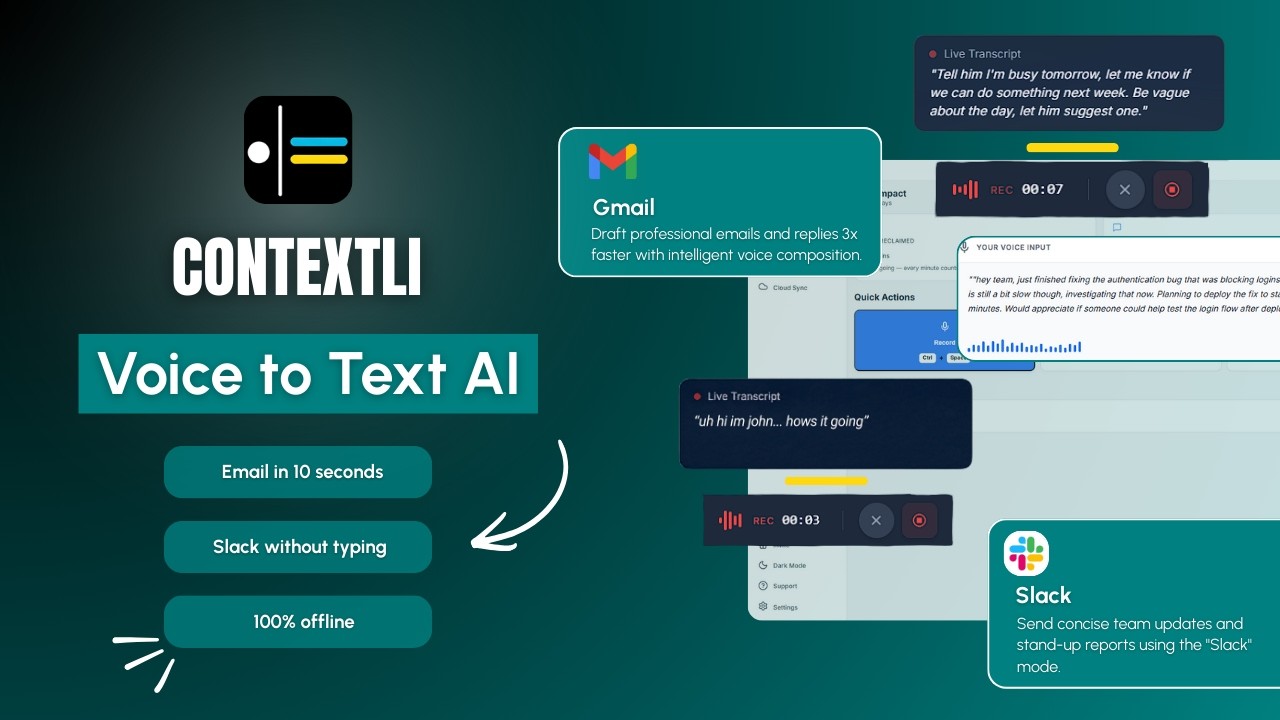
If the agent enables screen-awareness (off by default, the agent controls whether to turn it on), Contextli can also see the open ticket while the agent dictates. That means the agent does not have to re-state the customer's name, the issue summary, or the questions they asked. The agent hits the hotkey and says "apologize for the wait, confirm the refund will hit in five to seven business days, ask if there's anything else stopping them from renewing later." Contextli already knows the customer's name and the three questions in the ticket. The output is a full reply that names the customer, acknowledges the wait, confirms the timeframe, and asks the renewal question, in the team's voice.
The video below walks through how Contextli's Modes work in practice.
Support teams handle data that the rest of the company does not always see: account details, payment information, account holders' personal addresses, sometimes health or financial situations that the customer mentions in passing. Anything the agent dictates near an open ticket is potentially in scope.
Most dictation tools route that audio and the resulting text through their own servers. Wispr Flow is cloud-only, full stop. There is no on-device mode at any tier. Willow Voice is cloud-first by default, with an opt-in offline mode on Mac and iOS but not on Windows. Otter, which a lot of support teams use for meeting recap, is also cloud-only. For a support team that needs to defend its tool choices to a security review, "the tool ships customer data to a third party" is a hard conversation.
Contextli gives you three levels of privacy control. Use any of them, or stack all three.
Level 1: Local models. Transcription and AI processing run on your own machine. Internet off, app still works. You'll need a modern Mac or Windows laptop, not a ten-year-old machine.
Level 2: Bring your own key. You supply the API key for transcription or AI, and your data goes from your machine to the provider directly. Contextli never sees it.
Level 3: Disable cloud sync. Cloud sync is how Contextli lets you use the same notes across devices. Turn it off and we store nothing in our database. Your transcribed notes live as local files on your machine, where you can browse them yourself.
Combine all three and Contextli never makes a single request to our servers. Fully offline, fully private. No other dictation tool we know of offers this combination.
For a regulated support team, all three rungs may be in play. For a less-regulated team, even Level 3 alone is more than most competitors offer.
A support agent at a mid-sized SaaS company opens Zendesk at 9 a.m. and sees 38 open tickets in the queue. Three are refund requests, two are billing questions about an annual-to-monthly downgrade, a cluster of seven are about an outage that happened overnight, and the rest are spread across feature requests and how-to questions.
The agent has already customized Email Mode with the team's brand voice. They have fed it five past replies covering refund acknowledgments, outage updates, feature requests, and how-tos, plus three written instructions: always start with a specific acknowledgment, never start a reply with the word "unfortunately," always name a timeframe.
They open the first refund ticket. They hit the global hotkey and dictate: "apologize for the delay, confirm the refund will appear in 5 to 7 business days on the original payment method, ask if there is anything else preventing them from renewing later." Contextli produces a fully formed reply that opens with a one-sentence acknowledgment of the wait, names the 5-to-7-day window, names the original payment method, and asks the renewal question in the team's voice. The agent reads it, edits one phrase to add a more specific date, sends. Total time on the ticket: 28 seconds. Typing the same reply would have taken about 95 seconds.
They move to the outage cluster. Seven tickets, same root cause. They write the first reply by dictation, then copy the body into a saved reply for the other six. Total elapsed time on the cluster: under 4 minutes. A typed approach would have taken closer to 12 minutes for the first reply plus 6 minutes of copy-paste-personalize work for the rest.
By lunch, the agent has cleared 32 of the 38 tickets, with about 90 minutes of buffer left in the day to handle escalations and the harder how-to questions. Without Contextli, the same queue would have taken until 4 p.m.
The table below shows how the leading voice-to-text tools handle the things support teams actually care about: brand voice, customization, privacy, and team pricing.
| Feature | Contextli | Wispr Flow | Willow Voice | MacWhisper | Otter.ai |
|---|---|---|---|---|---|
| Local model mode | Yes | No | Opt-in (Mac/iOS only) | Yes (local-only) | No |
| Bring your own key | Yes | No | No | N/A (local already) | No |
| Disable cloud sync | Yes | No | No | N/A (no cloud) | No |
| Per-Mode customization with examples | Yes | No | Style memory (limited) | No | No |
| Brand voice trained by example | Yes | No | Partial | No | No |
| System-level into any app | Yes | Yes | Yes | Mac only | No (separate app) |
| Cross-platform (Mac and Windows) | Yes | Yes | Yes | Mac only | Yes |
| Pricing (Individual, monthly) | Free + paid | $15 | $15 | One-time license | $16.99 |
The wedge for support teams is not speed. Wispr Flow and Willow Voice are both quick at raw transcription. The wedge is that none of them adapt to your team's voice, and none of them let you keep customer data off the cloud.
The table below summarizes the comparison in one image.

A support manager's job is not just to find the fastest dictation tool. It is to find a tool that the team will actually use every day, that produces output the customer would not flag as "weird AI reply," and that the security team will sign off on.
The fastest dictation tool in the market does not help if its output still needs rewriting. The most accurate transcription does not help if the brand voice is wrong. And the cheapest tool is not the cheapest tool if it fails the security review six months in and the team has to migrate.
Contextli is not the fastest at raw transcription. Wispr Flow probably is. But Contextli is the only tool that lets the team configure a brand voice once, dictate in that voice everywhere, and keep customer data on the agent's machine if compliance requires it. That combination is what makes the daily math work for support teams.
For related reading on how Contextli's context-aware Modes work across other channels, see our pillar guide on context-aware speech-to-text for professionals. For a head-to-head with a cloud-only transcription API alternative, see Deepgram vs Contextli. For a direct comparison on the core product, see Contextli speech-to-text.
A reasonable 2026 benchmark is 25 to 35 tickets per agent per day for complex SaaS support, and 40 to 60 tickets per day for higher-volume e-commerce queues, with the caveat that quality matters more than raw count. A team using a context-aware dictation tool can reasonably target the top of that range without cutting reply quality, because the per-ticket time drops without the agent rushing.
Contextli is a system-level dictation app. It works into the focused window, including the reply box inside Zendesk, Intercom, Help Scout, Front, and the browser-based versions of all of those. There is no API integration into those tools. The agent dictates into whatever reply box is open, and the text appears as if they typed it.
Only if you do not customize the Mode. Out of the box, Email Mode produces generic professional replies. After you feed it three to five examples of how your team actually writes, the output matches that voice. The replies read like the agent who set up the Mode, not like an AI.
The Mode is matching style, not content. The agent provides the facts when they dictate, and the Mode shapes those facts into the team's voice. Unfamiliar question types still produce sensible replies, they just may need slightly more editing the first time. Adding the new reply as a future example improves the Mode over time.
Screen-awareness is off by default and the agent controls whether to turn it on. When enabled, Contextli can see what is in the focused window while the agent dictates, which lets the reply automatically reference the customer's name and the specific questions in the ticket. Agents handling sensitive ticket data may prefer to leave it off and dictate the facts manually. Both workflows are supported.
Contextli's Modes are configured per-user today. The recommended pattern for teams is for one senior agent or the support manager to write a sharable "brand voice template" (a list of the past replies and the written instructions) that every agent on the team pastes into their own Mode settings. We are exploring team-level Mode sync; for now, the template approach works.
Yes. Contextli types into the focused browser window, the same as it types into any native app. Zendesk in Chrome, Intercom in Safari, Help Scout in Edge: all work.
Contextli's free tier includes 100 credits per month per user, no credit card required. For teams that exceed the free tier, see contextli.com/pricing for current per-seat rates. The pricing math at team scale is usually favorable compared to Wispr Flow's or Willow Voice's $15 per user per month.
If you run a customer support team and want to see whether dictation actually saves your agents time, the fastest way to find out is to set up Email Mode with three to five of your team's past replies and try it for a week. The free tier (100 credits per month, no credit card required) is enough to test against a real ticket queue.
See how customer support teams use Contextli on the use-cases page, or download Contextli at contextli.com/download to set up your team's first Mode.

Junaid Khalid
Founder & CEO
Founder and solopreneur writing about how modern businesses run leaner and faster with AI. I build software that turns everyday work, from capturing thoughts to writing and staying organized, into something effortless, and I share what I learn along the way.
A weekly review template you can run in 15 minutes every Sunday. Six prompts, a scoring table, and a faster way to capture it by voice.
Junaid KhalidA vet visit notes template that captures the diagnosis, dosing, and follow-up before you leave the exam room. Speak it into your notes instead of typing.
Junaid KhalidCounseling progress notes software that writes your notes by voice and keeps client data on your own machine, so counselors finish notes the same day.
Junaid Khalid