Most anxiety journaling advice hands you a blank page and a vague instruction to "write about your feelings." That is the worst possible task when your chest is tight and your thoughts are already looping. A blank page asks you to build structure at the exact moment you have none. You need a specific question to answer, not an open field to fill.
The other problem is physical. When anxiety spikes, fine motor control drops. Typing a full entry can feel like too much, so you skip it, and the one time you most needed a record is the time you have nothing written down.
This guide gives you 25 mental health journal prompts for anxiety, grouped by what they actually do, plus a simple anxiety log template you can reuse. It also covers a faster way to get entries down when typing feels like too much: speaking them instead.
Journaling here is meant to support the work you do with a therapist or clinician, not replace it. If your anxiety is severe or persistent, please talk to a professional. Prompts help you notice patterns; they do not diagnose anything.
Key takeaways
- Use a fixed prompt instead of a blank page: a specific question is answerable when your thoughts are looping and a blank field is not.
- The 25 prompts below split into four jobs: name the trigger, question the thought, track the body, and plan the next small step.
- A repeatable anxiety log template (5 fields) turns scattered entries into patterns you can bring to a therapy session.
- When typing feels like too much, dictation gets an entry down in about 30 seconds instead of two to three minutes.
- Contextli is a desktop dictation app that types your spoken words straight into whatever journal or notes app you already use, and it can run fully offline so a private entry never leaves your machine.
Why fixed prompts beat a blank page for anxiety
Anxiety narrows attention. Open-ended tasks feel heavier than they are, and a blank journal page is an open-ended task: it asks you to decide what matters, in what order, while your brain is already spending its capacity on the worry.
A prompt removes that first decision. Instead of "write about how you feel," you answer "what specifically am I afraid will happen in the next hour?" That is a bounded question with an end. You can finish it.
A fixed set of questions also gives you comparability. Line up last Tuesday against this Tuesday and you can see whether the same trigger keeps returning, which a wall of free-form paragraphs hides. So the prompts below are deliberately narrow: each is a single question you can answer in two or three sentences. Pick two or three per entry, not all 25.
25 mental health journal prompts for anxiety, grouped by job
Name the trigger (prompts 1 to 7)
The first job is to pin down what actually set the anxiety off, separate from the story your mind built on top of it.
- What was I doing in the ten minutes before the anxiety started?
- What specifically am I afraid will happen, and by when?
- Is this a real deadline or a "should" I invented?
- Who is involved in this worry, and what do I imagine they are thinking?
- On a scale of 0 to 10, how anxious am I right now?
- Have I felt this exact worry before? When?
- What would I have to believe for this to be a genuine emergency?
Question the thought (prompts 8 to 14)
The second job is to check the anxious thought against evidence instead of accepting it as fact.
- What is the evidence that this fear is true?
- What is the evidence that it is not?
- If a friend told me this worry, what would I say to them?
- What is the most likely outcome, not the worst one?
- If the worst did happen, what would I actually do next?
- Am I predicting the future as if it were certain?
- What is one fact I know for sure right now, in this room?
Track the body (prompts 15 to 20)
Anxiety is physical before it is verbal. Logging the body helps you catch the early signs next time.
- Where do I feel this in my body right now?
- How is my breathing: fast, shallow, held, or steady?
- When did I last eat, drink water, or sleep a full night?
- What is my energy level from 0 to 10?
- What did my body do in the last hour that I did not notice at the time?
- If I put a hand on my chest and take three slow breaths, what changes?
Plan the next small step (prompts 21 to 25)
The last job is to end with one concrete action, so the entry closes on agency instead of the spiral.
- What is the smallest next step I can take in the next 15 minutes?
- What is one thing within my control here, and one thing that is not?
- Who could I tell about this, even in one sentence?
- What has helped me through this feeling before?
- What do I want to remember when this happens again?
The goal is not to feel calm by the last line. It is to have a record specific enough that your therapist, or your future self, can see the shape of the thing.
A reusable anxiety log template
Prompts are good for depth. A fixed template is good for tracking, because the same five fields, logged daily, become a chart of your week. Use this anxiety log template for quick entries, and save the longer prompts for the days you have more time.
| Field |
What to write |
Example |
| Time and date |
When the entry happens |
Tue, 7:40am |
| Intensity (0 to 10) |
Peak anxiety in the moment |
7 |
| Trigger |
The event just before it |
Unread email from my manager |
| Body signal |
The first physical sign |
Tight jaw, held breath |
| Next step |
One action you took or will take |
Read the email, replied in 2 lines |
Five fields, under a minute. Do it for two weeks and you will likely spot a repeat trigger you had never named. Bring that pattern to a session. Deciding what to log before your next appointment is its own small practice, and there is a fuller walkthrough in this mood tracking for anxiety guide.
When typing feels like too much, speak the entry
Most journaling advice assumes you can calmly type. During a spike, that assumption breaks. Fingers shake, and the friction of opening a doc and typing three paragraphs is enough to make you skip the entry entirely.
Speaking is lower friction. You can answer prompt 15 out loud in one breath, and if something types your words down as you talk, you have a record without the motor task.
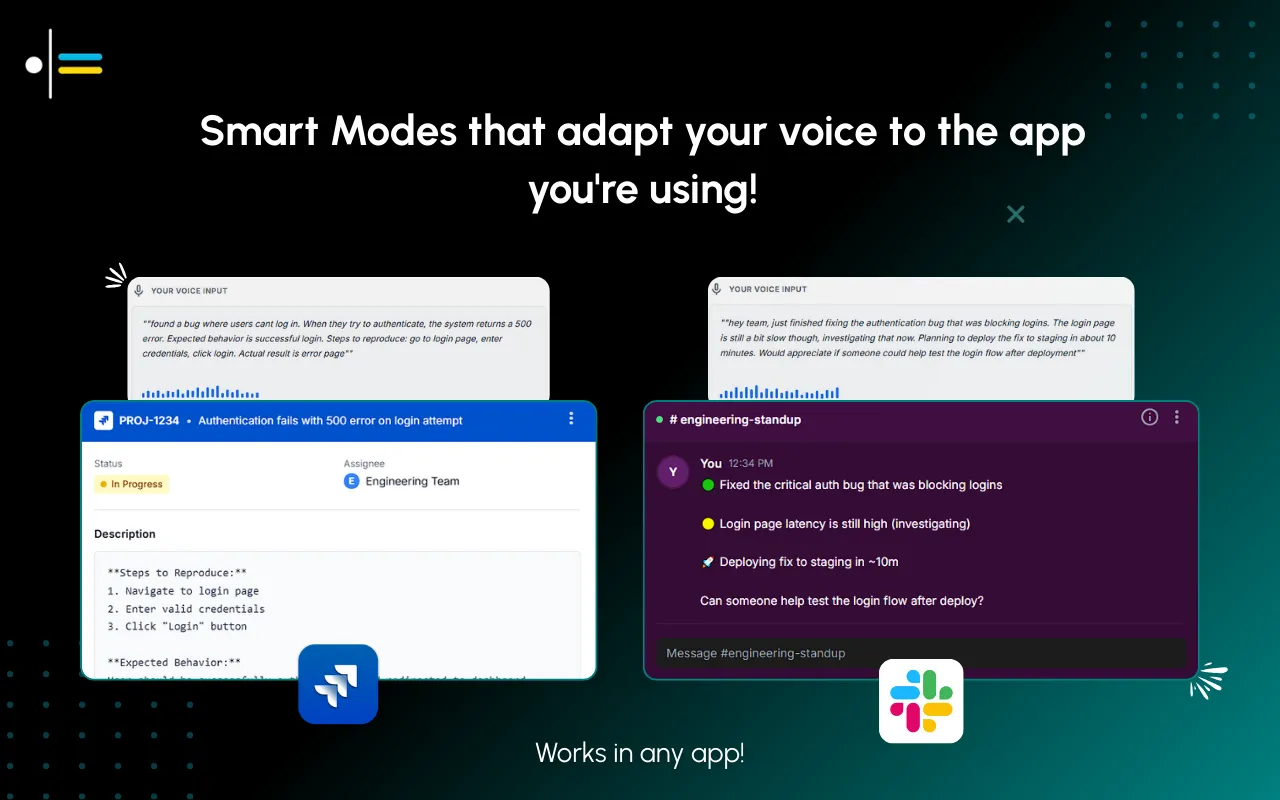
That is what Contextli does. It is a desktop dictation app that types your spoken words into whatever app already has focus: your journal app, a plain text file, a notes window, the anxiety log template above. It types where your cursor is, so there is no pasting from a separate transcription tool.
You can also show a Mode how you want entries to read. Feed Notes Mode three sample entries in short present-tense lines ("Chest tight. Manager email. Read it, replied.") and your dictated entries come out in that same clipped style instead of long rambling paragraphs. That is the customization-by-example flow: three or four examples, and the output matches your voice.
The privacy question, answered honestly
A journal about your anxiety is one of the most private things you will ever write. So the reasonable question is: where does the text go?
With Contextli you can turn cloud sync off entirely. When it is off, Contextli stores nothing in its database and your entries live as local files on your own machine. You can go further and run the local models, which do the transcription and the text processing on your own laptop with the internet switched off. Stack both and a private anxiety entry never leaves your computer.
The honest trade-off: local models need a reasonably modern Mac or Windows laptop. On older hardware they run slowly. If that is you, the alternative is bring-your-own-key, where your text goes straight from your machine to the model provider you chose and Contextli never sees it. The full breakdown of these levels is in the dictation privacy guide.
How Contextli compares to other ways to get an entry down
If all you want is raw transcription with nothing else, a faster tool may suit you. Wispr Flow is quicker if pure speed is the only thing you need. The table below is about matching the tool to private, low-friction journaling specifically.
| Tool |
Types into your journal app |
Can run fully offline |
Match entry style by example |
| Contextli |
Yes, into the focused window |
Yes, local models with internet off |
Yes, feed a Mode 3 to 4 examples |
| Apple Dictation |
Yes |
Partly, on-device on newer Macs |
No |
| Otter.ai |
No, transcribes in its own app |
No, cloud based |
No |
| Wispr Flow |
Yes |
No |
Limited |
The row that matters for a journal is the offline column. Otter.ai keeps your recordings in its cloud, which is a poor fit for entries about your mental health. Apple Dictation can run on-device on newer Macs but does not adapt to how you write. Contextli is the combination: types where you are, runs offline, and matches your style.
A real scenario: the 7:40am spike
It is Tuesday morning. Priya, a consultant, opens her laptop and sees an unread email from a client marked urgent. Her jaw tightens before she has read a word. She has two minutes before a call.
Typing a full journal entry now would take two to three minutes she does not have, and her hands are not steady. Instead she opens her notes file, presses her Contextli shortcut, and speaks: intensity seven, trigger unread urgent email, body signal tight jaw and held breath, next step read it then reply in two lines. Notes Mode types it straight into the file in the clipped style she trained it on. The whole thing takes about 30 seconds.
She reads the email. It is a scheduling change, not a crisis. She replies in two lines and joins her call. That night she opens the file and sees the same 7:40am trigger logged three times this week. That is the pattern she brings to her therapist on Thursday.

FAQ
What are the best mental health journal prompts for anxiety?
Start with prompts that name the trigger and question the thought, such as "what specifically am I afraid will happen, and by when?" and "what is the evidence this fear is true?" Answerable, specific questions work better during a spike than an open "write about your feelings" instruction.
How often should I journal for anxiety?
A short daily entry using the five-field log template beats a long entry once a week, because daily logging reveals repeating triggers. On calmer days, add two or three of the deeper prompts. Consistency matters more than length.
Can journaling replace therapy for anxiety?
No. Journaling supports the work you do with a therapist or clinician and helps you bring clearer patterns to a session, but it does not diagnose or treat anything. If your anxiety is severe or persistent, please speak with a professional.
Is it better to type or speak my journal entries?
Whichever you will actually do. During an anxiety spike, fine motor control drops and typing feels like more work, so speaking an entry is often faster: about 30 seconds by voice versus two to three minutes typing. On calm days, typing may feel more reflective.
How do I keep my anxiety journal private?
Keep entries as local files rather than in a cloud service. With Contextli you can turn cloud sync off so nothing is stored in its database, and run the local models with the internet off so the text never leaves your machine.
What should I track before a therapy session?
Log the time, the intensity from 0 to 10, the trigger event, the first body signal, and the next step you took. Two weeks of these five fields gives your therapist concrete patterns to work with instead of a vague "I felt anxious a lot."
Does Contextli work with my existing journal app?
Yes. Contextli is a system-level desktop app that types your spoken words into whatever window has focus, so it works with a plain text file, a notes app, or most journal apps. It types where your cursor is rather than transcribing inside its own separate window.
Keep exploring
If prompts help but you want to see the trends over time, the mood tracker app guide covers turning daily entries into a pattern view. To make journaling stick as a habit rather than a burst, read why most gratitude journal habits fail and what fixes them. And if the hard part is simply getting scattered thoughts out of your head fast, the best brain dump app guide is a good next read. All of these sit under the Contextli contexts library.
Try it for your next entry
If the barrier to journaling has been the physical act of typing when you are already tense, speaking your entry removes it. Contextli types your spoken words straight into your journal or notes file, matches the entry style you show it, and can run fully offline so a private entry stays on your machine.
Download Contextli and get your next anxiety entry down in about 30 seconds. The free tier gives you 100 credits/month, no credit card required. Try it on the download page.




 Junaid Khalid