


Weekly Reflection TemplateAug 19, 2026
Weekly Review Template: Run Your Review in 15 Minutes
A weekly review template you can run in 15 minutes every Sunday. Six prompts, a scoring table, and a faster way to capture it by voice.
 Junaid Khalid
Discover how speech-to-text for LinkedIn can revolutionize your content creation, allowing you to dictate LinkedIn posts efficiently and professionally, especially with context-aware tools like Contextli.

Creating professional LinkedIn posts using speech-to-text technology offers a powerful way to streamline your content workflow and ensure your messages resonate effectively with your professional network. This approach allows professionals to leverage their voice for content creation, significantly reducing the time and effort traditionally spent on typing.
Speech-to-text technology, particularly context-aware solutions like Contextli, provides a significant advantage for professionals looking to optimize their LinkedIn content creation. By understanding the unique requirements of LinkedIn communication, users can dictate posts that are not only accurate but also perfectly attuned to the platform's professional-casual tone. This guide explores how to effectively use speech-to-text for LinkedIn, highlighting Contextli's unique modes to enhance your professional presence.
Speech-to-text technology, also known as voice recognition technology or speech recognition software, converts spoken words into written text. This sophisticated field of computer science has evolved significantly, moving beyond simple transcription to include nuanced understanding of context and intent. For professionals, this means a faster and more natural way to generate written content.
The core benefit of speech-to-text lies in its ability to bridge the gap between thought and text, allowing users to articulate ideas at the speed of speech rather than typing. This is particularly valuable for those who find typing cumbersome or for individuals with accessibility needs. Modern speech-to-text solutions offer high accuracy, often adapting to individual speaking patterns and accents over time. To learn more about the broader applications of speech-to-text technology, consider exploring resources on speech-to-text for professionals.
LinkedIn is a professional networking platform, and the content shared there demands a specific tone and structure. Unlike a casual chat message or a formal email, LinkedIn posts often require a professional yet engaging voice - a "professional-casual" tone. This balance is crucial for building credibility, fostering connections, and communicating effectively with peers, clients, and potential collaborators.

Generic dictation tools often fall short because they treat all spoken input uniformly. When you dictate LinkedIn posts using such tools, you're left with the arduous task of manually adjusting grammar, vocabulary, sentence structure, and overall tone to fit the LinkedIn context. This extra editing negates much of the efficiency gained from dictation and increases cognitive load. The goal on LinkedIn is to share insights, engage in discussions, and showcase expertise without sounding overly formal or too informal. This nuanced requirement highlights the need for a more intelligent speech-to-text solution.
Contextli differentiates itself by introducing "Modes" - context-aware processing profiles that automatically adapt your speech to the right output format. This innovation directly addresses the challenge of maintaining appropriate tone and structure across different communication platforms, especially for LinkedIn content creation with voice.
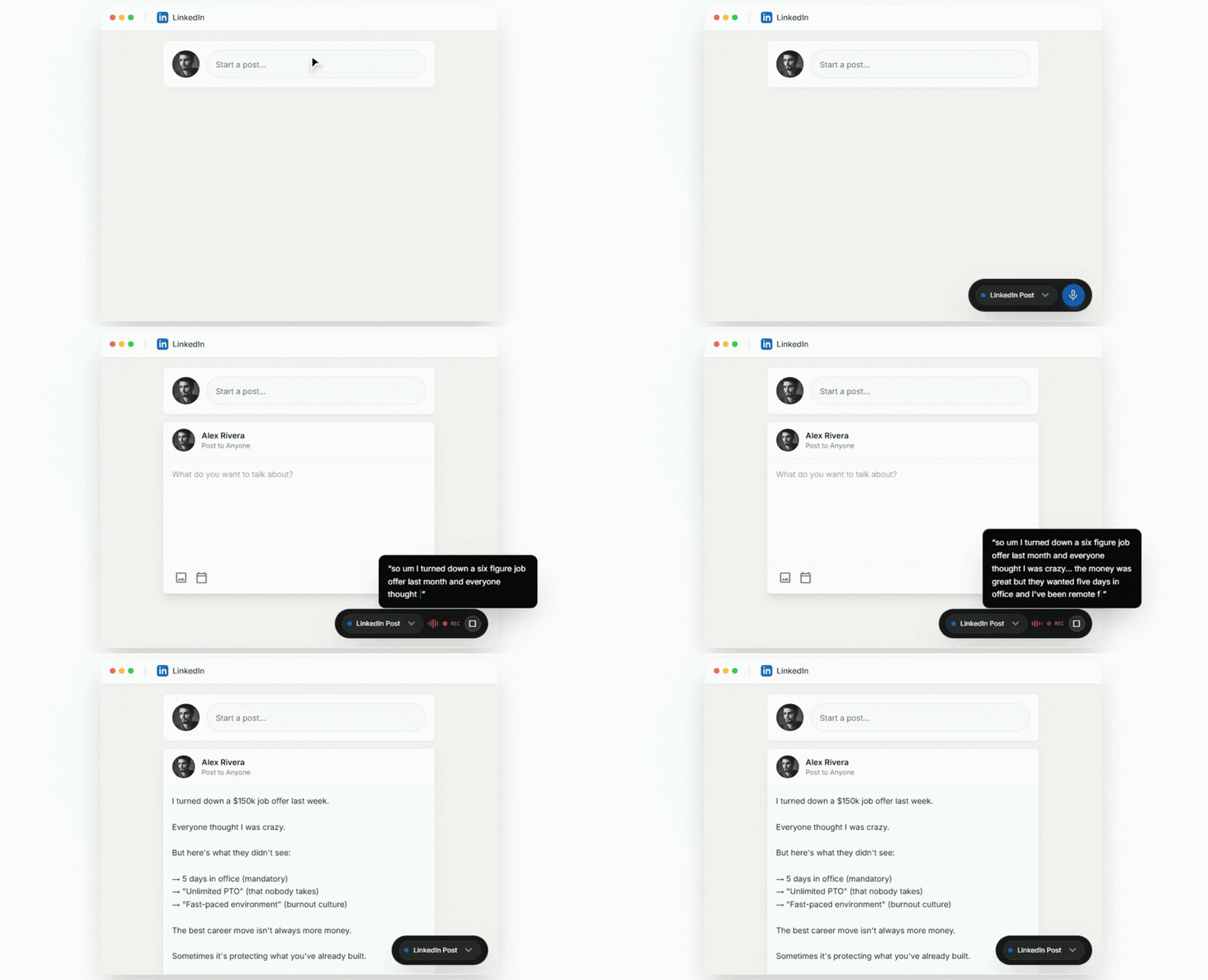
For LinkedIn, Contextli offers a dedicated LinkedIn Mode. This mode is specifically engineered to transform your spoken words into text that embodies a professional-casual tone, suitable for social posts. It intelligently adjusts phrasing, word choice, and sentence construction to align with LinkedIn's best practices, ensuring your message is impactful and well-received.
Beyond LinkedIn Mode, Contextli's other modes also offer versatile applications for professionals:
This contextual awareness means that instead of dictating and then extensively editing, you speak once, and Contextli handles the appropriate formatting and tone. This dramatically reduces friction, minimizes extra editing, and lowers cognitive load, allowing you to focus on the message itself rather than the mechanics of its delivery.
The impact of tailored content on LinkedIn cannot be overstated. While AI-generated LinkedIn posts now account for an estimated 30-40% of all content on the platform, AI-assisted posts outperform fully AI-written posts by 3.2X in engagement rate. This statistic, while not directly about speech-to-text, underscores the value of human input and contextual understanding in creating engaging content. Contextli empowers users to leverage their own voice and intelligence, enhanced by context-aware processing, to produce superior results.
Creating compelling LinkedIn content with voice recognition software is straightforward with Contextli. Here's a detailed guide to help you dictate LinkedIn posts effectively:
By following these steps, you can efficiently dictate LinkedIn posts that are both professional and engaging, significantly enhancing your linkedin content creation with voice.
Beyond just dictating, how you frame your message is key to impactful LinkedIn communication.
While speech-to-text technology offers immense benefits, certain pitfalls can hinder its effectiveness, especially when dictating for platforms like LinkedIn. Awareness of these can help you maximize your productivity.
| Feature/Tool | Generic Speech-to-Text | Contextli (LinkedIn Mode) |
|---|---|---|
| Tone Adaptation | Minimal/None | Professional-Casual |
| Structure | Basic Transcription | Optimized for Social Posts |
| Cognitive Load | High (editing required) | Low (pre-formatted) |
| Efficiency | Moderate | High |
| Error Correction | Manual | Automated suggestions |
| Target Audience | General | Professionals, Knowledge Workers |
| Output Quality | Raw/Needs extensive editing | Polished/Ready-to-use |
The ability to create professional LinkedIn posts using speech-to-text marks a significant leap forward for busy professionals, founders, consultants, and knowledge workers. Traditional dictation tools, while offering speed, often fail to address the critical need for contextual appropriateness, leaving users to spend valuable time manually adjusting tone, structure, and formatting.
Contextli's innovative approach, particularly its dedicated LinkedIn Mode, solves this problem by providing a context-aware solution that transforms your spoken words into perfectly tailored professional-casual posts. This means less friction, less editing, and a dramatically reduced cognitive load, allowing you to focus on the quality of your message rather than the mechanics of its delivery. By leveraging Contextli, you can dictate LinkedIn posts with confidence, knowing that your voice will be accurately and appropriately conveyed, enhancing your professional brand and engagement on the platform. Speak once. Write appropriately everywhere.
Modern speech recognition software, especially context-aware tools like Contextli, offers very high accuracy for transcribing speech. When using Contextli's LinkedIn Mode, the accuracy extends beyond just transcription to include appropriate tone and structure, making the output highly suitable for professional posts.
Yes, Contextli's design is versatile. While it has a specific LinkedIn Mode for professional-casual posts, its Messaging Mode is ideal for platforms like Slack or WhatsApp, offering conversational and concise output. This allows professionals to leverage voice to text for social media across various platforms, maintaining appropriate communication styles.
Contextli stands out from other voice recognition software for Windows by focusing on context-aware output. Unlike generic dictation tools that provide raw transcription, Contextli uses distinct "Modes" (e.g., Email, Messaging, Notes, LinkedIn) to automatically adapt your speech to the specific tone, structure, and formatting required for each communication context. This significantly reduces the need for manual editing and ensures professional output. You can find more information on Windows voice-to-text solutions here.
Absolutely. Contextli is designed specifically for professionals, founders, consultants, and knowledge workers who are heavy email and messaging users and write across multiple platforms daily. It streamlines the content creation process by ensuring appropriateness and clarity, making it an invaluable tool for anyone looking to produce high-quality, contextually relevant text efficiently.
Contextli, like advanced speech recognition software, is built to adapt to various speaking styles and accents over time. While clear enunciation is always recommended for optimal results, the software continuously learns from your input, improving its recognition capabilities to provide accurate transcriptions regardless of individual speech patterns.

Junaid Khalid
Founder & CEO
Founder and solopreneur writing about how modern businesses run leaner and faster with AI. I build software that turns everyday work, from capturing thoughts to writing and staying organized, into something effortless, and I share what I learn along the way.
A weekly review template you can run in 15 minutes every Sunday. Six prompts, a scoring table, and a faster way to capture it by voice.
Junaid KhalidA vet visit notes template that captures the diagnosis, dosing, and follow-up before you leave the exam room. Speak it into your notes instead of typing.
Junaid KhalidCounseling progress notes software that writes your notes by voice and keeps client data on your own machine, so counselors finish notes the same day.
Junaid Khalid