Professional voice recognition transcription is rapidly advancing, offering sophisticated solutions that convert spoken words into written text with remarkable accuracy and contextual intelligence. The short answer is that the landscape of voice recognition transcription in 2026 is defined not just by accuracy, but by the ability of tools to understand and adapt to the specific context of professional communication, a critical need addressed by innovative platforms like Contextli.
Summary
The year 2026 marks a significant leap in professional voice recognition transcription, moving beyond simple accuracy to context-aware processing. Traditional dictation tools often fall short for professionals who require varied tones and formats across different communication channels. Contextli addresses this by introducing "Modes" that automatically adapt speech to the appropriate output, such as Email Mode for professional correspondence or Messaging Mode for concise chats. This guide explores the technology behind speech to text transcription, highlights the challenges professionals face, and introduces Contextli as a leading solution for enhanced, context-appropriate communication.
Understanding Voice Recognition Transcription
Voice recognition transcription, also known as speech to text transcription, is a technology that converts spoken language into written text. In professional settings, this capability is no longer a novelty but an essential tool for boosting productivity and streamlining workflows. From dictating emails to transcribing meetings, its applications are vast and growing.

The relevance of voice recognition transcription in professional environments stems from its ability to save time and reduce the manual effort associated with typing. For professionals who spend a significant portion of their day communicating, writing, or documenting, efficient voice to text transcription can be a game-changer. It allows for faster content creation, improved accessibility, and more efficient information capture.
For a deeper dive into the foundational concepts, you can explore understanding voice recognition.
How Voice Recognition Works
At its core, voice recognition transcription relies on complex algorithms and machine learning models. When you speak, the software captures audio waves and converts them into a digital format. This digital representation is then analyzed to identify phonetic patterns, which are matched against an extensive language model. The system predicts the most likely sequence of words based on these patterns, context, and grammar rules.
Recent advancements in artificial intelligence have dramatically improved the accuracy and speed of these systems. Leading automated transcription platforms now achieve 99% accuracy, matching professional human transcribers while processing files in minutes rather than hours. AI transcription has transformed in the past year, with accuracy reaching human-level performance. The best models now achieve 97-99% accuracy on clear audio in English, matching or exceeding the performance of professional human transcribers in controlled conditions. This level of precision is critical for professional transcription tools, where errors can lead to miscommunication or legal implications.
Why Professionals Need Context-Aware Transcription Tools
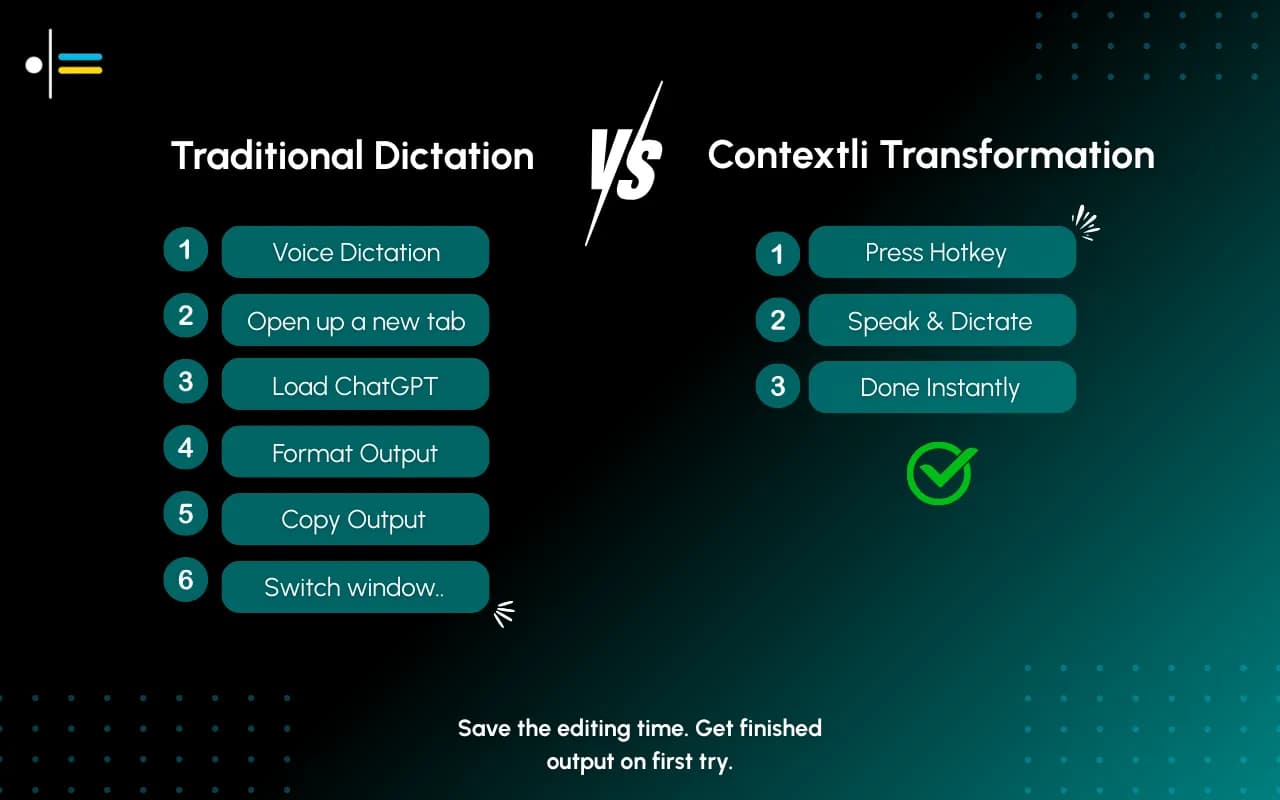
While generic speech to text transcription offers convenience, professionals face unique challenges that traditional tools often fail to address. The primary issue is the lack of context awareness. An email requires a formal, structured tone, while a Slack message demands conciseness and a conversational style. Personal notes might need bullet points and informal language. Current dictation tools typically offer a one-size-fits-all transcription, forcing users to manually edit and reformat their dictated text to fit the specific context.

This constant mental switching, editing, and reformatting lead to:
- Friction: The process of adapting dictated text to different platforms is cumbersome.
- Extra Editing: Significant time is spent correcting tone, structure, and formatting.
- Cognitive Load: Users must continuously think about how their speech needs to be altered for each specific output, diverting focus from the content itself.
Imagine a consultant dictating a client update. They might start with a formal email, then move to a quick internal message, and finally jot down some personal notes. Using a generic tool, they would have to completely rethink their phrasing and structure for each instance. This inefficiency is precisely what context-aware professional transcription tools aim to eliminate.
Introducing Contextli: The Future of Voice Recognition Transcription
Contextli steps into this gap, redefining professional voice recognition transcription by offering a solution that prioritizes appropriateness and clarity over mere speed. Instead of providing a blanket transcription, Contextli introduces "Modes" - context-aware processing profiles that automatically adapt your speech to the right output format. This innovative approach ensures your voice becomes the right kind of text for each context, revolutionizing how professionals communicate.
Contextli's core philosophy is simple: Speak once. Write appropriately everywhere. This means less editing, reduced cognitive load, and more consistent, professional output across all your communication channels. It's designed for the busy professional who values efficiency without sacrificing professionalism.
Different Modes of Contextli
Contextli's unique selling proposition lies in its specialized modes, each meticulously crafted to cater to specific professional communication needs. These modes are what make Contextli a standout among professional transcription tools.
- Email Mode: This mode processes your speech into a professional, neutral tone with proper structure. It ensures your dictated emails are ready to send, complete with appropriate greetings, closings, and paragraph formatting, saving you from extensive post-dictation editing.
- Messaging Mode: Designed for platforms like Slack or WhatsApp, Messaging Mode transforms your speech into conversational and concise text. It understands the need for brevity and informal language, making your dictated messages flow naturally in a chat environment.
- Notes Mode: For capturing ideas, meeting minutes, or personal reminders, Notes Mode converts your speech directly into organized bullet points. This structured output is ideal for quick reference and easy organization, eliminating the need to manually format your thoughts.
- LinkedIn Mode: This mode helps you craft professional-casual social posts tailored for platforms like LinkedIn. It strikes the perfect balance between professionalism and approachability, ensuring your dictated posts resonate with your professional network.
- Marketing Copy Mode: When you need to create compelling content, Marketing Copy Mode delivers benefit-driven, persuasive writing. It helps you articulate your message effectively, whether for product descriptions, ad copy, or promotional materials.
- General Dictation: For standard transcription needs, General Dictation provides a clean transcription that preserves the meaning of your speech without applying specific contextual formatting. It's perfect for tasks where raw, accurate text is the primary requirement.
These modes are not just about formatting; they subtly adjust the tone, vocabulary, and sentence structure to match the expected output, ensuring that the dictated text is not only accurate but also appropriate.
The market for speech to text transcription is crowded, with numerous tools offering varying degrees of accuracy and features. While many focus on speed or basic transcription, few address the critical need for context-aware output.
| Feature |
Contextli |
Generic Dictation Software |
Advanced AI Transcription (e.g., Otter.ai) |
| Context Awareness |
High (via specific Modes) |
Low (one-size-fits-all) |
Moderate (some speaker differentiation) |
| Output Adaptation |
Automatic tone, structure, formatting |
Manual editing required |
Primarily raw transcription |
| Target User |
Professionals, knowledge workers |
General users |
Meeting transcription, researchers |
| Primary Benefit |
Appropriateness, clarity, reduced cognitive load |
Speed, basic text conversion |
High accuracy, speaker ID, timestamps |
| Ease of Use |
High (speak and select mode) |
Moderate (requires post-editing) |
Moderate (feature-rich, can be complex) |
| Platform |
Desktop (Windows, Mac) |
Varies (web, mobile, built-in) |
Web, mobile |
While tools like Google Docs Voice Typing offer basic voice typing capabilities, and built-in options like Windows speech recognition and Mac speech to text provide convenience, they lack the nuanced contextual adaptation that professionals require. Windows voice to text tools and Mac speech to text options are excellent starting points, but they often necessitate significant manual adjustments. You can learn more about specific Windows voice to text tools in the Windows voice to text guide and explore Mac speech to text options in the Mac speech to text guide.
For example, a legal firm utilized AI transcription tools to transcribe client meetings, reducing turnaround time from days to hours and increasing overall productivity. This demonstrates the power of accurate transcription. However, Contextli takes this a step further by not just transcribing, but formatting that transcription appropriately for a follow-up email to the client, a quick note to a colleague, or a formal case summary. Similarly, a healthcare provider implemented AI-powered transcription for patient consultations, improving documentation accuracy and patient care quality. Contextli would then enable the doctor to effortlessly translate those consultation notes into a formal patient record, a concise message for a specialist, or a personal reminder for follow-up, each with the correct tone and structure.
You can learn more about specific Windows voice to text tools in the Windows voice to text guide and explore Mac speech to text options in the Mac speech to text guide.
Key Features to Look For
When selecting professional transcription tools, especially in 2026, consider these essential features:
- Accuracy: Near-human level accuracy is paramount to minimize errors and editing time. As noted, the best models now achieve 97-99% accuracy on clear audio.
- Context Awareness/Modes: The ability to adapt output based on the communication channel (e.g., email, chat, notes) is crucial for professionals.
- Speed and Efficiency: Fast processing reduces turnaround times, allowing for more immediate communication.
- Integration: Seamless integration with existing professional workflows and applications.
- Customization: Options to personalize vocabulary, accents, and speaking styles.
- Security: Robust data privacy and security measures, especially for sensitive professional information.
- Multi-Platform Support: Compatibility across different operating systems, such as dictation for Mac and Windows.
- Ease of Use: An intuitive interface that requires minimal training to operate effectively.
Conclusion: Enhancing Professional Communication with Contextli
The evolution of professional voice recognition transcription in 2026 is marked by a shift towards intelligent, context-aware solutions. While the core technology of speech to text transcription has reached near-human accuracy, the true innovation lies in how these tools adapt to the diverse demands of professional communication.

Contextli stands at the forefront of this evolution, offering a unique and powerful solution for professionals, founders, consultants, and knowledge workers. By providing dedicated modes for different communication contexts - from formal emails to concise messages and structured notes - Contextli eliminates the friction, extra editing, and cognitive load associated with generic dictation tools. It ensures that your spoken words are not just transcribed, but transformed into appropriate, polished text ready for any platform.
The integration of AI transcription tools can streamline workflows, reduce turnaround times, and enhance productivity across various industries. Contextli takes this efficiency to the next level by ensuring the output is always fit for purpose. It's about speaking messy and getting polished results, every time.
By choosing Contextli, professionals can speak once and write appropriately everywhere, significantly enhancing their communication efficiency and effectiveness. Experience the future of voice recognition transcription and elevate your professional output.
FAQ
What makes Contextli different from other professional transcription tools?
Contextli differentiates itself by offering context-aware "Modes" that automatically adapt your dictated speech to the specific tone, structure, and formatting required for different communication channels, such as email, messaging, or notes. Unlike generic speech to text transcription tools, Contextli focuses on appropriateness and clarity, reducing the need for extensive post-dictation editing.
How accurate is professional voice recognition transcription in 2026?
In 2026, professional voice recognition transcription has achieved remarkable accuracy. Leading AI transcription models now reach 97-99% accuracy on clear audio in English, matching or even exceeding the performance of professional human transcribers in controlled conditions. This high level of precision makes it a reliable tool for critical professional tasks.
Can Contextli be used for meeting transcription software?
While Contextli's primary focus is on adapting output for various written communication contexts, its General Dictation mode provides clean and accurate transcription that can be used for transcribing meetings. For follow-up actions from meetings, its Email Mode and Messaging Mode can then be used to craft appropriate communications based on the transcribed notes.
Is Contextli compatible with Mac devices?
Yes, Contextli is a desktop application designed to support multiple platforms, including dictation for Mac. This ensures that Mac users can benefit from its context-aware transcription capabilities, alongside their Windows counterparts.
How does Contextli handle different accents and speaking styles?
Contextli leverages advanced AI and machine learning algorithms that are continuously trained on vast datasets of diverse speech patterns. This allows it to effectively recognize and transcribe various accents and speaking styles with high accuracy, ensuring reliable performance for a broad range of users.




 Junaid Khalid