Dictating professional emails using speech-to-text has become an indispensable tool for professionals seeking efficiency and precision in their daily communications. While traditional dictation tools offer convenience, they often fall short in adapting to the specific contextual nuances required for professional correspondence. Contextli's Email Mode directly addresses this challenge by transforming spoken words into appropriately structured and toned emails, ensuring your message is not just transcribed, but perfectly tailored for its professional audience.
Summary
Contextli's Email Mode revolutionizes professional email dictation by providing context-aware speech-to-text capabilities. It automatically adjusts tone, structure, and formatting, saving professionals significant time and cognitive load. Unlike generic speech recognition software, Contextli ensures dictated emails are polished and ready-to-send, enhancing clarity and professionalism across various communication scenarios. This guide details its features, provides a step-by-step usage guide, and compares it to other tools, highlighting its unique benefits for professionals.

Understanding the Need for Context-Aware Speech-to-Text
Professionals today navigate a complex landscape of communication channels, each demanding a distinct tone, structure, and level of formality. An email to a client, for instance, requires a different approach than a quick message to a colleague on Slack, or personal notes for an upcoming meeting. Traditional dictation tools, while capable of converting speech to text, often treat all spoken input uniformly. This generic transcription forces users to manually adjust formatting, correct informal language, and edit for appropriate tone, leading to increased friction, extra editing time, and significant cognitive load.
The challenge intensifies when considering the sheer volume of written communication. Professionals are constantly drafting emails, messages, and documents. Relying on basic speech recognition software means that after dictating, a substantial amount of time must be spent refining the output to meet professional standards. This manual intervention defeats the purpose of using speech-to-text for efficiency. For instance, while voice typing can be up to three times faster than traditional typing, with average speaking speeds of 125-150 words per minute compared to typing speeds of 40-50 words per minute, the post-dictation editing often negates much of this speed advantage.
The need for context-aware speech-to-text becomes evident. Professionals require a tool that not only transcribes accurately but also understands the intent and destination of their message. This intelligent adaptation ensures that whether they are creating a formal email or taking quick notes, the output is appropriate and ready for its intended use. This is particularly crucial for those who prioritize professional output and seek to communicate quickly across many channels without sacrificing quality. For those looking to streamline their note-taking process, tools that adapt to specific contexts are equally beneficial, as highlighted in Flawless Meeting Notes.
Introducing Contextli: The Solution for Professional Communication
Contextli emerges as a specialized solution designed to address the nuanced communication needs of professionals. It is a context-aware speech-to-text desktop application that understands that your writing style varies depending on the platform and audience. Instead of a one-size-fits-all approach, Contextli introduces "Modes" - context-aware processing profiles that automatically adapt your speech to the right output format. This innovation allows professionals to speak naturally while ensuring the generated text is always appropriate and polished.
Contextli's core differentiator lies in its focus on appropriateness and clarity, rather than just speed or AI model sophistication. It ensures your voice becomes the right kind of text for each specific context, reducing the need for extensive post-dictation editing. This directly tackles the problem of friction and cognitive load often associated with generic speech recognition software.
What is Email Mode?
Contextli's Email Mode is a specialized processing profile engineered to transform your spoken words into professional, structured, and neutral-toned emails. When activated, Email Mode doesn't just transcribe; it intelligently processes your speech, applying conventions typically found in professional email correspondence.
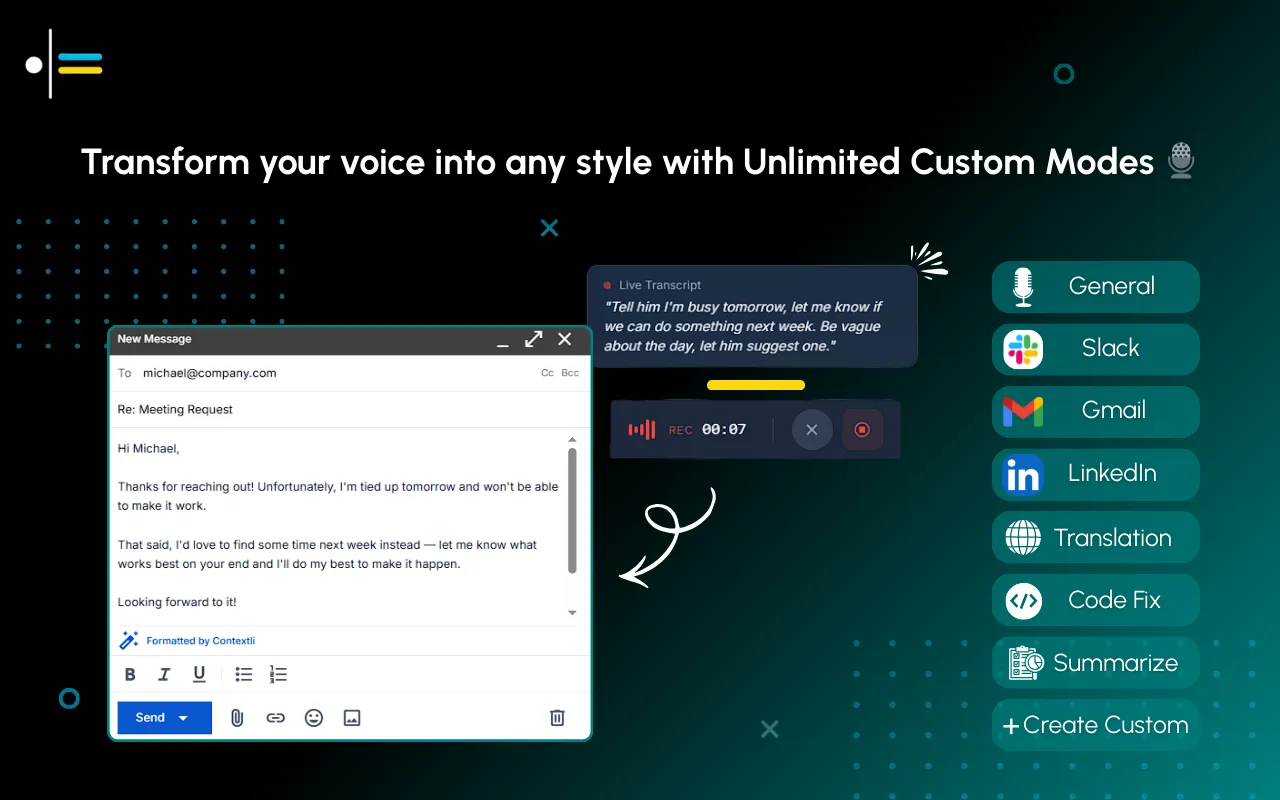
Here's how Email Mode functions and its benefits:
- Professional Tone: It automatically steers the language towards a professional, neutral tone, avoiding overly casual phrasing that might slip into dictation. This ensures your emails always convey respect and formality where needed.
- Proper Structure: Email Mode understands typical email components. A professional using Contextli's Email Mode can dictate an email response, and the software will automatically add appropriate greetings, structure the message, and include a sign-off, streamlining the email composition process. This includes formatting for paragraphs, bullet points, and even recognizing cues for subject lines.
- Reduced Editing: By providing context-aware formatting, Email Mode significantly reduces the time spent on editing. Contextli's transformation approach reduces the time spent on editing by providing context-aware formatting, saving approximately 3-4 minutes per email compared to traditional transcription methods. This means less time correcting, restructuring, and rephrasing, allowing you to focus on the content of your message.
- Enhanced Efficiency: The ability to dictate an entire email and have it automatically formatted with professional greetings, structured content, and appropriate sign-offs greatly enhances communication efficiency. This is particularly beneficial for heavy email users who need to communicate quickly across many channels.
- Predictable Output: Professionals value predictability. Email Mode ensures that regardless of your natural speaking style, the resulting email will consistently meet professional standards, fostering trust and reliability in your communications.
By leveraging Email Mode, professionals can speak messy and get polished, turning their voice into ready-to-send professional text without the usual hassle of manual adjustments.
Step-by-Step Guide to Dictating Emails with Contextli
Dictating professional emails with Contextli is designed to be intuitive and efficient. This guide will walk you through the process, from preparing your environment to utilizing Contextli's unique Email Mode for various scenarios.
Preparing Your Environment for Dictation
An optimal dictation environment is crucial for accurate and efficient speech-to-text conversion.
- Choose a Quiet Space: Minimize background noise as much as possible. This helps Contextli's speech recognition software accurately capture your voice without interference.
- Use a Quality Microphone: A good quality headset microphone or a dedicated desktop microphone will significantly improve transcription accuracy compared to built-in laptop microphones.
- Speak Clearly and Naturally: Articulate your words clearly, but maintain your natural speaking pace and rhythm. There's no need to exaggerate your speech.
- Position Your Microphone: Ensure your microphone is positioned correctly- typically a few inches from your mouth- to capture your voice effectively.
- Check Contextli Settings: Before you begin, quickly review Contextli's audio input settings to ensure the correct microphone is selected and audio levels are optimized.
Using Contextli for Different Email Scenarios
Contextli's Email Mode adapts to various professional email scenarios, ensuring appropriate output every time.
General Professional Email:
For a standard professional email, simply activate Email Mode within Contextli. Begin dictating your message as you normally would. Contextli will automatically handle the formatting.
- Example Dictation: "Subject: Project Update. Hi John, I wanted to provide a quick update on the Q3 project. We've completed phase one ahead of schedule. We anticipate launching the new feature by end of next week. Please let me know if you have any questions. Best regards, [Your Name]."
- Contextli Output (Email Mode):
Subject: Project Update
Hi John,
I wanted to provide a quick update on the Q3 project. We've completed phase one ahead of schedule. We anticipate launching the new feature by the end of next week.
Please let me know if you have any questions.
Best regards,
[Your Name]
Formal Client Communication:
When dictating an email to a client, Email Mode will ensure the language remains formal and respectful.
- Example Dictation: "Subject: Proposal for Q4 Initiatives. Dear Ms. Smith, Following our discussion yesterday, please find attached the detailed proposal for the Q4 initiatives. We believe this strategy aligns perfectly with your objectives. We look forward to your feedback. Sincerely, [Your Name]."
- Contextli Output (Email Mode):
Subject: Proposal for Q4 Initiatives
Dear Ms. Smith,
Following our discussion yesterday, please find attached the detailed proposal for the Q4 initiatives. We believe this strategy aligns perfectly with your objectives.
We look forward to your feedback.
Sincerely,
[Your Name]
Internal Team Updates with Bullet Points:
Email Mode can also interpret cues for structured lists, making it ideal for internal updates.
- Example Dictation: "Subject: Team Meeting Agenda. Hi Team. Here's a brief agenda for our meeting tomorrow. First, review Q2 performance. Second, discuss new marketing strategies. Third, allocate tasks for next week. Thanks, [Your Name]."
- Contextli Output (Email Mode):
Subject: Team Meeting Agenda
Hi Team,
Here's a brief agenda for our meeting tomorrow:
- Review Q2 performance.
- Discuss new marketing strategies.
- Allocate tasks for next week.
Thanks,
[Your Name]
By speaking naturally, Contextli's Email Mode handles the transformation, ensuring your professional email dictation is always appropriate and ready-to-send. This capability is a significant advantage over generic voice recognition software for Windows, which would require extensive manual editing for such varied outputs.
Comparing Contextli with Other Speech Recognition Tools
While many speech recognition software options exist, including built-in features on operating systems like Windows voice to text and Mac speech to text, Contextli offers a distinct advantage for professionals due to its context-aware approach. Most generic speech-to-text for email tools focus primarily on accurate transcription - converting spoken words into text as literally as possible. This often leaves the user responsible for adjusting tone, grammar, punctuation, and formatting to suit specific communication contexts.
Consider the common experience with basic voice recognition software for Windows or other operating systems. If you dictate an email using a standard tool, it might transcribe "hey jane got that report done will send it over soon" as is. While accurate in transcription, this lacks the professionalism required for most business communications. You would then need to manually add "Subject:", "Dear Jane,", capitalize, punctuate, and add a formal closing.
Contextli, by contrast, integrates an understanding of context directly into its processing. Its various Modes, such as Email Mode, Messaging Mode, and Notes Mode, are designed to interpret your intent and format the output accordingly. This goes beyond mere transcription, focusing on the appropriateness of the generated text.
Here's a comparison table highlighting the key differences:
| Feature/Tool |
Generic Speech Recognition Software (e.g., built-in Windows voice to text) |
Contextli |
| Primary Focus |
Accurate transcription of spoken words |
Context-aware transformation for appropriate output |
| Tone Adaptation |
None - user must manually adjust |
Automatic based on selected Mode (e.g., professional for Email Mode) |
| Structural Formatting |
Minimal - basic punctuation, often requires manual paragraphing |
Automatic greetings, bullet points, sign-offs, and appropriate paragraphing |
| Editing Time |
High - significant post-dictation editing required |
Low - output is largely ready-to-send, saving 3-4 minutes per email |
| Cognitive Load |
High - users must constantly switch context mentally |
Low - Contextli handles context, reducing mental burden |
| User Experience |
Speak-and-transcribe |
Speak-and-generate context-appropriate text |
| Use Cases |
General dictation, simple text entry |
Professional emails, messages, notes, marketing copy, social posts |
This table illustrates that while generic speech recognition software provides a foundation for voice to text for email, Contextli elevates the experience by integrating contextual intelligence. This makes it a superior choice for professionals who require not just speed, but also precision and appropriateness in their diverse communication needs. For a deeper dive into the underlying technology, you might find our Voice Recognition Guide insightful.
Tips for Effective Email Dictation
To maximize the benefits of using Contextli for professional email dictation, consider these best practices:
- Activate the Correct Mode: Always ensure you have Email Mode selected before you begin dictating an email. This is paramount for Contextli to apply the correct contextual formatting and tone.
- Speak Naturally, But Mind Your Pacing: While Contextli is designed to handle natural speech, a moderate pace allows for better processing. Avoid rushing or speaking too slowly.
- State Punctuation Explicitly (Initially): While Contextli's Email Mode will often infer punctuation, explicitly stating "comma," "period," "question mark," or "new paragraph" can enhance accuracy and structure, especially when you're starting out. Over time, you may find you need to do this less as the system learns your patterns.
- Use Clear Subject Lines: When dictating the subject line, speak it clearly at the beginning. Contextli is designed to recognize and format this important email component.
- Review Before Sending: Even with Contextli's advanced capabilities, a quick review of your dictated email is always recommended. This allows you to catch any minor errors or make subtle adjustments to phrasing that might be unique to your specific communication style or recipient. If a draft needs one more polish pass, a free email rewriter can refine the tone before you hit send.
- Practice Regularly: Like any skill, dictating emails effectively improves with practice. The more you use Contextli, the more accustomed you will become to its nuances, and the more accurate and efficient your dictation will be.
- Utilize Placeholders for Specifics: If you need to include complex names, technical terms, or numerical data, you can dictate a placeholder (e.g., "details to follow on the X Y Z project") and then quickly type in the precise information afterwards.
- Leverage Contextli's Other Modes: Remember that Contextli offers other modes like Messaging Mode for quick, informal communications or Notes Mode for structured bullet points. Switching between these modes ensures all your written output is contextually appropriate.
By incorporating these tips, you can transform your professional email dictation process, making it seamless, efficient, and consistently professional with Contextli.
FAQ
How accurate is Contextli's speech-to-text for email?
Contextli utilizes advanced speech recognition technology, offering high accuracy for professional email dictation. Its unique selling point is not just transcription accuracy, but its ability to contextually format and adapt the tone of your speech, significantly reducing post-dictation editing.
Can Contextli adapt to different accents and speaking styles?
Yes, Contextli is designed to be robust and can adapt to a wide range of accents and speaking styles. Consistent use helps the software learn your unique voice patterns, further improving accuracy over time.
Is Contextli compatible with all email platforms and applications?
Contextli is a desktop application designed to work across various applications on your computer, including most email clients and web-based email services. It acts as an input method, allowing you to dictate directly into where you would normally type.
How does Email Mode differ from General Dictation in Contextli?
General Dictation mode provides a clean, accurate transcription of your speech, preserving its original meaning without specific contextual formatting. Email Mode, on the other hand, actively transforms your speech into a professional email format, automatically adding greetings, structuring paragraphs, and ensuring an appropriate tone, saving significant editing time.
Can I use Contextli for purposes other than email?
Absolutely. Contextli offers multiple modes, including Messaging Mode for concise communications, Notes Mode for organized bullet points, LinkedIn Mode for professional social posts, and Marketing Copy Mode for persuasive writing. This ensures your voice becomes the right kind of text for any professional context.
Conclusion
The ability to dictate professional emails efficiently and accurately is no longer a luxury but a necessity for busy professionals. Traditional speech-to-text tools often fall short, requiring extensive manual editing to achieve the desired tone and structure. Contextli's Email Mode fundamentally changes this paradigm by offering a context-aware solution that understands the nuances of professional communication.
By transforming your spoken words into polished, ready-to-send emails, Contextli not only enhances your productivity but also ensures consistency and professionalism across all your correspondence. The unique capability to automatically adapt tone, structure, and formatting saves valuable time, reducing the cognitive load associated with switching between various communication styles. As evidenced by studies showing AI-assisted emails positively influencing perceptions of clarity and professionalism [A study involving 194 Vietnamese undergraduates found that AI-assisted institutional emails positively influenced students' perceptions of email clarity and professionalism.], Contextli empowers users to make a stronger, more appropriate impact with every message.
Embrace the future of professional communication. Speak once, write appropriately everywhere. Experience the difference Contextli's Email Mode can make in your daily workflow.
Ready to revolutionize your email communication? Try Contextli today and transform your voice into context-aware, ready-to-send professional text.



 Junaid Khalid