


Weekly Reflection TemplateAug 19, 2026
Weekly Review Template: Run Your Review in 15 Minutes
A weekly review template you can run in 15 minutes every Sunday. Six prompts, a scoring table, and a faster way to capture it by voice.
 Junaid Khalid
A workflow guide for recruiters who send 50 to 200 personalized messages a day. How to set up a dictation tool that matches your team voice, keeps candidate data private, and shortens the time from sourcing a profile to
Recruiters write more than almost any other role. A full-cycle recruiter or sourcer sends between 50 and 200 personalized messages a day across LinkedIn InMail, email, and ATS replies. The volume is bad enough. The harder part is keeping every message sounding like a person who actually read the profile, in a tone that matches the team voice, while the calendar fills up with interviews and feedback rounds.
Typing all of that is slow. Templates make the messages obvious. Generic AI rewriters lose the team voice and miss the candidate-specific context. The right answer for recruiters in 2026 is dictation, but only dictation that can be customized to a specific team voice and that respects how sensitive candidate data is. This guide covers what to look for and how Contextli is set up for recruiter workflows.
LinkedIn Recruiter accounts can send up to 1,000 InMails per day after the first week. Most recruiters never hit that ceiling, but the practical daily reality is 50 to 200 outbound messages across InMail, email, and ATS. Each one needs to reference something specific from the candidate's profile to clear the noise: passive candidates in high-demand fields now receive between 10 and 30 recruiting messages per week from different teams, and members using the LinkedIn Open to Work badge receive about 40 percent more outreach than those who do not.
Pure templates get ignored, response rates collapse below 5 percent in saturated categories like SaaS engineering when the message looks copied. Personalized first-touch outreach lands somewhere between 18 and 25 percent in recruiting on average, with top performers hitting 30 to 40 percent. The catch is that personalization at this volume eats hours a day if it is typed.
There is also a brand-voice problem. A great recruiting team has a recognizable tone, calm, specific, candidate-respectful, no buzzwords, and that tone is usually written down somewhere internal. Generic AI writing tools do not know that tone. Templates flatten it. The recruiter has to manually re-inject the voice on every message.
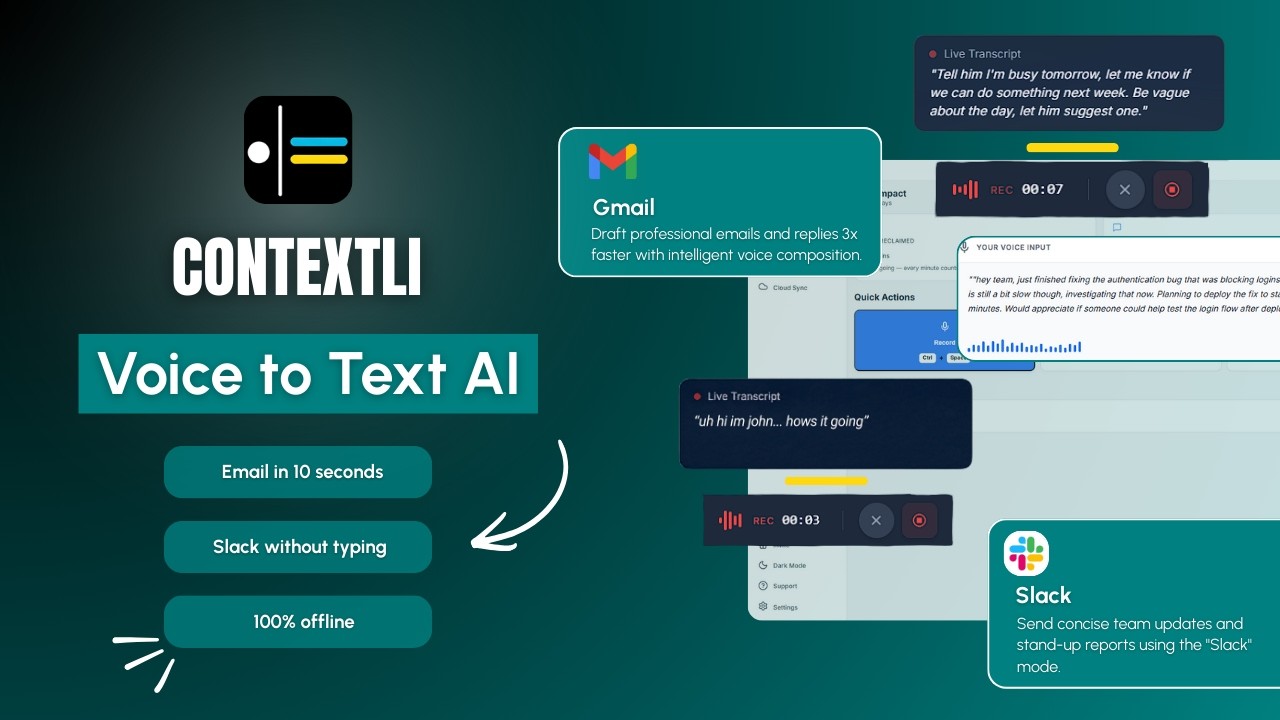
The Contextli demo above walks through what context-aware dictation looks like in practice. The same idea, applied to recruiter outreach, is the focus of the rest of this guide.
There are four dimensions that actually matter once you start sending recruiter messages at volume. Most tools handle one or two. Almost none handle all four.
Brand-voice customization. The tool must let you teach it how your team writes. Not just a glossary of words to avoid. Actual examples of full messages your team has sent and a sample of the tone, sentence length, and sign-off style.
Channel adaptation. A LinkedIn InMail is short and casual. A follow-up email after a screen is longer and more structured. A rejection message has a specific empathetic register. The tool should produce the right output for the channel, not the same format everywhere.
Privacy controls. Candidate names, contact details, salary expectations, and current employer information all flow through your messages. Any dictation tool that ships every word to a vendor's cloud and stores it there forever creates an exposure your security team will eventually ask about. Tools that offer local processing, bring-your-own-key, and the ability to turn off cloud sync give the recruiter control instead.
Speed at the source. Time-to-first-message matters more than the marginal accuracy difference between modern dictation engines. Modern transcription engines all converge on similar accuracy. The differentiator is what happens after the words come out: a tool that hands you a clean, voice-matched, channel-appropriate draft in 25 seconds beats one that hands you a raw transcript in 5 seconds.

The setup for a recruiter takes about 20 minutes and is worth doing once. Contextli's Modes are channel-aware contexts. The base Modes are Email Mode, Messaging Mode, Notes Mode, LinkedIn Mode, Marketing Copy Mode, and General Dictation. For a recruiter, three of those carry most of the load.
Email Mode is for the longer-form messages: follow-ups after a screen, interview confirmations, debriefs to hiring managers, candidate rejection notes. To set it up, paste five to ten examples of how you (or someone on your team whose voice you want to match) actually write candidate emails. Then add specific instructions: "always reference one thing from the candidate's last role," "never start an email with the word I," "sign off as 'Alex, Senior Recruiter' not 'Best regards.'" From then on, every dictated email lands in that voice.
Messaging Mode handles the shorter, less formal messages: LinkedIn DMs, replies inside the ATS, internal Slack pings to the hiring manager. Same setup pattern, but with shorter examples. Messaging Mode produces shorter sentences, fewer formalities, and a more conversational rhythm.
LinkedIn Mode is the one most recruiters get the most value from. The recruiter feeds it three to five InMails that actually got responses, plus the team's brand-voice guidelines. From then on, dictating an InMail produces a draft that opens with something specific about the candidate, references the role being recruited for, and closes with a low-friction next-step ask. The recruiter still reads it, makes one or two edits, hits send.
The base Modes are the starting point. The actual win comes from making them yours.
Every Mode can be customized. Feed Email Mode three or four examples of how you actually write to candidates, your sign-off style, your sentence length, your preferred opening, and from then on every dictated email matches that voice. You can give it specific instructions too: "always reference the candidate's most recent role," "never use the word excited," "if the candidate is at a current employer, refer to their current company by name."
If you turn on screen-awareness (off by default, you control it), Contextli can see what you are looking at when you dictate. You are reading a candidate's LinkedIn profile with their headline, current company, and recent post visible. You hit the hotkey and say "thank them for the recent post about engineering management, mention the staff role we are running with the platform team, ask if they would be open to a 20-minute intro call this week." Contextli already knows the candidate's name, your name, and the context from the open profile. It writes the InMail the way you would, with greeting, specific reference, role pitch, and a clean next-step ask. You read it, change one word, send.
Screen-awareness is opt-in. Recruiters who handle sensitive candidate searches or work for security-conscious clients can leave it off and Modes still work fine with example-based customization alone. This matters more for recruiters than most professionals realize. The data flowing through a recruiter's day includes candidate names, current employers, salary expectations, reference notes, and sometimes flags about a candidate's situation that should not end up in some other vendor's training data. Contextli gives you three levels of privacy control. Use any of them, or stack all three.
Level 1: Local models. Transcription and AI processing run on your own machine. Internet off, app still works. You will need a modern Mac or Windows laptop, not a ten-year-old machine.
Level 2: Bring your own key. You supply the API key for transcription or AI, and your data goes from your machine to the provider directly. Contextli never sees it.
Level 3: Disable cloud sync. Cloud sync is how Contextli lets you use the same notes across devices. Turn it off and we store nothing in our database. Your transcribed notes live as local files on your machine, where you can browse them yourself.
Combine all three and Contextli never makes a single request to our servers. Fully offline, fully private. No other dictation tool we know of offers this combination. Not Wispr Flow, not Willow Voice, not MacWhisper, not Superwhisper, not Apple Dictation, not ChatGPT voice.
For most in-house recruiters, level 3 alone is enough; their company's security policy is fine with cloud transcription as long as nothing persists. For agency recruiters working on retained executive searches, level 1 plus level 3 is the answer. For recruiters in regulated industries (healthcare, finance, defense contracting), level 1 plus level 2 plus level 3 is the answer.
The table below covers the dimensions a recruiter actually needs.
| Tool | Per-message customization with examples | Brand-voice matching | Local model option | Bring-your-own-key | Channel-aware output |
|---|---|---|---|---|---|
| Contextli | Yes, per Mode, with examples | Yes, walked through above | Yes | Yes | Yes, 6 Modes |
| Wispr Flow | No per-mode example training | Vocabulary list only | No | No | Limited |
| Willow Voice | No per-mode example training | Style-matching, not example-based | Offline Mode on Mac and iOS, not full local AI | No | AI Mode is single-purpose |
| Apple Dictation (native) | No | No | Yes, on-device | Not applicable | No, raw transcription |
| ChatGPT voice | Limited via custom instructions | Generic | No | Not applicable | Built for chat with AI, not your apps |
| Otter.ai | Not designed for per-message dictation | No | No | No | Different category, meeting recording |
The image below shows the gap between traditional dictation and Contextli's context-aware writing for recruiter outreach.
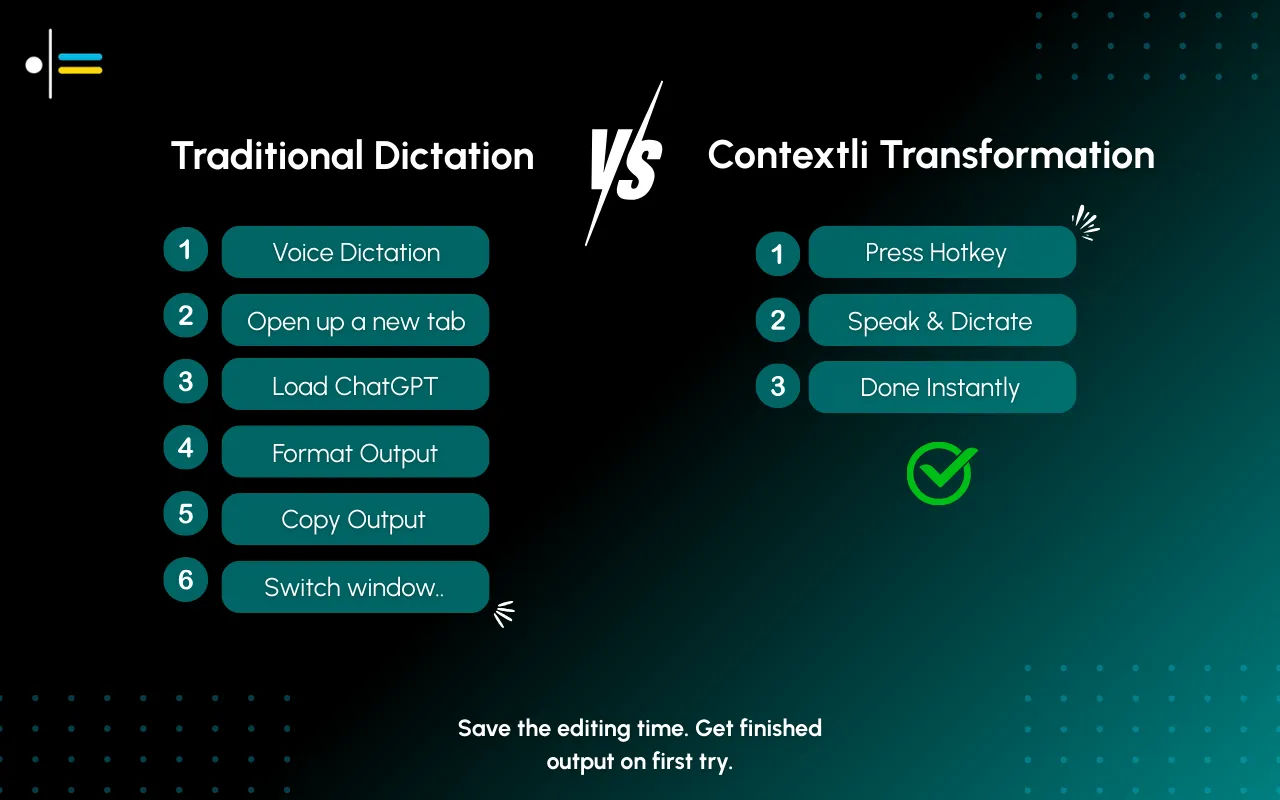
Most of those tools are excellent at what they were built for. Wispr Flow is faster than Contextli for raw transcription. Willow Voice has a cleaner UI and an attractive offline mode on Mac. Apple Dictation is free and built in. Otter is the right answer if your job is mostly recording and recapping meetings. For a recruiter sending 100 outbound messages a day in a specific team voice, the bottleneck is not transcription speed, it is the writing layer on top, and that is where Contextli is built to fit.
A senior recruiter at a Series B SaaS company opens her ATS at 9:15. There are 28 new candidates flagged by the sourcing team overnight: 22 for two staff engineering roles, 6 for a head of product role. Her goal for the next 90 minutes is to send personalized first-touch outreach to all 28.
She has previously customized LinkedIn Mode with seven InMails that got responses, plus her team's tone guidance (calm, specific, never starts with "I came across your profile"). She has customized Email Mode with five candidate emails she wrote last quarter.
For each candidate, the flow is:
Total time per candidate: about 45 seconds. Typing each message at her usual care level took about 2 minutes per candidate. Across 28 candidates the savings are about 30 minutes. Across a full week of similar mornings the savings are roughly 3 to 4 hours. More importantly, the messages still sound like her.
A few honest caveats. Contextli is a system-level dictation app. It types into the focused window. It does not have an integration with Greenhouse, Lever, Workday, or LinkedIn Recruiter the way some scheduling tools do, it works inside those apps by dictating into whichever text field is focused. That is fine for almost every message a recruiter sends, but it is not a replacement for an ATS-native workflow tool.
Contextli is also a writing layer, not a sourcing layer. It does not find candidates for you, score them, or rank inbound applications. It assumes you already know who you want to reach out to and the message is the bottleneck.
And dictation is not always the right tool. For dense technical interviewer feedback that needs precise scoring, typing is still better, though our free meeting notes formatter can tidy raw interview notes into a clean debrief afterward. For status updates to your VP that benefit from being terse, typing is still better. Contextli wins clearly when the volume is high and the output needs to match a specific voice.
Yes. Agency recruiters tend to switch tone often because they write to candidates across multiple client brand voices in a single day. Contextli handles that with multiple customized Email Mode and LinkedIn Mode contexts, one per client. The hotkey switches between them in two clicks.
About 20 minutes total. Five minutes to install. Ten minutes to feed Email Mode and LinkedIn Mode three to five example messages each. Five minutes to add specific instructions ("never start an email with I," "always sign off as Alex"). Most recruiters spend more time tweaking their LinkedIn Recruiter saved searches than that.
Yes, in the sense that you dictate directly into whichever text field is focused inside those apps. There is no API integration. Contextli types into the input box the same way you would. That works fine for InMail, candidate emails, ATS comments, and Slack pings to the hiring manager.
Contextli is the only tool we know of that offers all three privacy controls: local models, bring-your-own-key, and the ability to turn off cloud sync entirely. For sensitive searches, you can stack all three and Contextli never makes a request to our servers. For most recruiters the disable-cloud-sync option alone is enough.
Only if you skip the customization. The base Modes produce generic-sounding output. Once you feed Email Mode and LinkedIn Mode five to ten examples of how you actually write, the output matches your voice and reads like you wrote it. Candidates do not bounce off Contextli-generated outreach the way they bounce off obvious AI-rewriter messages.
Yes, and most recruiters use Email Mode for this with a separate context for rejections. Feed it three or four rejection messages you have written in the past where the tone was right. Add instructions like "never use the phrase 'we have decided to move forward with other candidates,'" "thank the candidate for a specific thing from the interview." Then dictate the rejection in 15 seconds, read it, send.
Contextli's free tier gives you 100 credits per month with no credit card required, which is enough for trying it on real recruiter work. Willow Voice charges around 12 to 15 dollars per month for an individual plan. Wispr Flow is in a similar pricing range. Contextli's paid tiers are competitive; full pricing is on the pricing page.
Yes, transcription works across major languages. The customization-by-example flow works in whichever language you feed it examples in. A recruiter sourcing across multiple regions can have one Email Mode context per language.
If you have not seen the broader picture of how context-aware dictation works, the pillar guide on context-aware speech-to-text covers the foundations. For the comparison against the AI voice tool most professionals already know, the ChatGPT vs Contextli writeup is the right next read. To go deeper on Email Mode specifically, see Email Mode: How Contextli Writes Client Emails From a Single Hotkey. For a related role-specific take, the sales-rep guide covers a workflow that overlaps with recruiter outreach.
Recruiter teams that handle 50 to 200 outbound messages a day are exactly who Contextli's per-Mode customization is built for. Start free with 100 credits per month, no credit card required. Spend 20 minutes setting up Email Mode, LinkedIn Mode, and Messaging Mode with examples from your own outreach, then run a real morning of candidate messages through it.
See how recruiting and other professional teams use Contextli on the use cases page or download Contextli to start.

Junaid Khalid
Founder & CEO
Founder and solopreneur writing about how modern businesses run leaner and faster with AI. I build software that turns everyday work, from capturing thoughts to writing and staying organized, into something effortless, and I share what I learn along the way.
A weekly review template you can run in 15 minutes every Sunday. Six prompts, a scoring table, and a faster way to capture it by voice.
Junaid KhalidA vet visit notes template that captures the diagnosis, dosing, and follow-up before you leave the exam room. Speak it into your notes instead of typing.
Junaid KhalidCounseling progress notes software that writes your notes by voice and keeps client data on your own machine, so counselors finish notes the same day.
Junaid Khalid