If you dictate sensitive work, the part you actually care about is not the transcription accuracy. It is the request path. Where does the audio go after you press the hotkey, and who can read it on the way? Most dictation tools answer that question with a single sentence: "everything goes through our servers." Contextli answers it with three options, and one of them is Bring Your Own Key.
This guide walks through what BYOK means inside Contextli specifically, how the request flow changes when you turn it on, what it costs, and how it sits alongside the other two privacy levels (local models and disabled cloud sync). If you have a compliance team, this is the level they usually want to understand.
Quick takeaways
- BYOK in Contextli means you supply your own API key for the transcription provider, the AI provider, or both. Audio goes from your machine to your provider, not through Contextli.
- It is level 2 of a three-rung privacy stack. You can combine it with local models (level 1) and disabled cloud sync (level 3) for a fully offline, fully private setup.
- The trade-off is honest: you pay the provider directly at API rates. For a heavy daily user, that is usually under a dollar a month in AI cleanup costs.
- No other major dictation tool we know of offers BYOK alongside local models alongside disabled cloud sync. Wispr Flow, Willow Voice, Otter, and Apple Dictation all run cloud-only with no BYOK option.
- BYOK is most useful for regulated industries, security-conscious developers, executives handling sensitive comms, and anyone whose employer has a policy against routing data through third-party SaaS pipelines.
What BYOK actually means in a dictation app
Most dictation tools work like this. You press the hotkey. Your microphone audio gets sent to the vendor's servers. The vendor's servers transcribe it (often by calling a model provider like OpenAI, Deepgram, or AssemblyAI behind the scenes). The transcribed text gets cleaned up by an AI model (also routed through the vendor). The cleaned text comes back to your machine. The vendor sees every word at every step.
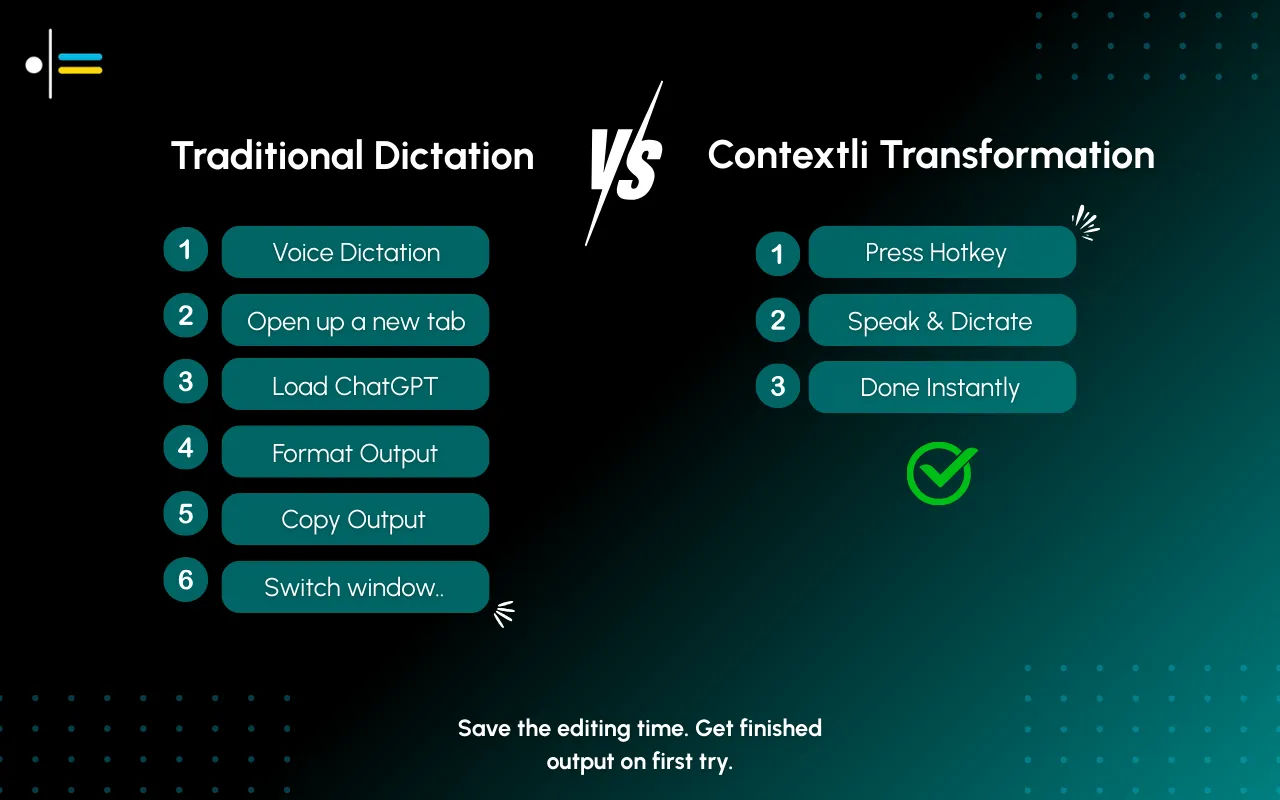
BYOK changes the routing. Instead of audio going to the vendor and then on to a model provider, you supply your own API key for the provider directly. The vendor app on your machine packages the audio, signs the request with your key, and sends it straight to the provider. The provider returns the text. The vendor's servers never appear in the request chain.
The benefit is twofold. First, you remove one party from the data path, which is the whole reason a security team would care. Second, you pay the model provider at their direct API rate, which is often a fraction of what a subscription-based dictation tool absorbs into its monthly fee.
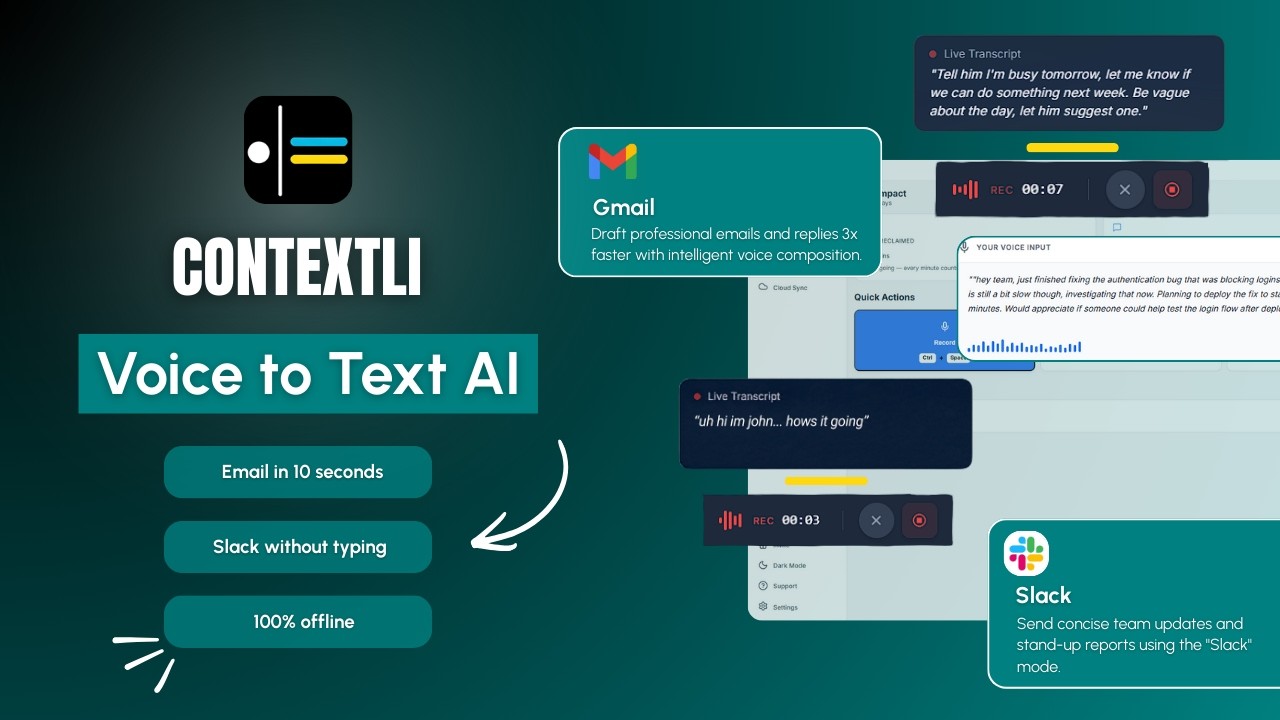
The video above walks through what Contextli does end to end. BYOK is invisible in the demo because it does not change the user experience. You still press the hotkey, you still see the cleaned-up text appear. It only changes where the request goes.
How BYOK works inside Contextli
Contextli supports BYOK for two separate steps in the dictation pipeline.
The first step is transcription, the part that turns your audio into raw text. You can plug in an API key from a provider like OpenAI (for Whisper or similar models) or another transcription provider Contextli supports. When you set this key, your microphone audio is uploaded directly from the Contextli app on your machine to that provider, signed with your key. The provider returns the raw transcript. Contextli's backend never sees the audio.
The second step is AI cleanup, the part that takes raw transcribed text and turns it into a properly formatted email, message, note, or post depending on which Mode is active. You can plug in an API key for an AI provider (such as OpenAI's GPT models or Anthropic's Claude). When you set this key, the raw transcript and the Mode's instructions get sent from your machine directly to the AI provider, signed with your key. The cleaned text comes back. Again, Contextli's backend is not in the loop.
You can set both keys, just one, or neither. The setup lives in Contextli's preferences alongside the other privacy controls. Switching to BYOK is a settings change, not a different product tier.
Where BYOK sits in the privacy ladder
Contextli gives you three levels of privacy control. Use any of them, or stack all three.
Level 1: Local models. Transcription and AI processing run on your own machine. Internet off, app still works. You will need a modern Mac or Windows laptop, not a ten-year-old machine.
Level 2: Bring your own key. You supply the API key for transcription or AI, and your data goes from your machine to the provider directly. Contextli never sees it.
Level 3: Disable cloud sync. Cloud sync is how Contextli lets you use the same notes across devices. Turn it off and we store nothing in our database. Your transcribed notes live as local files on your machine, where you can browse them yourself.
Combine all three and Contextli never makes a single request to our servers. Fully offline, fully private. No other dictation tool we know of offers this combination.
BYOK sits in the middle of that ladder for a reason. Level 1 (local models) is the strongest privacy posture because no external server is in the loop at all, but it requires hardware that can run the models. Level 3 (disable cloud sync) is the simplest, it just stops one specific kind of data persistence. BYOK is the middle ground for people who want cloud-grade model quality without routing data through a SaaS vendor. The provider is still in the loop, but you chose the provider, and you control the key.
What it costs
This is the part most people get wrong. BYOK is often described as "more expensive than a subscription." For a normal dictation user, it is the opposite.
Direct API pricing from major providers in 2026 typically runs in the cents-per-hour range for transcription and the cents-per-million-tokens range for AI cleanup. For a heavy daily dictation user (say, a knowledge worker generating 50,000 cleaned-up words per month), the AI cleanup costs land well under a dollar a month at current API rates. Transcription costs depend on the provider and how much actual audio you generate, but for typed-output use cases (dictating into emails, messages, notes), it is usually a few dollars a month at most.
Compare that to a subscription dictation tool charging $15 a month, which is the going rate for Wispr Flow Pro and similar tier products. The vendor absorbs the model provider cost into their fee and adds margin on top. With BYOK, you are paying the model provider directly, with no markup.
The math only flips if you dictate truly enormous volumes (think hours and hours of audio every day, like a transcriptionist running a recording-heavy workflow). For everyone else, BYOK is cheaper.
The trade is that you have to manage your own API keys, which is a one-time setup step, and you have to monitor your own usage, which most providers expose with a dashboard.
How Contextli compares to other dictation tools on BYOK
The table below covers the five dictation tools most professionals evaluate alongside Contextli. The privacy stack comparison is the part that matters for buyers thinking about regulated workflows.
| Tool |
Local model mode |
BYOK (transcription) |
BYOK (AI cleanup) |
Disable cloud sync |
| Contextli |
Yes |
Yes |
Yes |
Yes |
| Wispr Flow |
No |
No |
No |
No (cloud-only) |
| Willow Voice |
No |
No |
No |
No (cloud-only) |
| MacWhisper |
Yes (local-only) |
n/a (local) |
n/a (no cleanup layer) |
n/a (no cloud) |
| Superwhisper |
Yes (local-first) |
Some providers |
Some providers |
n/a (no cloud sync) |
| Apple Dictation |
Yes (on-device) |
No |
n/a (no cleanup layer) |
n/a |
A few notes on the table. MacWhisper and Apple Dictation are transcription-only products. They do not have an AI cleanup step, so the BYOK conversation for them is moot in that column. Superwhisper has BYOK for some provider integrations and runs local-first, which is a strong privacy posture, but it does not have the context-aware Modes layer that Contextli does. Wispr Flow and Willow Voice both process all audio in the cloud through their own pipelines with no opt-out. That is fine for users with no compliance constraints; it is a hard stop for users with constraints.
Who BYOK is actually for
In our experience, BYOK matters most for four kinds of readers.
The first is anyone working in a regulated industry. Legal professionals, financial advisors, healthcare clinicians, and therapists all face employer or self-imposed compliance rules about where client data can be processed. BYOK lets you point Contextli at a provider that your firm or your compliance setup has already vetted, rather than asking your compliance team to approve a new SaaS data processor (Contextli).
The second is security-conscious developers. If you have already wired your team into a specific model provider (because you have a contract, a BAA, a data-processing addendum), you do not want to introduce another vendor in the audio path. BYOK lets you reuse the provider relationship you already have.
The third is executives at companies with strict data-handling policies. Many enterprise security teams maintain an approved-vendor list. Contextli is rarely on it because the company is small and new. The model providers (OpenAI, Anthropic, etc.) often are on it because those relationships are already in place. BYOK lets the executive use the tool without re-litigating the vendor question.
The fourth is the curious technical user who simply wants to understand and control the data path. This person is paying for the optionality more than the privacy outcome. That is a legitimate reason too.
Real-world setup: a consultant turning BYOK on
A management consultant who bills $400/hour spends a chunk of every morning replying to client emails. The emails contain client names, project specifics, sometimes financial details under NDA. Her firm has a vendor approval process. OpenAI's API is approved (her firm has a contract). Contextli, as a small SaaS app, is not.
She installs Contextli. In preferences, she switches to BYOK for both transcription and AI cleanup, pasting in her firm-issued OpenAI API key. She also customizes Email Mode by feeding it five of her past client emails, so the cleaned-up output sounds like her: short paragraphs, specific timeframes, no fluff.
Her morning workflow now looks like this. She opens an email from a client. She hits the Contextli hotkey and dictates: "confirm the working session for next Tuesday at 10am central, let her know I will send the pre-read materials by Friday end of day, ask whether she wants to invite the deputy CFO." Contextli's app on her machine sends the audio directly to OpenAI's API (signed with her firm's key), gets the transcript back, runs the Email Mode cleanup against OpenAI's API again, and inserts the polished reply into Gmail. Total time: about 25 seconds.
Two things are true at the end of that workflow. First, her firm's compliance setup is satisfied because the only third party in the data path is OpenAI, whom they already approved. Second, the cost on her firm's API bill for that one email is roughly a tenth of a cent.
What BYOK does not do
BYOK is a real privacy improvement, not a marketing point, but it is not a magic shield. Two honest caveats.
It does not remove the model provider from the equation. Your audio still goes to OpenAI or Anthropic or whoever you point it at. If your concern is "I do not want any external server to see this content," BYOK is the wrong level of the ladder. Use local models (level 1) instead.
It does not affect how Contextli stores customization data on your machine. The examples you fed Email Mode to teach it your voice, the custom instructions you set, the preferences, all of that lives in local files on your computer. Cloud sync (level 3) is what determines whether those settings also get copied to our database for cross-device use. BYOK is orthogonal to that.
The right mental model is: BYOK chooses where the request goes. Local models chooses whether the request goes anywhere at all. Disable cloud sync chooses whether we store anything in our database. Pick the combination that matches your threat model.
How to turn on BYOK in Contextli
Inside the Contextli app, open preferences and find the privacy and providers section. You will see two API key fields, one for transcription, one for AI cleanup. Paste your key into either or both. Save. Hit your dictation hotkey to confirm it works. That is the whole setup.
If you have not yet signed up for a model provider, the easiest first step is OpenAI's API platform. Generate a key, set a low monthly spend limit so you can monitor your costs, and paste it into Contextli. Your first few dictations will tell you what your real usage looks like. Adjust the spend limit accordingly.
If your firm already has a contract or BAA with a provider, ask your IT or security team for an API key issued under that contract, not a personal key. That way your usage rolls up to the firm's billing and your firm's compliance posture covers it.
FAQ
Does BYOK make Contextli more accurate?
Not directly. Accuracy depends on the model you point Contextli at. If you point it at a top-tier model from OpenAI or Anthropic, you will get top-tier output. The accuracy is the same whether Contextli routes through their servers or you route through yours.
Can I use BYOK without disabling cloud sync?
Yes. The three privacy levels are independent. You can run BYOK with cloud sync on if you want your Mode customizations to follow you across devices but you still want the audio and text to bypass Contextli's pipeline.
Does BYOK affect screen-awareness?
Screen-awareness (off by default, you control it) runs locally on your machine. If you enable it, the screen content gets combined with your dictation and sent to whichever AI provider you have pointed Contextli at. With BYOK on, that provider is your provider, not ours. Most users with strict privacy requirements simply leave screen-awareness off; the other Modes work fine without it.
Can I use a self-hosted model with BYOK?
Yes, if your self-hosted model exposes an OpenAI-compatible API. Point Contextli at the endpoint URL and pass whatever auth token your setup requires. This is the combination that gives you maximum control: you choose the model, you host the model, you control the key.
Is BYOK available on every Contextli plan?
Yes. BYOK is part of the core product, not a paid add-on. You can run it on the free tier the same way you can run it on the paid tier.
What providers does Contextli's BYOK support?
The major ones: OpenAI for transcription (Whisper API) and AI cleanup (GPT models), and Anthropic for AI cleanup (Claude models). Support for additional providers grows over time; check the current preferences pane for the live list.
Does the model provider see my Mode customization examples?
Yes, with one caveat. When BYOK is on and you dictate, the request to the AI provider includes the active Mode's instructions and any examples you have customized it with, because that is what tells the AI what voice to write in. If you do not want that, run a fresh Mode without customization examples and accept the more generic output.
If you are evaluating Contextli through a privacy lens, the dictation privacy guide for 2026 walks through the whole three-rung ladder in more depth. For the customization side, Email Mode for client emails shows how to teach Contextli your voice, which is the other half of the BYOK story. If you are deciding between Contextli and the cloud-only competitors, Deepgram vs Contextli and the pillar guide to context-aware speech to text cover the broader comparison. For founders specifically, voice to text for founders walks through the role-specific workflow.
Try Contextli with your own key
If your work requires you to control where the audio and text go, BYOK is the cleanest way to use Contextli. The setup takes about three minutes, and most users land at under a dollar a month in API costs for normal dictation volumes. There is a free tier with 100 credits a month, no credit card required, so you can test the privacy posture before committing. Open Contextli's features page to see the privacy stack alongside the rest of the product, or grab the download and try BYOK with your own API key today.



 Junaid Khalid