


Weekly Reflection TemplateAug 19, 2026
Weekly Review Template: Run Your Review in 15 Minutes
A weekly review template you can run in 15 minutes every Sunday. Six prompts, a scoring table, and a faster way to capture it by voice.
 Junaid Khalid
Contextli's Messaging Mode is built for Slack, WhatsApp, iMessage, and Teams: short sentences, casual register, no greetings or sign-offs. Customize it with 3 to 5 of your past messages and every dictation matches your t
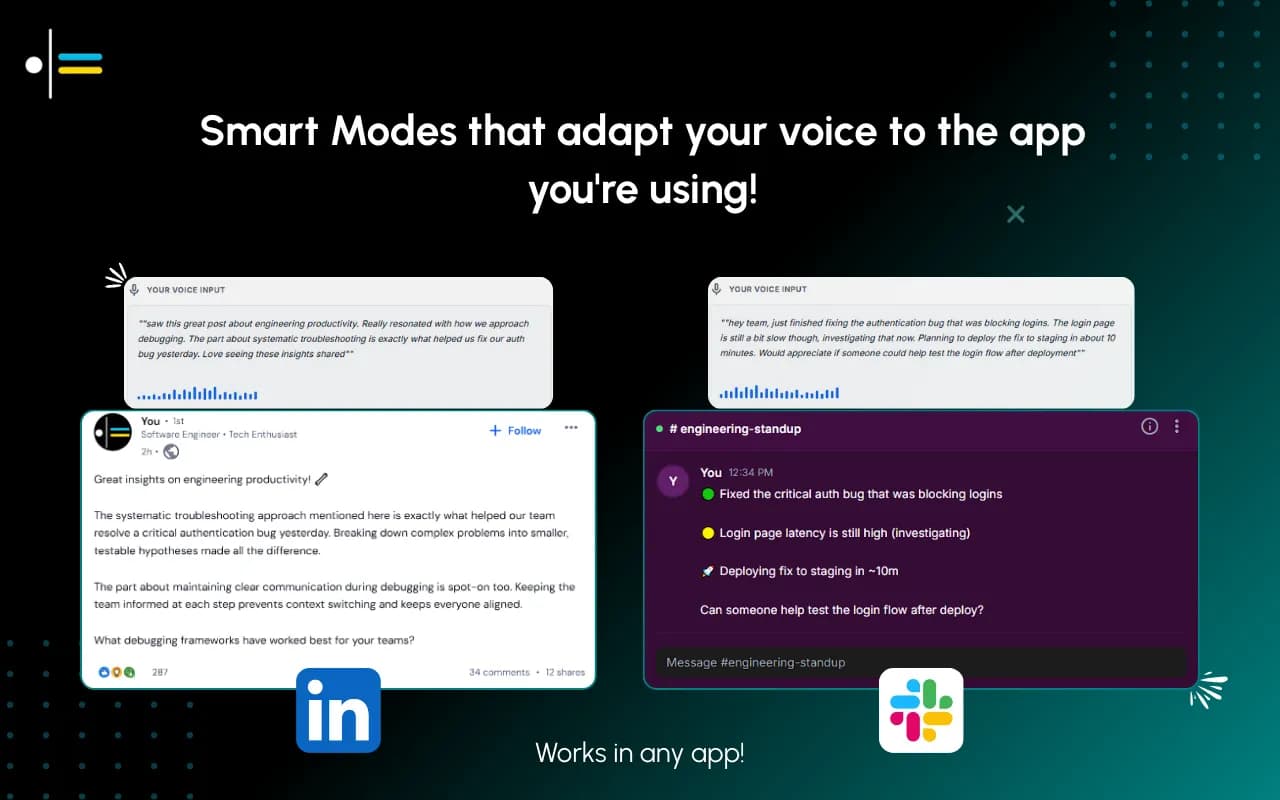
Most professionals who use voice-to-text in chat apps end up sounding like their email signature wandered into the wrong room. The dictation tool produces a perfectly grammatical, slightly formal sentence with a capital first letter and a period at the end, and the Slack channel quietly judges them for it. The fix is not to type faster. It is to use a Mode that knows the difference between a client email and a quick "I'll be 5 mins late" to your team.
This is what Contextli's Messaging Mode does. It is one of six Modes in the app, and it is built for the way people actually write in Slack, WhatsApp, iMessage, and Teams: short sentences, casual register, no sign-off, no "Dear team." This guide walks through how it works, how to customize it for your team's specific tone, and how it stacks up against the alternatives.
Knowledge workers spend about 88% of their workweek on communication tasks, and a meaningful share of that is now happening in chat apps rather than email. Slack alone serves 47 million daily active users, and WhatsApp has become the default external-comms tool for entire industries, including consulting, real estate, and parts of healthcare.
The problem is that almost every dictation tool was built with a single output style in mind. You speak, the tool transcribes, and the result looks like a memo. Then you spend 15 seconds editing the period off the end, lowercasing the first word, deleting the greeting, and shortening the sentence. By that point, typing would have been faster.
There are three specific failures that show up in chat:
None of those are accuracy problems. Modern transcription engines (including the one Wispr Flow, Superwhisper, and MacWhisper use) hit similar word error rates. The differentiator is what happens to the text after it gets transcribed.

Messaging Mode is one of six Modes in Contextli. The full set is Email Mode, Messaging Mode, Notes Mode, LinkedIn Mode, Marketing Copy Mode, and General Dictation. Each Mode is a different output style tuned to a specific channel.
When Messaging Mode is active, the app makes a few specific choices:
The hotkey is the same across every Mode. You hold the key, you speak, you release. Contextli writes into whatever app has focus, including Slack, WhatsApp Web, iMessage, Teams, Discord, and any browser-based chat tool.
Because Contextli works at the system level, there is no Slack bot to install. There is no WhatsApp API key. The app sees your microphone audio and types into the focused window. The chat apps themselves do not know Contextli exists. This matters for two reasons: there is nothing to configure on the workspace side, and there is no API plumbing that could break if Slack or WhatsApp changes their terms.
The base Messaging Mode is calibrated to a generic professional casual register. The actual win comes from making it yours.
The customization flow takes about 2 minutes:
From then on, every Messaging Mode dictation matches that voice and length. If your team uses lowercase "ok" instead of "Okay," the Mode will use lowercase ok. If your team uses British slang or a specific internal shorthand, the Mode learns it.
This is where Contextli pulls ahead of dictation tools that route everything through a single generic output style. Wispr Flow does not have per-channel customization with user examples. Willow Voice does not have it either. Apple Dictation produces the same output regardless of which app you are in. Even ChatGPT voice, which has memory, does not have a "this is how I talk to my team in Slack vs. how I email my clients" switch.
Each chat channel has its own micro-conventions. Messaging Mode adapts to them automatically, and you can tighten the customization per channel by adding examples from each.
Slack is where most internal team chat happens, and the convention varies wildly by team. Engineering teams default to lowercase, terse, and code-flavored. Sales teams skew slightly more polished but still casual. Customer-facing teams sometimes mirror the brand voice they use externally.
In Slack, Messaging Mode tends to:
If your team uses code references frequently, train Messaging Mode by including a few of those in your examples. It will then handle them correctly, putting backticks around library names, function calls, and command-line flags.
WhatsApp is the messy one. It mixes personal and professional contexts, often within the same chat. The same thread might have a contract negotiation followed by a logistics question followed by a meme.
Messaging Mode in WhatsApp tends toward shorter messages with looser punctuation. It also handles the multi-line break convention well: a long thought gets broken into 2 or 3 separate sends rather than one wall of text. You can tighten this by including WhatsApp-specific examples during customization.
iMessage tends to be the most personal channel and the one where over-formatting reads worst. Native Apple Dictation handles this badly. It inserts periods and capital letters as if you were writing a formal note.
Messaging Mode strips that formatting back. If you say "hey lemme know when you're free this week," the output is "hey lemme know when you're free this week." Not "Hey, let me know when you are free this week."
Both work the same way Slack does: type into the focused window, use the channel's convention, skip formal greetings on replies inside a thread. Discord specifically rewards short and informal output, and Messaging Mode handles that naturally. A community manager replying to a Discord support channel can dictate the same kind of 1-line answers they would type, just faster.
The dictation market has split into two camps. Pure transcription tools (Wispr Flow, Willow Voice, MacWhisper, Superwhisper, Apple Dictation, native Windows voice typing) take what you say and write it out. Context-aware tools (Contextli) take what you say and adapt it for the channel.
The table below shows how each tool handles the specific things that matter in chat.
| Tool | Per-channel output style | Customize with your own examples | Skips greetings and sign-offs by default | Local processing option | Pricing |
|---|---|---|---|---|---|
| Contextli Messaging Mode | Yes, 6 channel Modes | Yes, paste 3 to 5 messages | Yes | Yes, local models | 100 free credits/month, paid tiers above |
| Wispr Flow | No, single output style | No | Partial, no real Messaging Mode | No, cloud only | $15/mo monthly, $12/mo annual |
| Willow Voice | No, single output style | No | No | No, cloud only | Paid, varies |
| MacWhisper | No, transcription only | No | No | Yes, local | One-time purchase |
| Superwhisper | Limited via prompts | Yes via prompts (no example-based) | Via prompts | Yes, local on Mac | $8.49/mo (Plus) |
| Apple Dictation | No | No | No | Yes, on-device | Free, built-in |
| ChatGPT voice | Yes via custom instructions | No (no per-Mode separation) | Inconsistent | No, cloud only | Included with ChatGPT plans |
Wispr Flow is the closest competitor by volume of users. It is fast, well-polished, and broadly integrated with apps. What it does not have is per-channel adaptation. The same dictation pipeline runs whether you are writing a Slack message or a board email. That single-output design is a problem for chat specifically.
The infographic below summarizes the wedge points across the top tools.

A startup CTO is on a customer call when a Slack thread starts heating up between two engineers about a deploy. The CTO has Messaging Mode already customized with 5 examples of how he writes to his team: lowercase, terse, occasional code reference, no greeting on replies. He hits the Contextli hotkey and says: "hold off on shipping that, let's pair on it after the call, the cache invalidation is sketchy." The output goes into Slack as: "hold off on shipping that, let's pair on it after the call. the cache invalidation is sketchy." Total time: about 6 seconds vs. the 20 seconds it would have taken to type. He stays on the customer call. The thread cools down.
A real estate agent is between showings. WhatsApp pings: a buyer has follow-up questions about the property tour from this morning. The agent has Messaging Mode customized with 4 examples of her past WhatsApp replies to buyers. She hits the hotkey and says: "yes the kitchen reno was finished last year and the bathroom is from 2021, I can send the permits over later today, are you still planning to view the second property at 4?" The output goes into WhatsApp as 3 short messages broken naturally, with no period at the end of the last one. Total time: about 12 seconds vs. the 45 seconds it would have taken to thumb-type on a phone screen between showings.
Chat content is often more sensitive than email. Internal Slack threads include unannounced product decisions, hiring discussions, salary references, and customer health information. WhatsApp threads include contract terms, personal logistics, and sometimes regulated client communications.
Contextli gives you three levels of privacy control. Use any of them, or stack all three.
Level 1: Local models. Transcription and AI processing run on your own machine. Internet off, app still works. You will need a modern Mac or Windows laptop, not a ten-year-old machine.
Level 2: Bring your own key. You supply the API key for transcription or AI, and your data goes from your machine to the provider directly. Contextli never sees it.
Level 3: Disable cloud sync. Cloud sync is how Contextli lets you use the same Modes across devices. Turn it off and we store nothing in our database. Your transcribed notes live as local files on your machine, where you can browse them yourself.
Combine all three and Contextli never makes a single request to our servers. Fully offline, fully private. No other dictation tool we know of offers this combination. Not Wispr Flow. Not Willow Voice. Not Apple Dictation (which still phones home for analytics). Not ChatGPT voice.
For most chat use cases, the cloud-sync toggle alone is enough. Legal, healthcare, and finance professionals tend to want all three rungs. The customization examples you paste into Messaging Mode also stay local when local-only mode is on, so your sample Slack messages do not leave your machine.
Honest about the tradeoff: dictation does not win in every chat scenario. Specifically:
Messaging Mode is fastest for replies that are 1 to 3 sentences long, especially when they involve context the recipient already has. That is most of what knowledge workers send in chat.
Both. Contextli is a system-level dictation app that types into the focused window. Whichever Slack you have open (desktop app, Slack web in a browser, or even the Slack mobile-mirror in iPad) gets the dictation as long as the input field is focused.
No, not by default. Single-line chat replies skip terminal periods unless the channel convention clearly calls for them. You can override this with a custom instruction during Messaging Mode customization if you want periods on everything.
Email Mode produces full email format: greeting, body, sign-off. Messaging Mode produces conversational replies: no greeting, no sign-off, short sentences. They are different output styles tuned for different channels. Both can be customized with your own examples.
Currently, Messaging Mode is one Mode that adapts based on your customization examples. If you want strong Slack-vs-WhatsApp differentiation, include examples from both channels during customization. The Mode will pick up the differences. Per-channel sub-Modes may be added in the future based on user demand.
No. Contextli is a system-level dictation app. It types into the focused window of whichever app you are using. There is no API integration to authorize, no bot to install, and nothing to configure on the Slack or WhatsApp workspace side. This is intentional: it means the same Mode works in every chat app, and there is no API change that can break it.
You can add custom-spelling rules during Messaging Mode customization. For example: "spell Junaid as J-u-n-a-i-d" or "always use the brand name 'LiGo' with capital L and capital G." The Mode applies these consistently across all dictations.
The underlying transcription engine handles casual speech well, including contractions, slang, and unfinished sentences. The Mode then cleans up the obvious dictation artifacts ("um," repeated words, false starts) without sanitizing your voice. The accuracy is comparable to Wispr Flow and Superwhisper. The differentiator is what Messaging Mode does with the text afterward.
Yes. Switch to General Dictation Mode, which does plain transcription without any per-channel adaptation. Useful for code, verbatim quotes, or raw thinking that you will edit yourself.
If you spend more than 30 minutes a day in Slack, WhatsApp, or iMessage, Messaging Mode will save you time. Download Contextli, set up Messaging Mode with 3 to 5 of your past chat messages as examples, and see how the output compares to what you would have typed. The free tier gives you 100 credits per month, no credit card required. Download Contextli and try it on tomorrow's first batch of Slack replies.

Junaid Khalid
Founder & CEO
Founder and solopreneur writing about how modern businesses run leaner and faster with AI. I build software that turns everyday work, from capturing thoughts to writing and staying organized, into something effortless, and I share what I learn along the way.
A weekly review template you can run in 15 minutes every Sunday. Six prompts, a scoring table, and a faster way to capture it by voice.
Junaid KhalidA vet visit notes template that captures the diagnosis, dosing, and follow-up before you leave the exam room. Speak it into your notes instead of typing.
Junaid KhalidCounseling progress notes software that writes your notes by voice and keeps client data on your own machine, so counselors finish notes the same day.
Junaid Khalid